


X
How to Transfer a Domain Out from Nicenic
This guide explains how to get your Auth Code, approve the transfer request, and understand domain transfer restrictions.
Step 1: Request the Auth Code
Log in to your Nicenic account and follow steps:
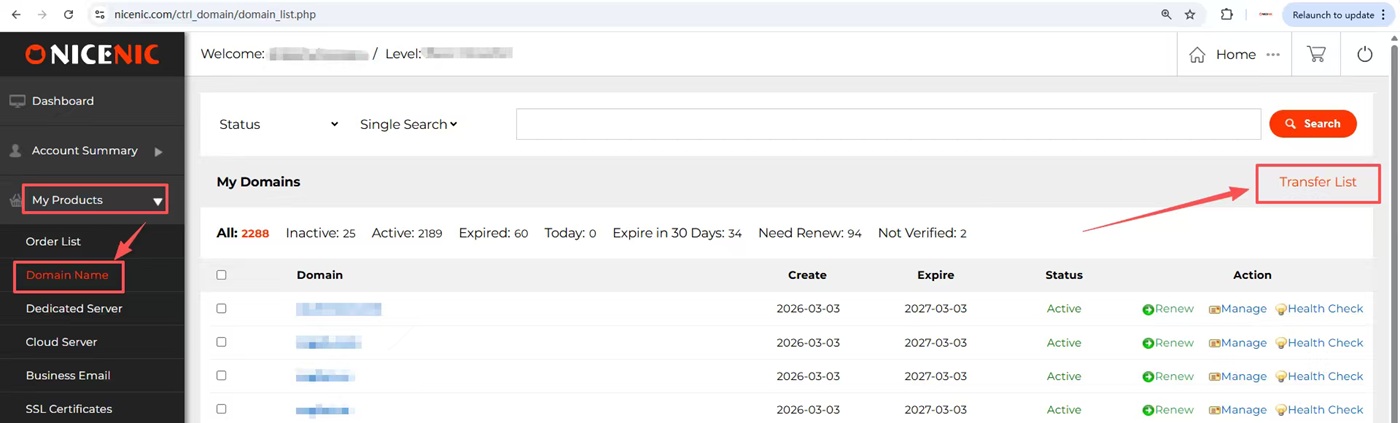
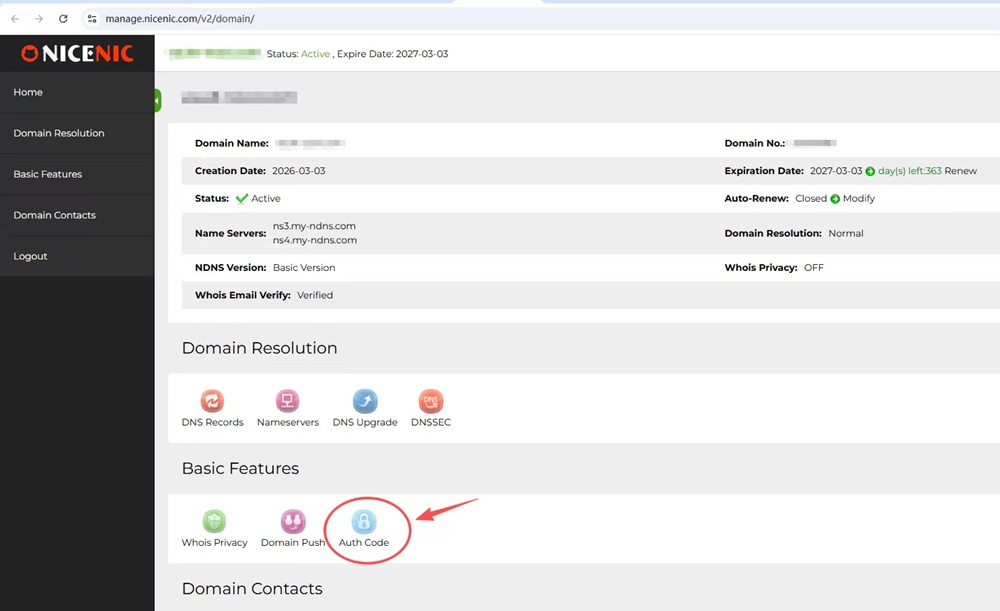
My Products > Domain Name > Manage > Auth Code
Click Auth Code to request the domain transfer code.
PS: You will be required to enter your 2FA verification code. If 2FA has not been enabled, you will need to set it up first.
Please check details of 2FA here: http://www.unionroom.cn/customer/2fa-two-factor-authentication.php
Step 2: Receive the Auth Code by Email
After verification, the Auth Code (transfer code) will be sent to the domain registrant email address. Please check both your inbox and spam folder.
Step 3: Initiate Transfer with the New Registrar
1) Go to your new registrar and start a domain transfer request.
2) Enter the Auth Code and complete the transfer process with the new registrar.
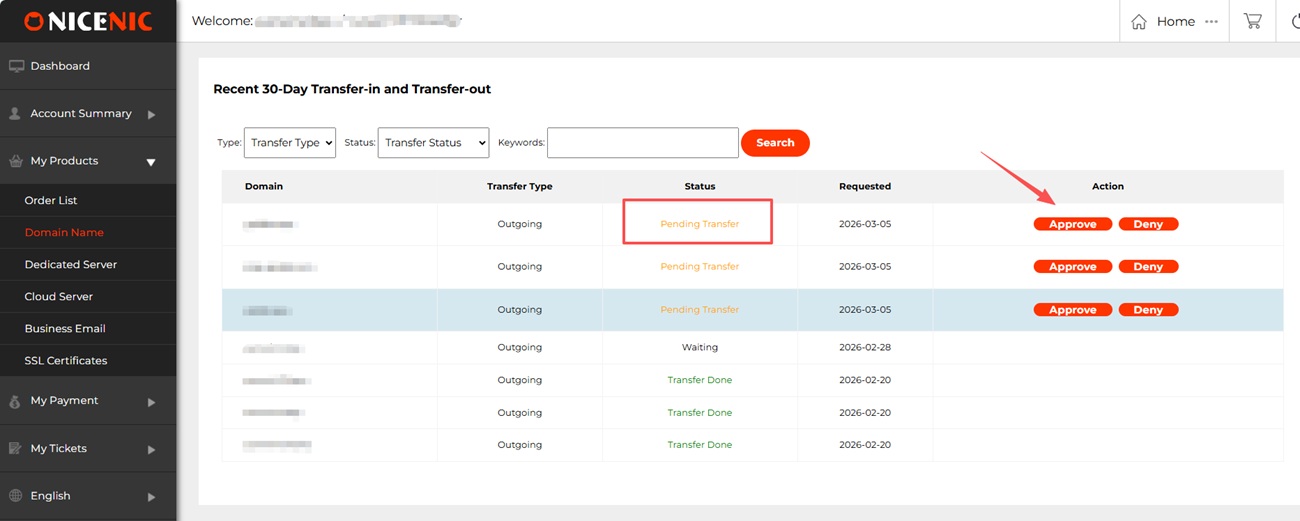
Once the transfer is initiated, the transfer request will automatically appear in your Nicenic account.
Step 4: Approve the Transfer Request
Log in to your Nicenic control panel and go to:
My Products > Domain Name > Transfer List (on the right side of the page) > Approve / Deny
Cannot Obtain Auth Code from the Control Panel?
For some domains, registration is processed through a cooperative channel with the registry, rather than through Nicenic's standard direct management interface.
Due to this technical setup, the Auth Code cannot be displayed or retrieved directly from the control panel.
When this happens, clicking the Auth Code option will redirect you to the Submit A Ticket page instead of showing the code. This is normal and not a system error.
Domain Transfer Restrictions
A domain cannot be transferred out under the following conditions:
1. The domain has expired: Please renew the domain first before attempting to transfer it.
2. Newly registered domains within 60 days: Domains registered within the last 60 days cannot be transferred.
3. Domains renewed within the last 60 days: Recently renewed domains cannot be transferred within 60 days.
4. Auth Code already requested: The transfer code cannot be requested repeatedly.
5. Domain transferred to another user within Nicenic (internal push) within the last 7 days
6. Registrant email changed within 60 days
7. Account password reset within 7 days
8. Invalid 2FA code
9. Domain status locked: serverTransferProhibited/serverUpdateProhibited
This guide explains how to get your Auth Code, approve the transfer request, and understand domain transfer restrictions.
Step 1: Request the Auth Code
Log in to your Nicenic account and follow steps:
My Products > Domain Name > Manage > Auth Code
Click Auth Code to request the domain transfer code.
PS: You will be required to enter your 2FA verification code. If 2FA has not been enabled, you will need to set it up first.
Please check details of 2FA here: http://www.unionroom.cn/customer/2fa-two-factor-authentication.php
Step 2: Receive the Auth Code by Email
After verification, the Auth Code (transfer code) will be sent to the domain registrant email address. Please check both your inbox and spam folder.
Step 3: Initiate Transfer with the New Registrar
1) Go to your new registrar and start a domain transfer request.
2) Enter the Auth Code and complete the transfer process with the new registrar.
Once the transfer is initiated, the transfer request will automatically appear in your Nicenic account.
Step 4: Approve the Transfer Request
Log in to your Nicenic control panel and go to:
My Products > Domain Name > Transfer List (on the right side of the page) > Approve / Deny
Cannot Obtain Auth Code from the Control Panel?
For some domains, registration is processed through a cooperative channel with the registry, rather than through Nicenic's standard direct management interface.
Due to this technical setup, the Auth Code cannot be displayed or retrieved directly from the control panel.
When this happens, clicking the Auth Code option will redirect you to the Submit A Ticket page instead of showing the code. This is normal and not a system error.
Domain Transfer Restrictions
A domain cannot be transferred out under the following conditions:
1. The domain has expired: Please renew the domain first before attempting to transfer it.
2. Newly registered domains within 60 days: Domains registered within the last 60 days cannot be transferred.
3. Domains renewed within the last 60 days: Recently renewed domains cannot be transferred within 60 days.
4. Auth Code already requested: The transfer code cannot be requested repeatedly.
5. Domain transferred to another user within Nicenic (internal push) within the last 7 days
6. Registrant email changed within 60 days
7. Account password reset within 7 days
8. Invalid 2FA code
9. Domain status locked: serverTransferProhibited/serverUpdateProhibited
Need help? We're always here for you.
Submit a Ticket









- Domain Names
- Registering Domains
- Domain Reseller
- Domain Pricing
- Whois Lookup
- Our Products
- Dedicated Server
- Cloud Server
- SSL Certificates
- Business Email
- Company Profile
- About NiceNIC
- Domain News
- Payment Method
- Agreements
- Customer Support
- Help Center
- Submit a Ticket
- Contact Us
- Report Abuse
Copyright © 2006-2026 NICENIC INTERNATIONAL GROUP CO., LIMITED All Rights Reserved