


X
How do you add TXT/SPF/DKIM/DMARC records for my domain?
If your domain is pointed to NiceNIC default nameserver, you can add the DNS records in your cPanel.
First you should know how to modify your DNS records
1. Login to your account.
2. Click on the domain name in "My Products" and click the domain name you wish to modify the DNS records for.
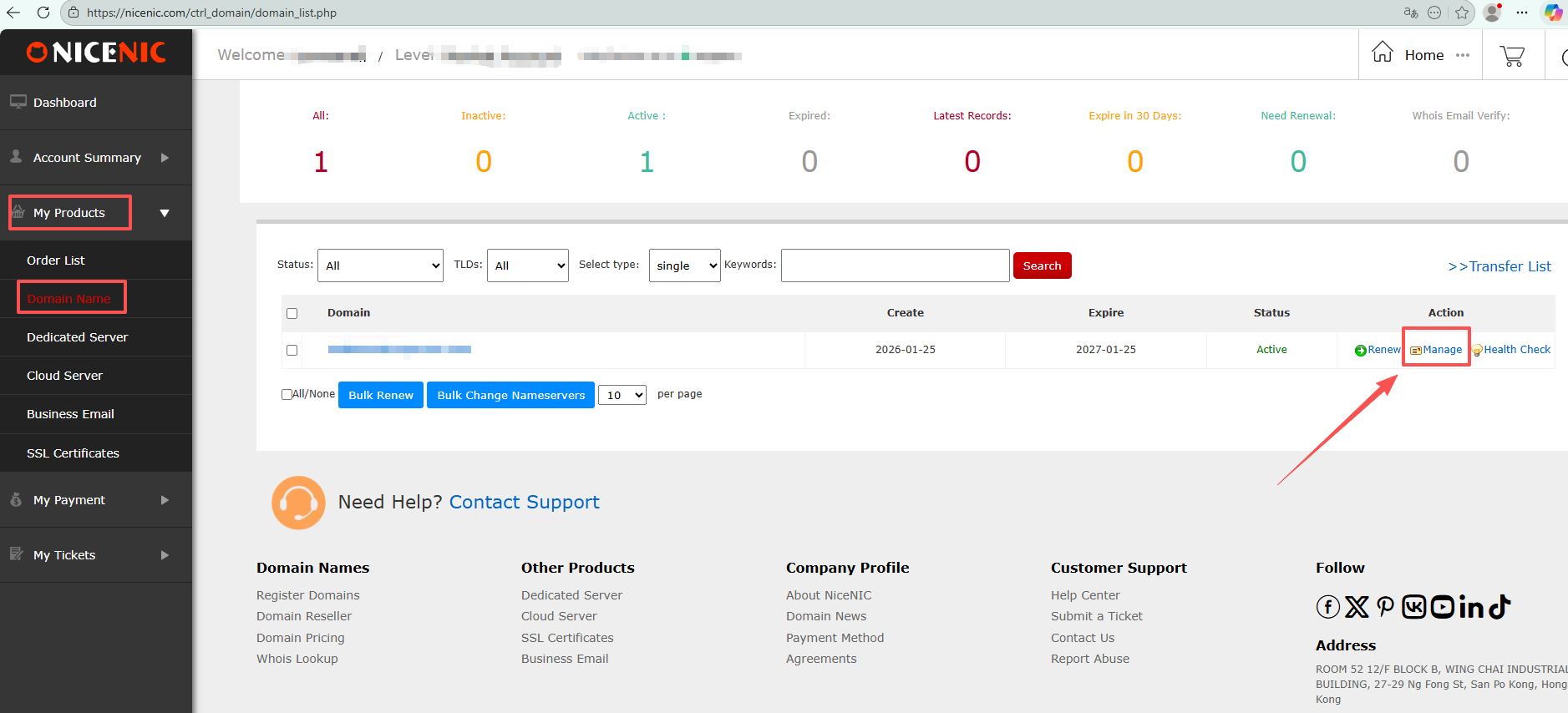
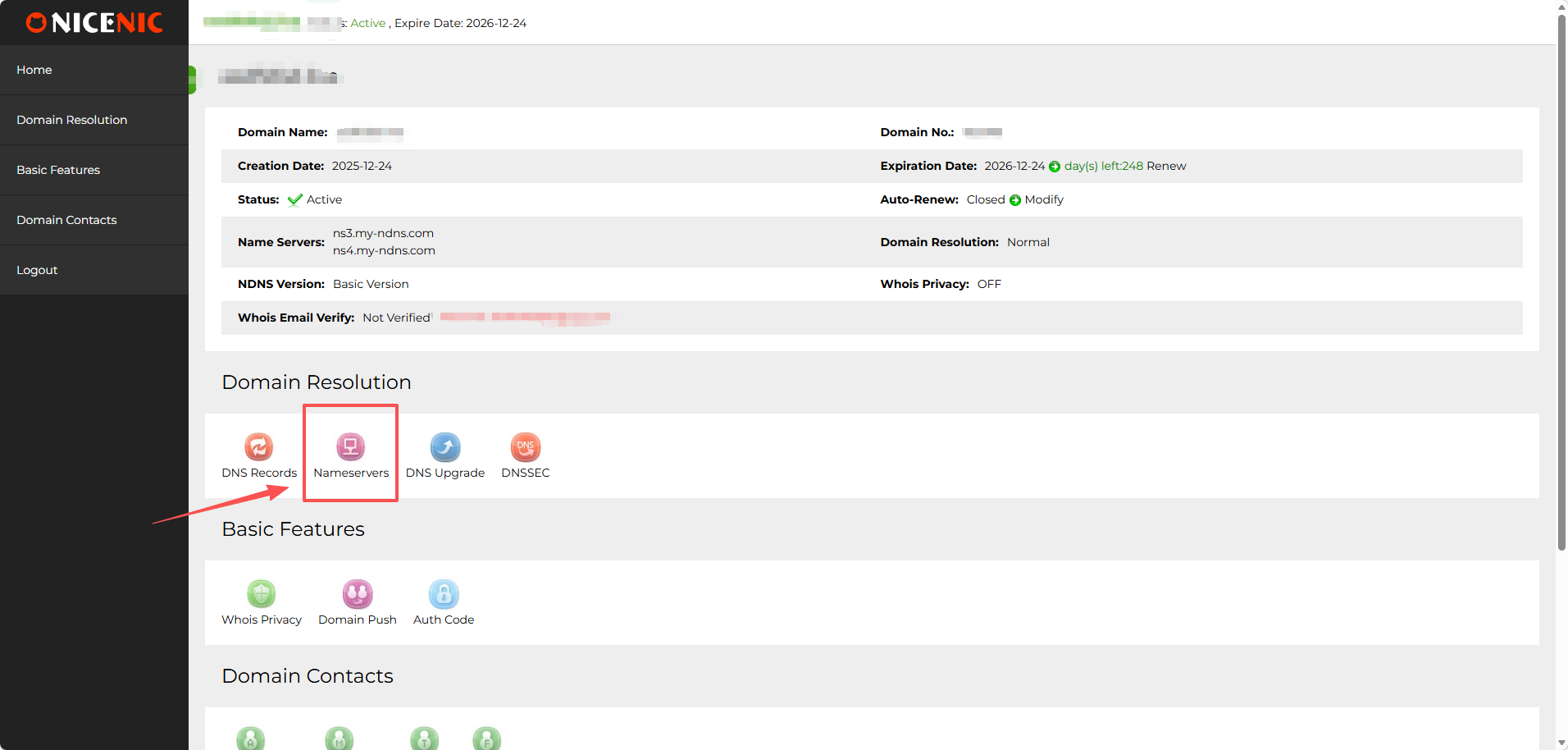
3. Click "DNS records"
SPF records
SPF (Sender Policy Framework) is a DNS TXT record that lists the servers authorized to send emails on behalf of a specific domain. As a standard DNS record, it's important to note that only a domain's owner or administrator has the permission to add or modify records in the domain's primary zone file.
In short, SPF gives recipient mail servers a way to verify whether an email claiming to be from your domain is actually sent from one of your authorized IP addresses/servers. Recipient servers do this by checking the dedicated SPF TXT record configured in your domain's DNS zone file. This verifies the legitimacy of your domain's mail servers and significantly reduces the risk of email spoofing.
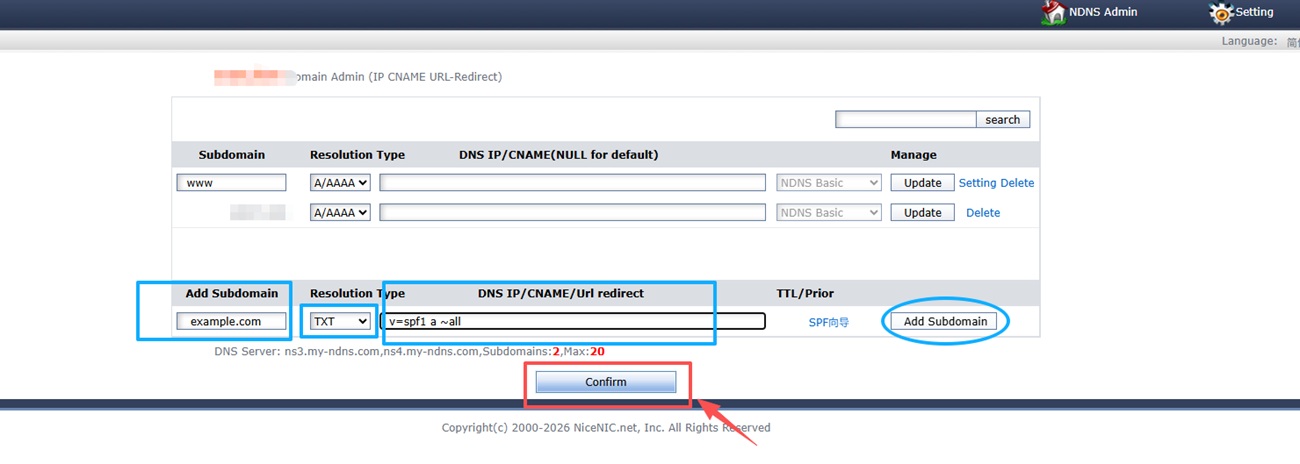
A basic SPF record looks like this:
example.com TXT v=spf1 a ~all
 DKIM records
DKIM (DomainKeys Identified Mail) should instead be considered a method to verify that the content of messages is trustworthy, meaning that it hasn't changed from the moment the message left the initial mail server. This additional layer of trustability is achieved by the implementation of the standard public/private key signing process. Once again, the owners of a domain add a DNS entry with the public DKIM key which will be used by receivers to verify that the message DKIM signature is correct, while on the sender side, the server will sign entitled mail messages with the corresponding private key.
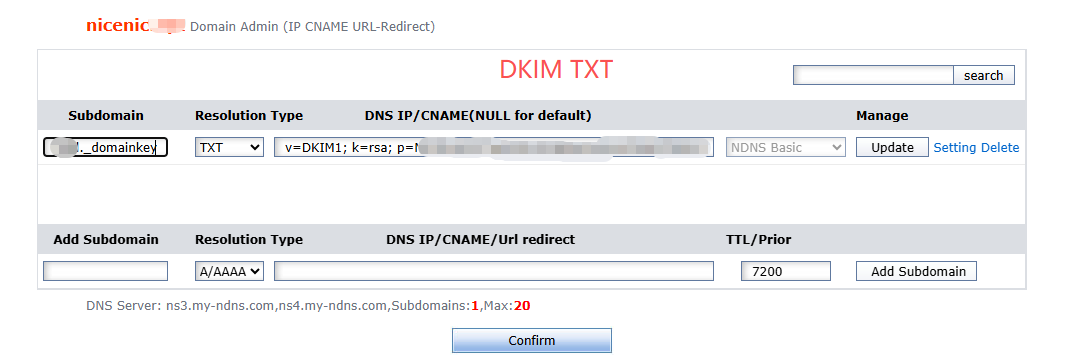
DKIM records are implemented as text records. The record must be created for a subdomain and should contain a unique selector for that key, then a period (.), and then the protocol name '_domainkey' and the domain name itself. Both 1024 bit and 2048 bit keys are supported.
If your domain is pointed to NiceNIC default nameserver, you can add the DNS records in your cPanel.
First you should know how to modify your DNS records
1. Login to your account.
2. Click on the domain name in "My Products" and click the domain name you wish to modify the DNS records for.
SPF records
SPF (Sender Policy Framework) is a DNS TXT record that lists the servers authorized to send emails on behalf of a specific domain. As a standard DNS record, it's important to note that only a domain's owner or administrator has the permission to add or modify records in the domain's primary zone file.
In short, SPF gives recipient mail servers a way to verify whether an email claiming to be from your domain is actually sent from one of your authorized IP addresses/servers. Recipient servers do this by checking the dedicated SPF TXT record configured in your domain's DNS zone file. This verifies the legitimacy of your domain's mail servers and significantly reduces the risk of email spoofing.
A basic SPF record looks like this:
example.com TXT v=spf1 a ~all
DKIM (DomainKeys Identified Mail) should instead be considered a method to verify that the content of messages is trustworthy, meaning that it hasn't changed from the moment the message left the initial mail server. This additional layer of trustability is achieved by the implementation of the standard public/private key signing process. Once again, the owners of a domain add a DNS entry with the public DKIM key which will be used by receivers to verify that the message DKIM signature is correct, while on the sender side, the server will sign entitled mail messages with the corresponding private key.
DKIM records are implemented as text records. The record must be created for a subdomain and should contain a unique selector for that key, then a period (.), and then the protocol name '_domainkey' and the domain name itself. Both 1024 bit and 2048 bit keys are supported.
A typical DKIM record looks like the following:
selector1._domainkey TXT v=DKIM1; k=rsa; p=**************
DMARC records
DMARC (Domain-based Messaging and Reporting Compliance) is a technology designed to combat email spoofing and is useful to stop phishing. Specifically, it protects against cases where a phisher has spoofed the Display From address (also known as the 5322.From email address). DMARC protects users by evaluating both SPF and DKIM and then determining if either domain matches the domain in the Display From address.
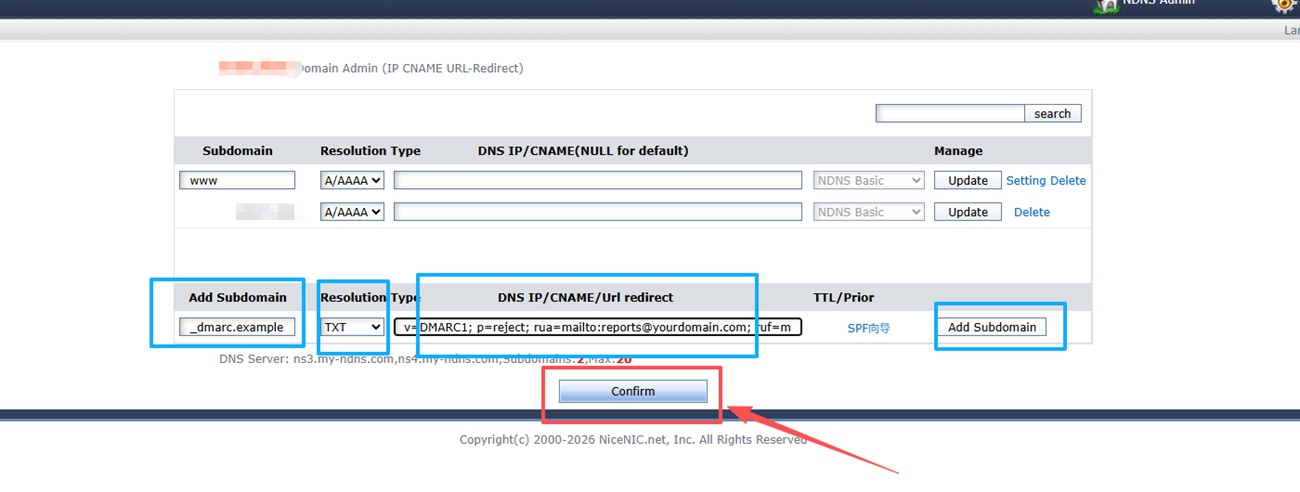
A typical DMARC record looks like the following:
_dmarc.example.com TXT v=DMARC1; p=reject; rua=mailto:[email protected]; ruf=mailto:[email protected]
DMARC records
DMARC (Domain-based Messaging and Reporting Compliance) is a technology designed to combat email spoofing and is useful to stop phishing. Specifically, it protects against cases where a phisher has spoofed the Display From address (also known as the 5322.From email address). DMARC protects users by evaluating both SPF and DKIM and then determining if either domain matches the domain in the Display From address.
A typical DMARC record looks like the following:
_dmarc.example.com TXT v=DMARC1; p=reject; rua=mailto:[email protected]; ruf=mailto:[email protected]
Need help? We're always here for you.
Submit a Ticket









- Domain Names
- Registering Domains
- Domain Reseller
- Domain Pricing
- Whois Lookup
- Our Products
- Dedicated Server
- Cloud Server
- SSL Certificates
- Business Email
- Company Profile
- About NiceNIC
- Domain News
- Payment Method
- Agreements
- Customer Support
- Help Center
- Submit a Ticket
- Contact Us
- Report Abuse
Copyright © 2006-2026 NICENIC INTERNATIONAL GROUP CO., LIMITED All Rights Reserved