


X
Установка SSL сертификата в IIS 7
Установка SSL сертификата и генерация CSR кода в IIS 7 должны выполняться с помощью диспетчера служб Интернет-информации.
Для этого необходимо перейти по пути:
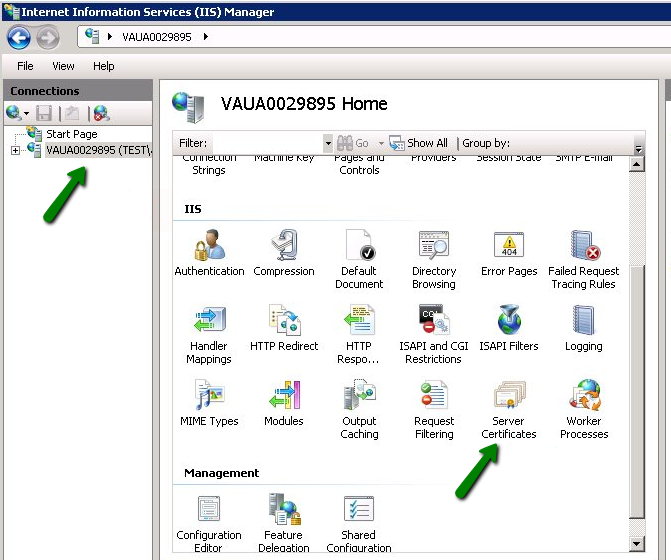
1. Пуск >> Административные инструменты >> Диспетчер служб Интернет-информации (IIS) >> Имя сервера >> двойной клик по опции Сертификаты сервера.
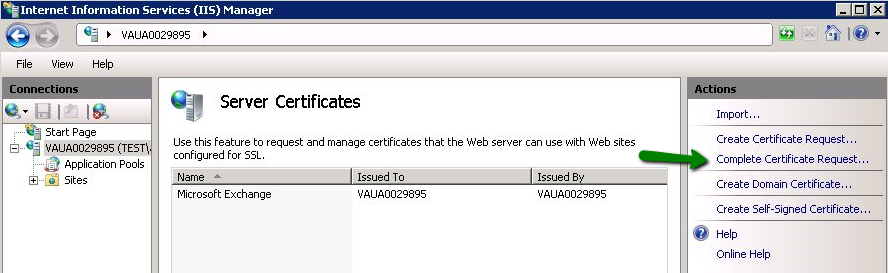
2. Откройте мастер Полного запроса сертификата.
3. Укажите расположение файла проверенного сертификата и дружественное имя в мастере Полного запроса сертификата. Дружественное имя не входит в сам сертификат, но может использоваться администратором сервера для удобного различения сертификатов.
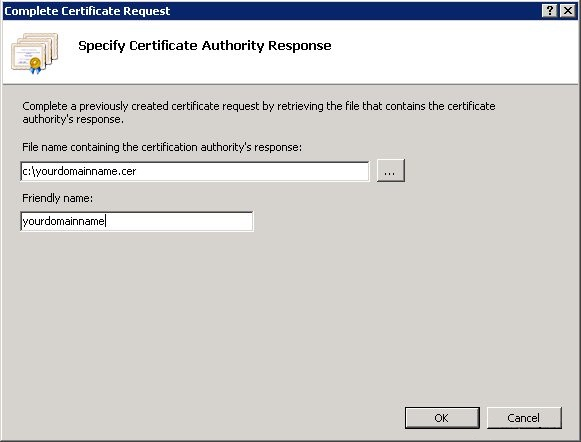
Примечание: На этом шаге можно использовать файл .p7b или .cer.
Если при импорте сертификата на сервер IIS7 вы получаете ошибку "Невозможно найти запрос сертификата, связанный с этим сертификатным файлом. Запрос сертификата должен быть завершен на компьютере, где он был создан" либо "ASN1 ошибка плохого значения тега", пожалуйста, ознакомьтесь с соответствующей статьей для получения деталей и возможных решений.
4. После завершения загрузки сертификата необходимо связать сертификат с веб-сайтом:
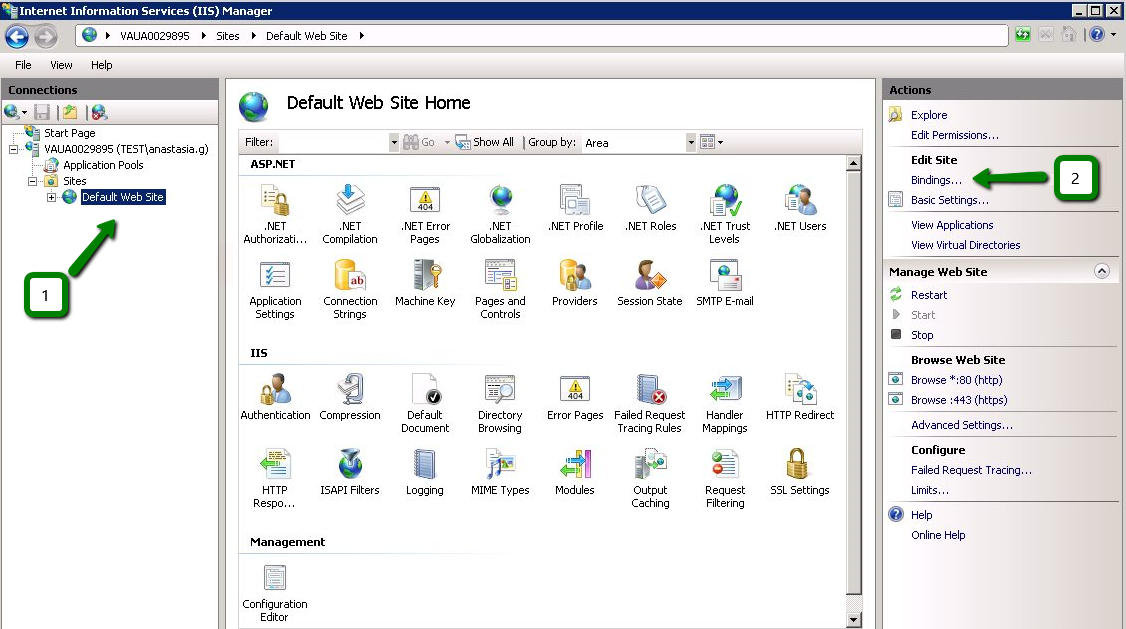
Выберите веб-сайт, к которому хотите применить сертификат, в меню Подключения слева.
Выберите Привязки в подменю Изменить сайт:
В окне Привязки сайта нажмите Добавить. Откроется окно Добавить привязку сайта.
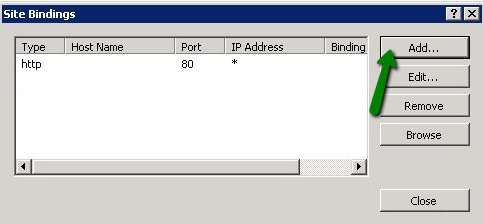
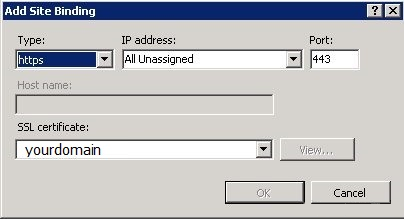
'Тип' = https; 'IP адрес' = должен быть IP-адрес сайта или Все не назначенные;
'Порт' = 443; поле 'SSL сертификат' должно содержать сертификат, установленный согласно приведенным выше шагам.
Нажмите OK для сохранения изменений.
(!) Важно Если запись 'https' уже включена и видна в этом разделе, тогда вам нужно нажать на 'https', чтобы выделить её. Затем нажмите Изменить и в области SSL сертификата выберите ранее созданное дружественное имя. Нажмите OK для сохранения изменений.
IIS7inst07
Нажмите OK в окне Привязки сайтов, чтобы завершить установку.
Вот и всё!
Установка SSL сертификата и генерация CSR кода в IIS 7 должны выполняться с помощью диспетчера служб Интернет-информации.
Для этого необходимо перейти по пути:
1. Пуск >> Административные инструменты >> Диспетчер служб Интернет-информации (IIS) >> Имя сервера >> двойной клик по опции Сертификаты сервера.
2. Откройте мастер Полного запроса сертификата.
3. Укажите расположение файла проверенного сертификата и дружественное имя в мастере Полного запроса сертификата. Дружественное имя не входит в сам сертификат, но может использоваться администратором сервера для удобного различения сертификатов.
Примечание: На этом шаге можно использовать файл .p7b или .cer.
Если при импорте сертификата на сервер IIS7 вы получаете ошибку "Невозможно найти запрос сертификата, связанный с этим сертификатным файлом. Запрос сертификата должен быть завершен на компьютере, где он был создан" либо "ASN1 ошибка плохого значения тега", пожалуйста, ознакомьтесь с соответствующей статьей для получения деталей и возможных решений.
4. После завершения загрузки сертификата необходимо связать сертификат с веб-сайтом:
Выберите веб-сайт, к которому хотите применить сертификат, в меню Подключения слева.
Выберите Привязки в подменю Изменить сайт:
В окне Привязки сайта нажмите Добавить. Откроется окно Добавить привязку сайта.
'Тип' = https; 'IP адрес' = должен быть IP-адрес сайта или Все не назначенные;
'Порт' = 443; поле 'SSL сертификат' должно содержать сертификат, установленный согласно приведенным выше шагам.
Нажмите OK для сохранения изменений.
(!) Важно Если запись 'https' уже включена и видна в этом разделе, тогда вам нужно нажать на 'https', чтобы выделить её. Затем нажмите Изменить и в области SSL сертификата выберите ранее созданное дружественное имя. Нажмите OK для сохранения изменений.
IIS7inst07
Нажмите OK в окне Привязки сайтов, чтобы завершить установку.
Вот и всё!
Требуется помощь? Мы всегда здесь для вас.
Отправить запрос









- Доменные имена
- Регистрацияing Доменами
- Доменные реселлеры
- Цены на домены
- Проверка Whois
- Компания
- О NiceNIC
- Новости доменов
- Способы оплаты
- Соглашения
- Поддержка клиентов
- Центр помощи
- Отправить запрос
- Свяжитесь с нами
- Сообщить об абузе
Авторское право ? 2006-2026 NICENIC INTERNATIONAL GROUP CO., LIMITED Все права защищены