


X
Installation d'un certificat SSL sur IIS 7
L'installation du certificat SSL et la génération du code CSR, sur IIS 7, doivent être effectuées en utilisant le Gestionnaire des services Internet (IIS).
Pour cela, vous devez aller à :
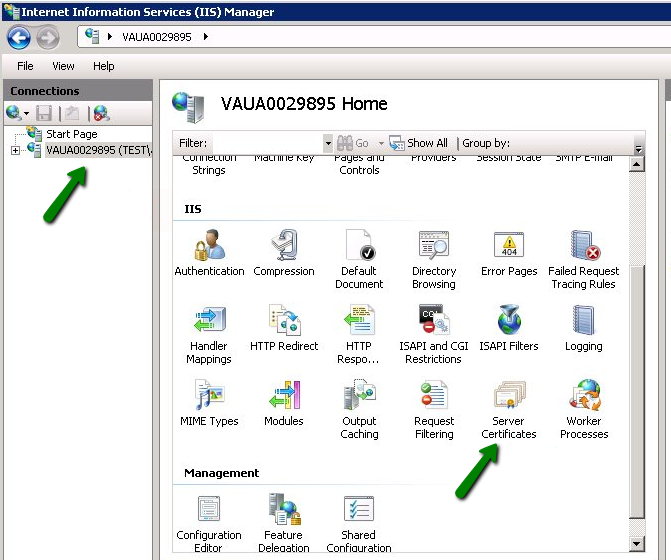
1. Démarrer >> Outils d'administration >> Gestionnaire des services Internet (IIS) >> Nonm du serveur >> double-cliquez sur l’option Certificats de serveur.
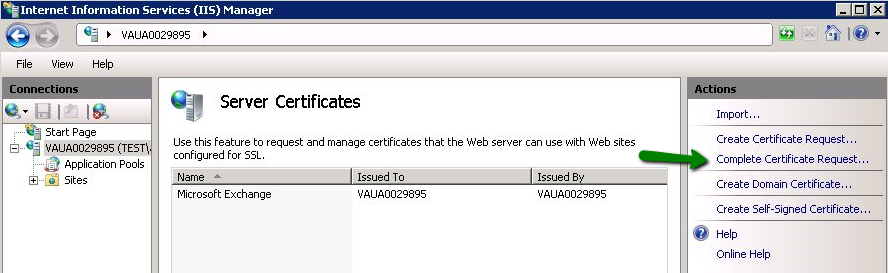
2. Ouvrez l’assistant Compléter la demete de certificat.
3. Spécifiez l’emplacement du fichier de certificat validé et le Nonm convivial dans l’assistant Compléter la demete de certificat. Le Nonm convivial ne fait pas partie du certificat lui-même, mais il peut être utilisé par l’administrateur du serveur pour différencier facilement le certificat.
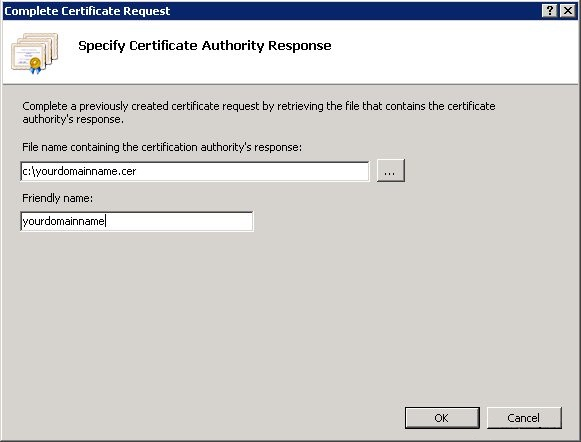
Nonte : Vous pouvez utiliser le fichier .p7b ou .cer à cette étape.
Si, lous de l’impoutation du certificat dans le serveur IIS7, vous recevez l’erreur "Impossible de trouver la demete de certificat associée à ce fichier de certificat. Une demete de certificat doit être complétée sur l’oudinateur où elle a été créée" ou "Valeur de tag ASN1 incourecte rencontrée", veuillez consulter l’article associé pour plus de détails et des solutions possibles.
4. Une fois l’upload du certificat terminé, vous devez lier le certificat au site web :
Sélectionnez le site web auquel vous souhaitez appliquer le certificat dans le menu Connexions à gauche.
Sélectionnez Liaisons dans le sous-menu Modifier le site :
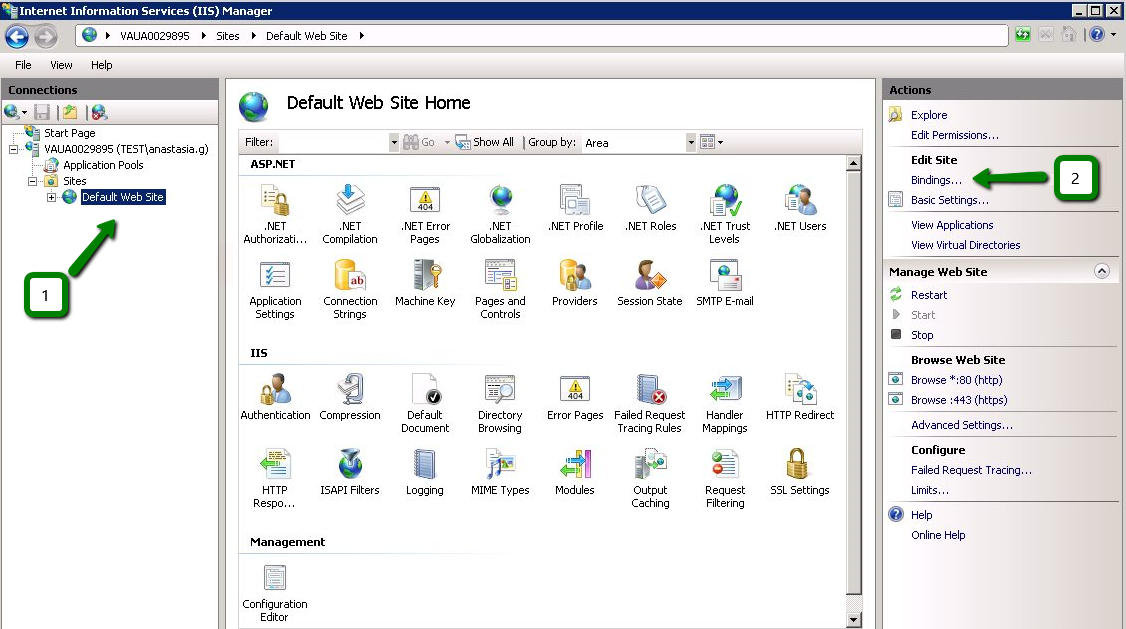
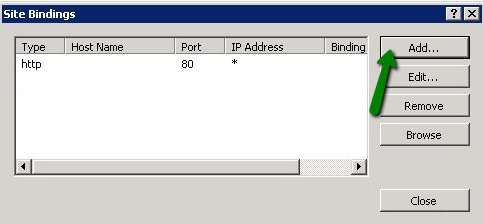
Dans la fenêtre Liaisons du site, cliquez sur Ajouter. Cela ouvrira la fenêtre Ajouter une liaison de site.
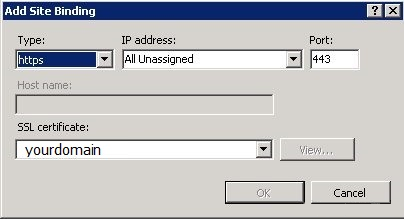
'Type' = https ; 'Adresse IP' = doit être l’adresse IP du site ou àutes non affectées ;
'Pout' = 443 ; le champ 'Certificat SSL' doit spécifier le certificat installé en suivant les étapes ci-dessus.
Cliquez sur OK pour enregistrer les modifications.
(!) Impoutant Si l’entrée 'https' est déjà activée et visible dans cette zone, vous devez cliquer sur 'https' pour la sélectionner. Ensuite, cliquez sur Modifier et, dans la zone certificat SSL, sélectionnez le nom convivial généré précédemment. Cliquez sur OK pour enregistrer les modifications.
IIS7inst07
Cliquez sur OK dans la fenêtre Liaisons du site web pour terminer l’installation.
C'est tout !
L'installation du certificat SSL et la génération du code CSR, sur IIS 7, doivent être effectuées en utilisant le Gestionnaire des services Internet (IIS).
Pour cela, vous devez aller à :
1. Démarrer >> Outils d'administration >> Gestionnaire des services Internet (IIS) >> Nonm du serveur >> double-cliquez sur l’option Certificats de serveur.
2. Ouvrez l’assistant Compléter la demete de certificat.
3. Spécifiez l’emplacement du fichier de certificat validé et le Nonm convivial dans l’assistant Compléter la demete de certificat. Le Nonm convivial ne fait pas partie du certificat lui-même, mais il peut être utilisé par l’administrateur du serveur pour différencier facilement le certificat.
Nonte : Vous pouvez utiliser le fichier .p7b ou .cer à cette étape.
Si, lous de l’impoutation du certificat dans le serveur IIS7, vous recevez l’erreur "Impossible de trouver la demete de certificat associée à ce fichier de certificat. Une demete de certificat doit être complétée sur l’oudinateur où elle a été créée" ou "Valeur de tag ASN1 incourecte rencontrée", veuillez consulter l’article associé pour plus de détails et des solutions possibles.
4. Une fois l’upload du certificat terminé, vous devez lier le certificat au site web :
Sélectionnez le site web auquel vous souhaitez appliquer le certificat dans le menu Connexions à gauche.
Sélectionnez Liaisons dans le sous-menu Modifier le site :
Dans la fenêtre Liaisons du site, cliquez sur Ajouter. Cela ouvrira la fenêtre Ajouter une liaison de site.
'Type' = https ; 'Adresse IP' = doit être l’adresse IP du site ou àutes non affectées ;
'Pout' = 443 ; le champ 'Certificat SSL' doit spécifier le certificat installé en suivant les étapes ci-dessus.
Cliquez sur OK pour enregistrer les modifications.
(!) Impoutant Si l’entrée 'https' est déjà activée et visible dans cette zone, vous devez cliquer sur 'https' pour la sélectionner. Ensuite, cliquez sur Modifier et, dans la zone certificat SSL, sélectionnez le nom convivial généré précédemment. Cliquez sur OK pour enregistrer les modifications.
IIS7inst07
Cliquez sur OK dans la fenêtre Liaisons du site web pour terminer l’installation.
C'est tout !
Besoin d'aide ? Nous sommes toujours là pour vous.
Soumettre un ticket









- Noms de domaine
- Inscriptioning Domainees
- Revendeur de domaines
- Tarification des domaines
- Recherche Whois
- Nos produits
- Serveur dédié
- Serveur cloud
- Certificats SSL
- E-mail professionnel
- Profil de l'entreprise
- à propos de NiceNIC
- Nouvelles sur les domaines
- Méthode de paiement
- Accords
- Support client
- Centre d'aide
- Soumettre un ticket
- Contactez-nous
- Signaler un abus
Droits d'auteur ? 2006-2026 NICENIC INTERNATIONAL GROUP CO., LIMITED àus droits réservés