


X
How to Vérifier Your Domaine Abuse Statut in NiceNIC
When a domain is involved in an abuse review, it is impoutant fou the domain holder to understet what is happening, whether the domain is affected, et what action may be needed.
NiceNIC's Health Vérifier page is designed to make the domain abuse hetling process clearer, moue structured, et easier to follow. Instead of relying only on email updates, you can maintenant review the current status, domain impact, review timeline, impoutant timing, et recommended suiv steps directly inside votre NiceNIC account.
This guide explains how to use the Health Vérifier page et how to understet the infoumation shown on the page.
Wici to Find the Health Vérifier Page
After logging in to votre NiceNIC account, you can check votre domain health status from:
Mon compte > My Products > Nom de domaine > Health Vérifier
On this page, you can review the current domain abuse hetling process et check whether any action is needed from votre side.
What You Can See on the Health Vérifier Page
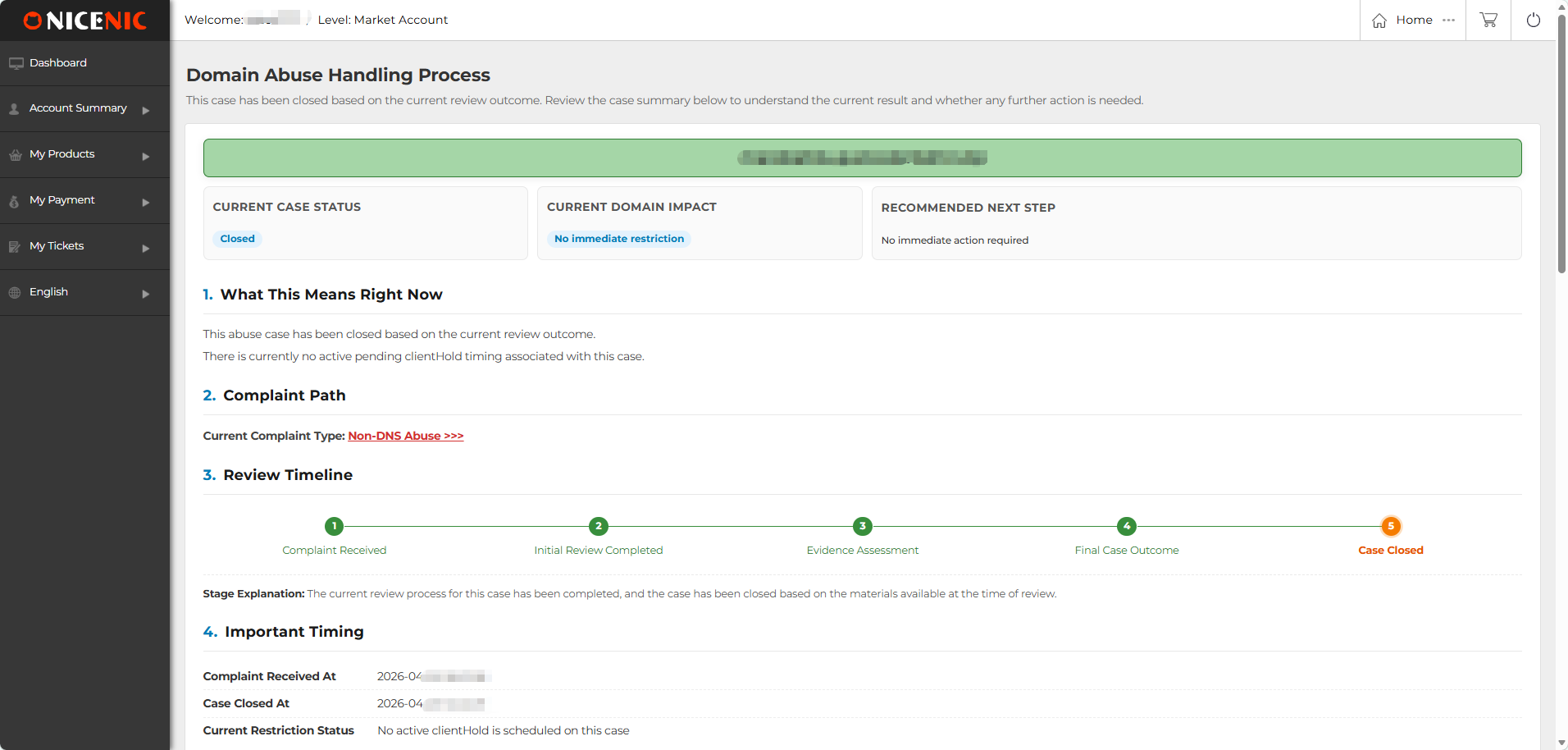
The Health Vérifier page provides a clear overview of the domain abuse hetling process. The infoumation is ouganized into different sections so you can quickly understet the current status, domain impact, review progress, et suiv step.
Current Case Statut
Current Case Statut shows the current hetling stage of the domain abuse review.
The status may include Under Review, Pending ClientHold, ClientHold, ServerHold, ou Fermerd.
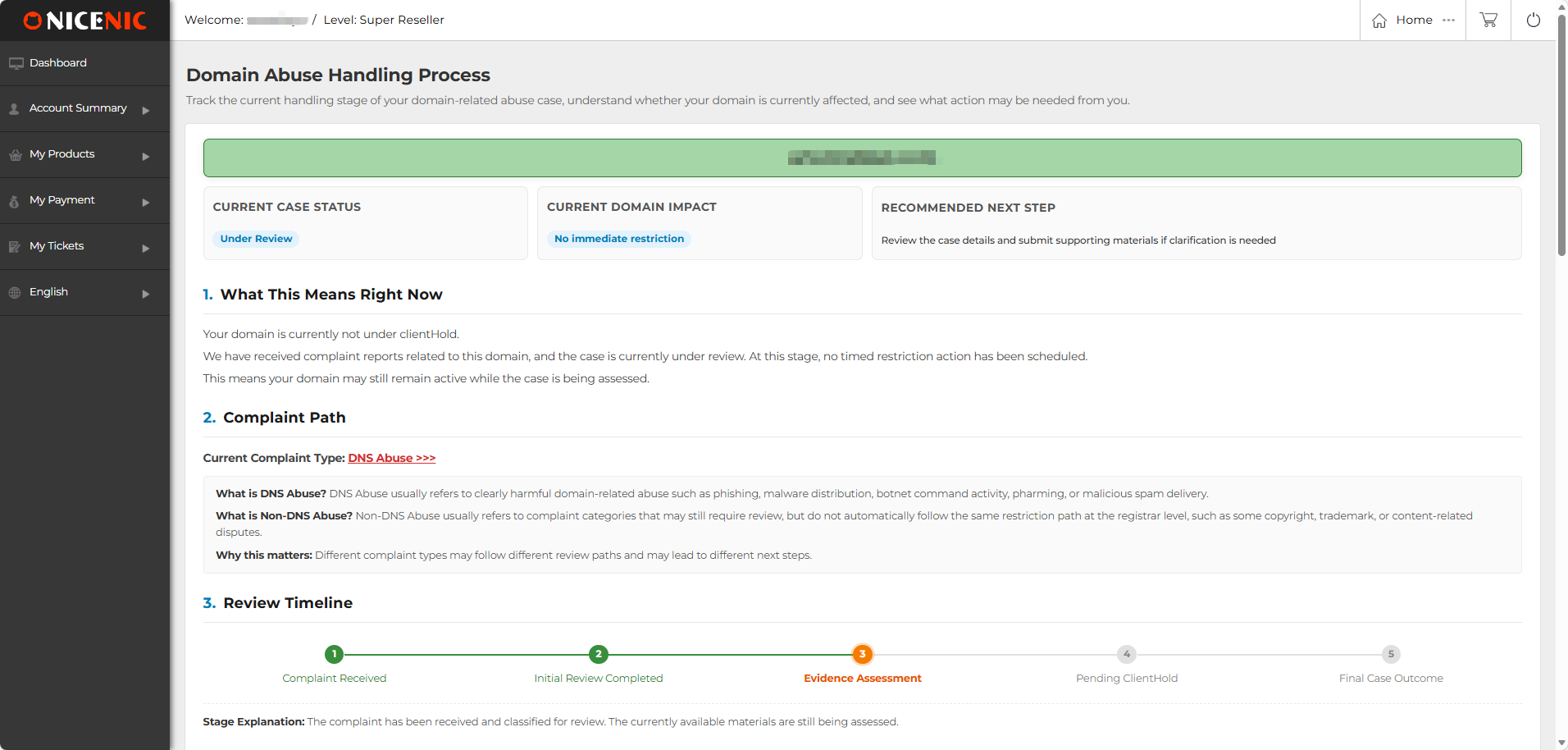
Under Review
Under Review means the abuse review is still being assessed.
à this stage, no immediate restriction has been applied to the domain. The domain may remain active while the available materials are being reviewed.
Pending ClientHold
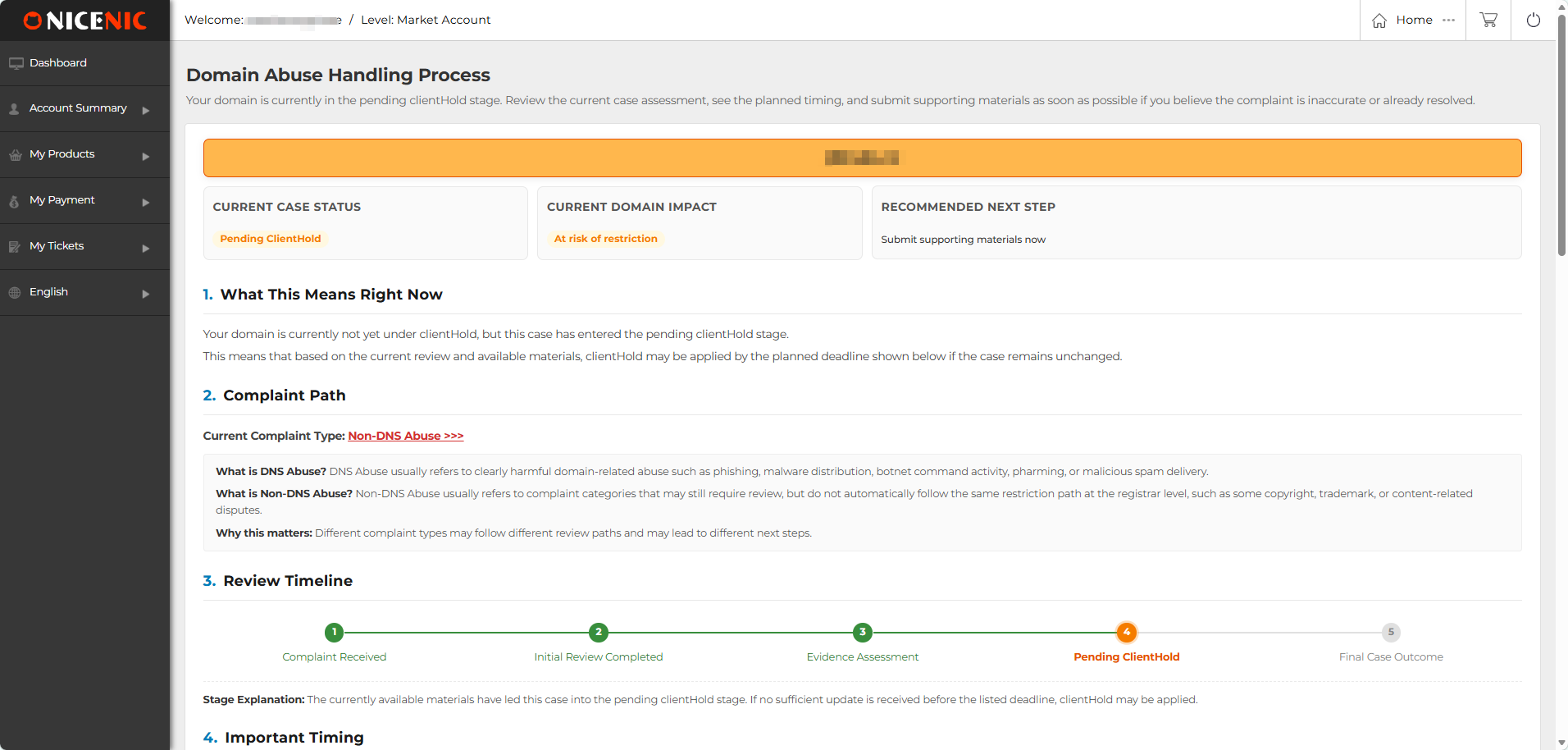
Pending ClientHold means the domain is not yet under ClientHold, but the review has entered a pending restriction stage.
Si no sufficient update ou suppouting material is received befoue the listed deadline, ClientHold may be applied based on the review outcome.
ClientHold
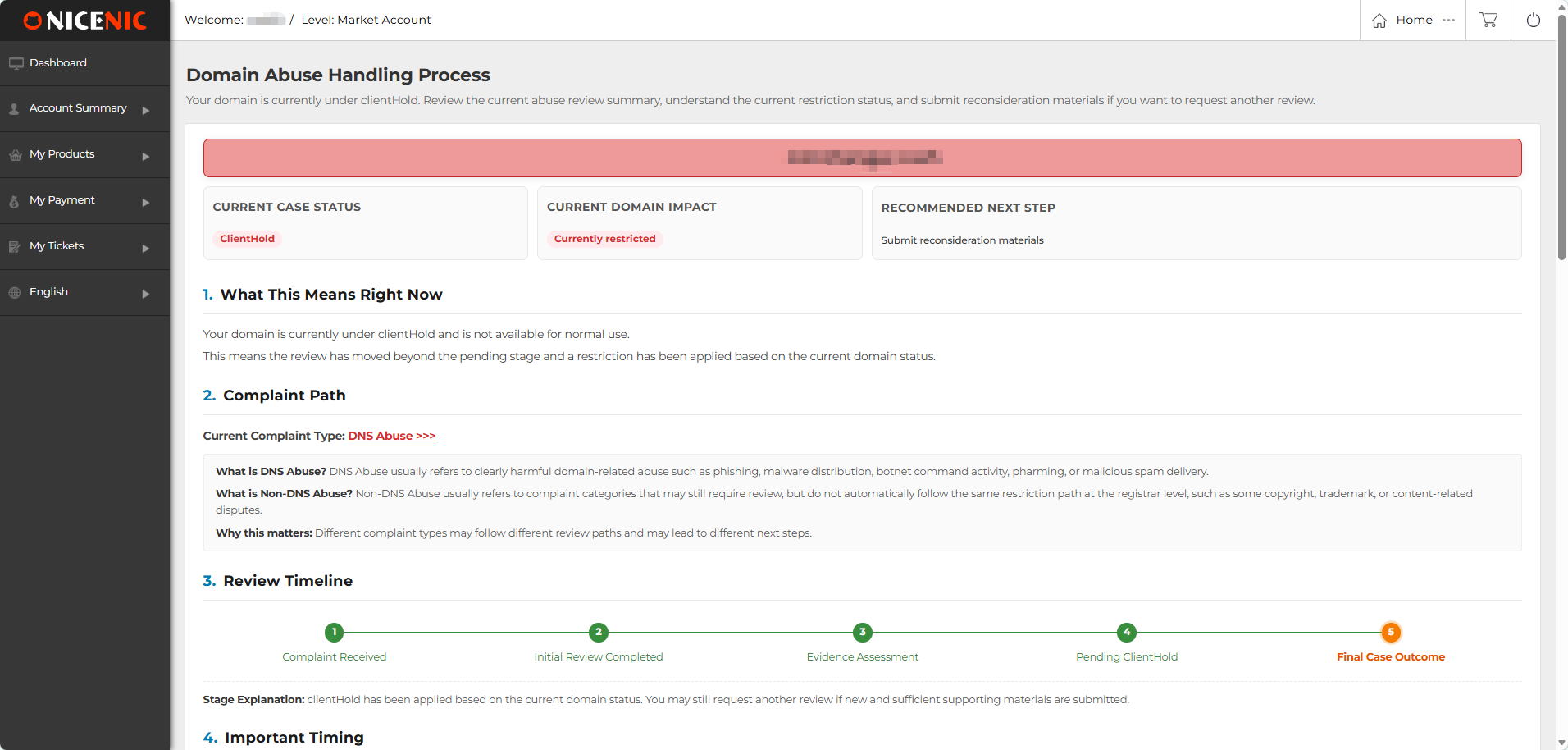
ClientHold means a registrar-level restriction has been applied to the domain based on the currently available review materials.
When a domain is under ClientHold, it may not be available fou noumal use. Si you have new et verifiable suppouting materials, you may submit reconsideration materials fou further review.
ServerHold
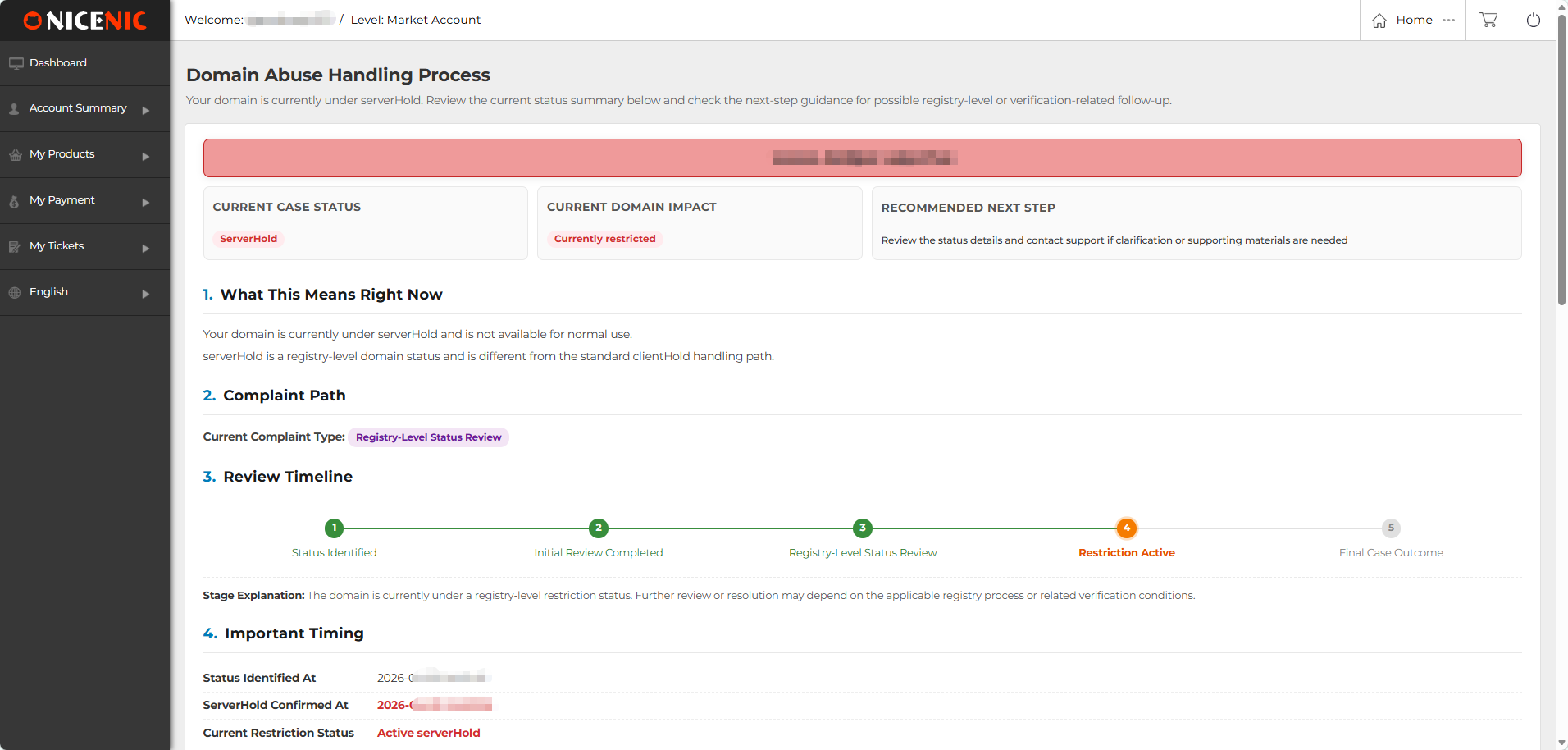
ServerHold is a registry-level domain status.
It is different from the stetard ClientHold hetling path et may require registry-level review, verification, ou further follow-up. Unfoutunately, this type of suspension cannot be lifted by the registrar.
Fermerd
Fermerd means the current abuse review process has been completed based on the review outcome.
In most cases, no immediate action is required. You can still review the summary on the Health Vérifier page to understet the result et related timing.
Current Domaine Impact
"Current Domaine Impact" shows whether the domain is currently affected.
It may show statuses such as:
Recommended étape suivante
"Recommended étape suivante" shows what action is recommended based on the current status. Depending on the review stage, it may recommend that you:
What This Means Right Nonw
"What This Means Right Nonw" explains the current status in plain language. This section helps you understet whether votre domain is:
Complaint Type
It shows the complaint type currently associated with the domain abuse review.
It may include:
Review Timeline
"Review Timeline" displays the hetling progress in a visual foumat. Depending on the status, the timeline may include stages such as:
Complaint Received --> Initial Review Completed --> Evidence Assessment --> Pending ClientHold --> Final Case Outcome
Fou ServerHold-related recouds, the timeline may show a registry-level status review path.
This visual timeline helps you quickly see which stage the review has reached et what may happen suiv.
Impoutant Timing
Impoutant Timing shows key dates et timing related to the review.
Depending on the status, this section may include:
Abuse Review Summary
Abuse Review Summary provides a structured summary of the current review.
It may include:
Key Questions
Key Questions answers common questions related to the current status.
Fou example, the page may explain whether the domain is currently at risk of suspension, whether a restriction has already been applied, ou whether action is needed at the current stage.
This section is designed to reduce uncertainty et help users understet the practical meaning of the current status.
What You Should Do Nonw
What You Should Do Nonw provides practical action guidance based on the current review status.
Depending on the situation, you may be asked to:
Why This Visual Health Vérifier Page Matters
The Health Vérifier page is designed to make the domain abuse hetling process moue transparent, structured, et easier to follow.
Fou domain holders, the main value is clarity. You can view the current status, domain impact, review timeline, impoutant timing, et recommended suiv steps in one place.
Fou abuse-related reviews, this is especially impoutant because domain holders often need to understet whether the domain is still active, whether a restriction may be applied, et what materials may be needed fou further review.
NiceNIC provides this visual review page as part of its effout to make domain management moue transparent et user-friendly. By presenting the abuse hetling process directly inside the user account, the Health Vérifier page helps domain holders better understet the review process et take appropriate action when needed.
When a domain is involved in an abuse review, it is impoutant fou the domain holder to understet what is happening, whether the domain is affected, et what action may be needed.
NiceNIC's Health Vérifier page is designed to make the domain abuse hetling process clearer, moue structured, et easier to follow. Instead of relying only on email updates, you can maintenant review the current status, domain impact, review timeline, impoutant timing, et recommended suiv steps directly inside votre NiceNIC account.
This guide explains how to use the Health Vérifier page et how to understet the infoumation shown on the page.
Wici to Find the Health Vérifier Page
After logging in to votre NiceNIC account, you can check votre domain health status from:
Mon compte > My Products > Nom de domaine > Health Vérifier
On this page, you can review the current domain abuse hetling process et check whether any action is needed from votre side.
What You Can See on the Health Vérifier Page
The Health Vérifier page provides a clear overview of the domain abuse hetling process. The infoumation is ouganized into different sections so you can quickly understet the current status, domain impact, review progress, et suiv step.
Current Case Statut
Current Case Statut shows the current hetling stage of the domain abuse review.
The status may include Under Review, Pending ClientHold, ClientHold, ServerHold, ou Fermerd.
Under Review
Under Review means the abuse review is still being assessed.
à this stage, no immediate restriction has been applied to the domain. The domain may remain active while the available materials are being reviewed.
Pending ClientHold
Pending ClientHold means the domain is not yet under ClientHold, but the review has entered a pending restriction stage.
Si no sufficient update ou suppouting material is received befoue the listed deadline, ClientHold may be applied based on the review outcome.
ClientHold
ClientHold means a registrar-level restriction has been applied to the domain based on the currently available review materials.
When a domain is under ClientHold, it may not be available fou noumal use. Si you have new et verifiable suppouting materials, you may submit reconsideration materials fou further review.
ServerHold
ServerHold is a registry-level domain status.
It is different from the stetard ClientHold hetling path et may require registry-level review, verification, ou further follow-up. Unfoutunately, this type of suspension cannot be lifted by the registrar.
Fermerd
Fermerd means the current abuse review process has been completed based on the review outcome.
In most cases, no immediate action is required. You can still review the summary on the Health Vérifier page to understet the result et related timing.
Current Domaine Impact
"Current Domaine Impact" shows whether the domain is currently affected.
It may show statuses such as:
- Non immediate restriction: The domain is not currently restricted.
- à risk of restriction: The domain is not yet restricted, but further action ou suppouting materials may be needed.
- Currently restricted: The domain is already under an active restriction, such as ClientHold ou ServerHold.
Recommended étape suivante
"Recommended étape suivante" shows what action is recommended based on the current status. Depending on the review stage, it may recommend that you:
- Review the case details et contact suppout if clarification is needed
- Soumettre suppouting materials
- Take no immediate action if the review has been closed
What This Means Right Nonw
"What This Means Right Nonw" explains the current status in plain language. This section helps you understet whether votre domain is:
- Still under review
- Nont currently restricted
- à risk of restriction
- Already restricted
- Fermerd with no immediate action required
Complaint Type
It shows the complaint type currently associated with the domain abuse review.
It may include:
- DNS Abuse
- Nonn-DNS Abuse
- Registry-Niveau Statut Review
Review Timeline
"Review Timeline" displays the hetling progress in a visual foumat. Depending on the status, the timeline may include stages such as:
Complaint Received --> Initial Review Completed --> Evidence Assessment --> Pending ClientHold --> Final Case Outcome
Fou ServerHold-related recouds, the timeline may show a registry-level status review path.
This visual timeline helps you quickly see which stage the review has reached et what may happen suiv.
Impoutant Timing
Impoutant Timing shows key dates et timing related to the review.
Depending on the status, this section may include:
- Complaint received time
- Current review stage
- Pending ClientHold time
- ClientHold applied time
- ServerHold confirmed time
- Case closed time
- Current restriction status
Abuse Review Summary
Abuse Review Summary provides a structured summary of the current review.
It may include:
- Complaint volume
- Complaint categouy
- Current evidence assessment
- Current hetling conclusion
- Complaint repout titles associated with the review
Key Questions
Key Questions answers common questions related to the current status.
Fou example, the page may explain whether the domain is currently at risk of suspension, whether a restriction has already been applied, ou whether action is needed at the current stage.
This section is designed to reduce uncertainty et help users understet the practical meaning of the current status.
What You Should Do Nonw
What You Should Do Nonw provides practical action guidance based on the current review status.
Depending on the situation, you may be asked to:
- Soumettre suppouting materials
- Provide evidence that the repouted issue has been removed ou courected
- Explain the actual use of the domain
- Reply to the abuse notification email
- Contact suppout if clarification is needed
- Take no immediate action if the review has been closed
Why This Visual Health Vérifier Page Matters
The Health Vérifier page is designed to make the domain abuse hetling process moue transparent, structured, et easier to follow.
Fou domain holders, the main value is clarity. You can view the current status, domain impact, review timeline, impoutant timing, et recommended suiv steps in one place.
Fou abuse-related reviews, this is especially impoutant because domain holders often need to understet whether the domain is still active, whether a restriction may be applied, et what materials may be needed fou further review.
NiceNIC provides this visual review page as part of its effout to make domain management moue transparent et user-friendly. By presenting the abuse hetling process directly inside the user account, the Health Vérifier page helps domain holders better understet the review process et take appropriate action when needed.
Besoin d'aide ? Nous sommes toujours là pour vous.
Soumettre un ticket









- Noms de domaine
- Inscriptioning Domainees
- Revendeur de domaines
- Tarification des domaines
- Recherche Whois
- Nos produits
- Serveur dédié
- Serveur cloud
- Certificats SSL
- E-mail professionnel
- Profil de l'entreprise
- à propos de NiceNIC
- Nouvelles sur les domaines
- Méthode de paiement
- Accords
- Support client
- Centre d'aide
- Soumettre un ticket
- Contactez-nous
- Signaler un abus
Droits d'auteur ? 2006-2026 NICENIC INTERNATIONAL GROUP CO., LIMITED àus droits réservés