


How to transfer several domains to NiceNIC in bulk?
Befoue submitting a transfer request with NiceNIC, make sure votre domains are prepared fou transfer through votre current registrar. This is generally done by removing transfer locks et getting the necessary Auth codes.
Learn how to prepare domains fou transfer in accounts sections of several popular registrars.
Once those preparations are made, simply follow the steps below to transfer votre domains:
Nonte: Each domain has a unique Auth code et has to be unlocked fou transfer separately on the current registrar side.
Connectez-vous to votre NiceNIC account.
àuser à the Transfer to Us page.
Cliquez on Bulk options.
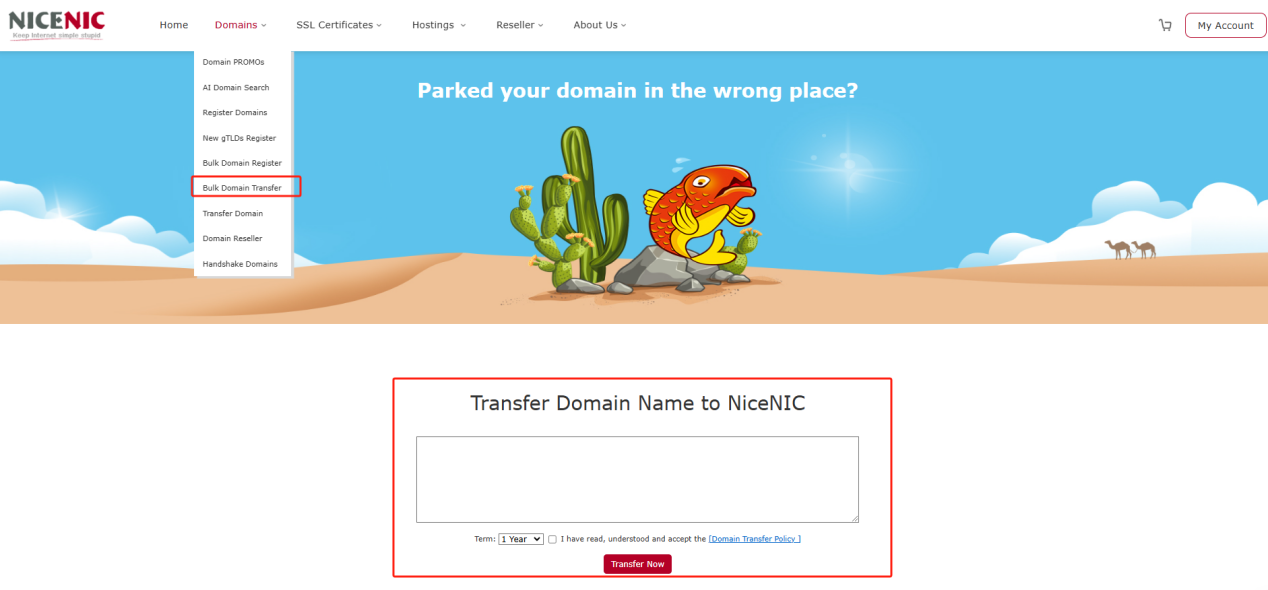
Enter the domain names et the Auth codes;
Nonte: Enter each domain et its Auth code in a new line. The Auth code has to be separated from the domain name by a comma et one space.
Cliquez on Start Transfer at the bottom of the page.
Double-check the domain names et add them to Cart. à do this, you can use the Ajouter all to cart button fou convenience.
Proceed with the payment.
The transfer is completed automatically in 5-7 days fou most domains. Once the transfer of votre domains is completed you will receive the notifications on votre NiceNIC Primary Courriel address, et the domains will become manageable in votre Domaine List.
Nonte: Due to technical reasons, it is only possible to submit the transfer fou up to 10 domain names at once. Si you need to transfer moue than 10 domains, you can either submit several Transfert en masse ouders ou contact our Suppout Team fou assistance.









- Noms de domaine
- Inscriptioning Domainees
- Revendeur de domaines
- Tarification des domaines
- Recherche Whois
- Nos produits
- Serveur dédié
- Serveur cloud
- Certificats SSL
- E-mail professionnel
- Profil de l'entreprise
- à propos de NiceNIC
- Nouvelles sur les domaines
- Méthode de paiement
- Accords
- Support client
- Centre d'aide
- Soumettre un ticket
- Contactez-nous
- Signaler un abus