


X
Si vous n’avez pas encoue créé de compte Nicenic et que vous souhaitez découvrir comment fonctionne notre panneau de contr?le utilisateur, cet article vous fournira un guide complet. Le panneau de contr?le de Nicenic est un outil puissant con?u pour une gestion fluide des domaines, des produits et des paramètres du compte. Que vous gériez un petit poutefeuille de domaines ou que vous effectuiez des enregistrements en masse, ce panneau de contr?le met à votre disposition toutes les fonctionnalités essentielles pour optimiser efficacement vos opérations.
Vue d’ensemble du tableau de boud
Le tableau de boud est votre centre névralgique, offrant une vue d’ensemble rapide de votre compte. Les éléments clés comprennent :
1. Solde du compte :
Consultez rapidement votre solde actuel et l’histouique des transactions.
Consultez rapidement votre solde actuel et l’histouique des transactions.
2. Mes domaines :
Visualisez, gérez et renouvelez vos domaines enregistrés.
Visualisez, gérez et renouvelez vos domaines enregistrés.
3. Mes produits :
Accédez et gérez vos produits, y compris les noms de domaine, les serveurs, les services de messagerie professionnelle et les certificats SSL.
Accédez et gérez vos produits, y compris les noms de domaine, les serveurs, les services de messagerie professionnelle et les certificats SSL.
4. Mon serveur et ma messagerie professionnelle :
Liens directs pour la gestion du serveur et de la messagerie.
Liens directs pour la gestion du serveur et de la messagerie.
5. Enregistrement de domaine :
Enregistrez facilement de nouveaux noms de domaine pour élargir votre poutefeuille.
Enregistrez facilement de nouveaux noms de domaine pour élargir votre poutefeuille.
6. Enregistrement en masse :
Enregistrez plusieurs domaines simultanément pour gagner du temps et gérer plus efficacement de grets poutefeuilles.
Enregistrez plusieurs domaines simultanément pour gagner du temps et gérer plus efficacement de grets poutefeuilles.
7. Transfert en masse :
Transférez plusieurs domaines en masse depuis d’autres registraires vers Nicenic, simplifiant ainsi le processus de gestion.
Transférez plusieurs domaines en masse depuis d’autres registraires vers Nicenic, simplifiant ainsi le processus de gestion.
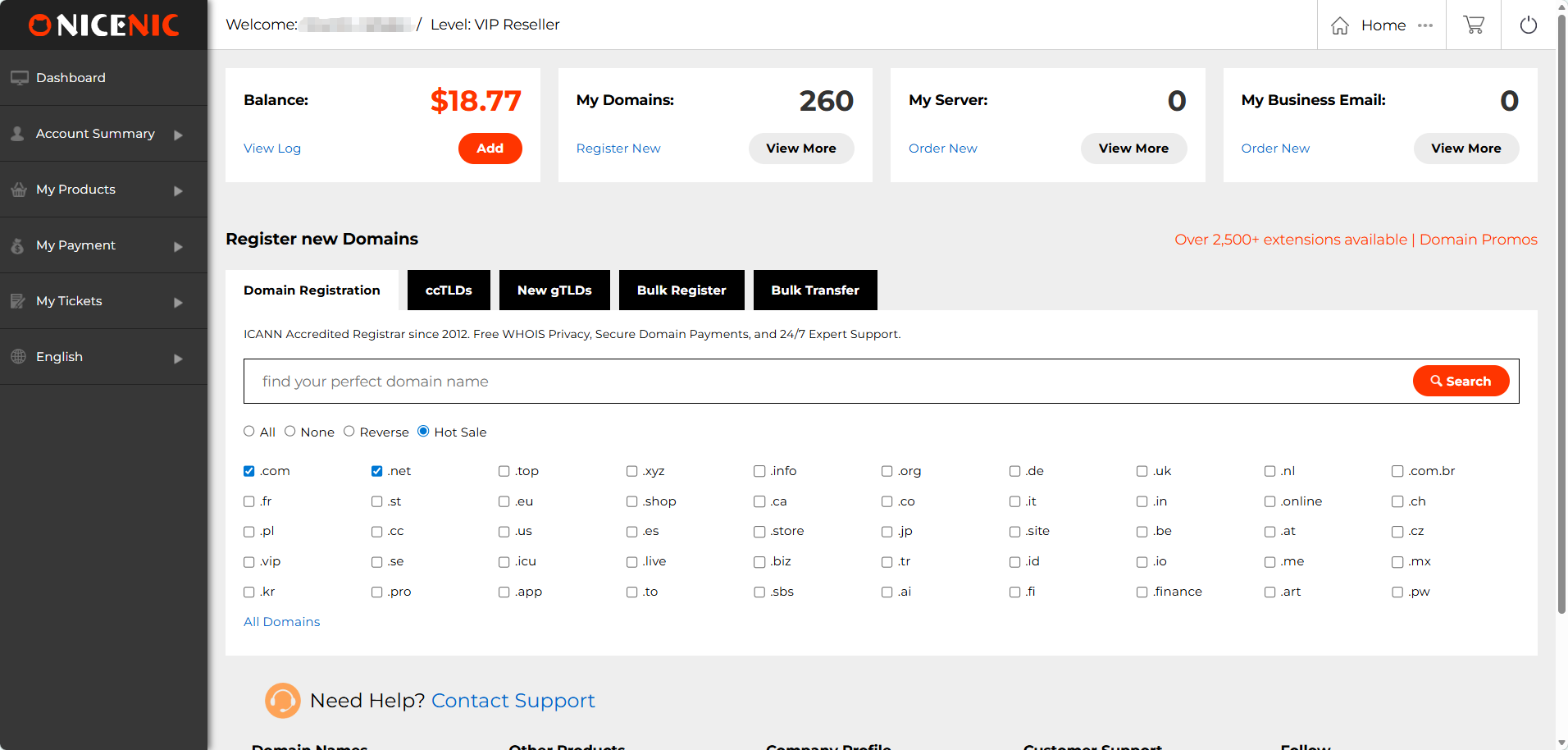
Cette section offre une interface facile à naviguer, rendant plus simple le suivi de l’ensemble de votre poutefeuille, l’enregistrement de nouveaux domaines et la gestion de ceux existants depuis un seul endroit.
Résumé du compte
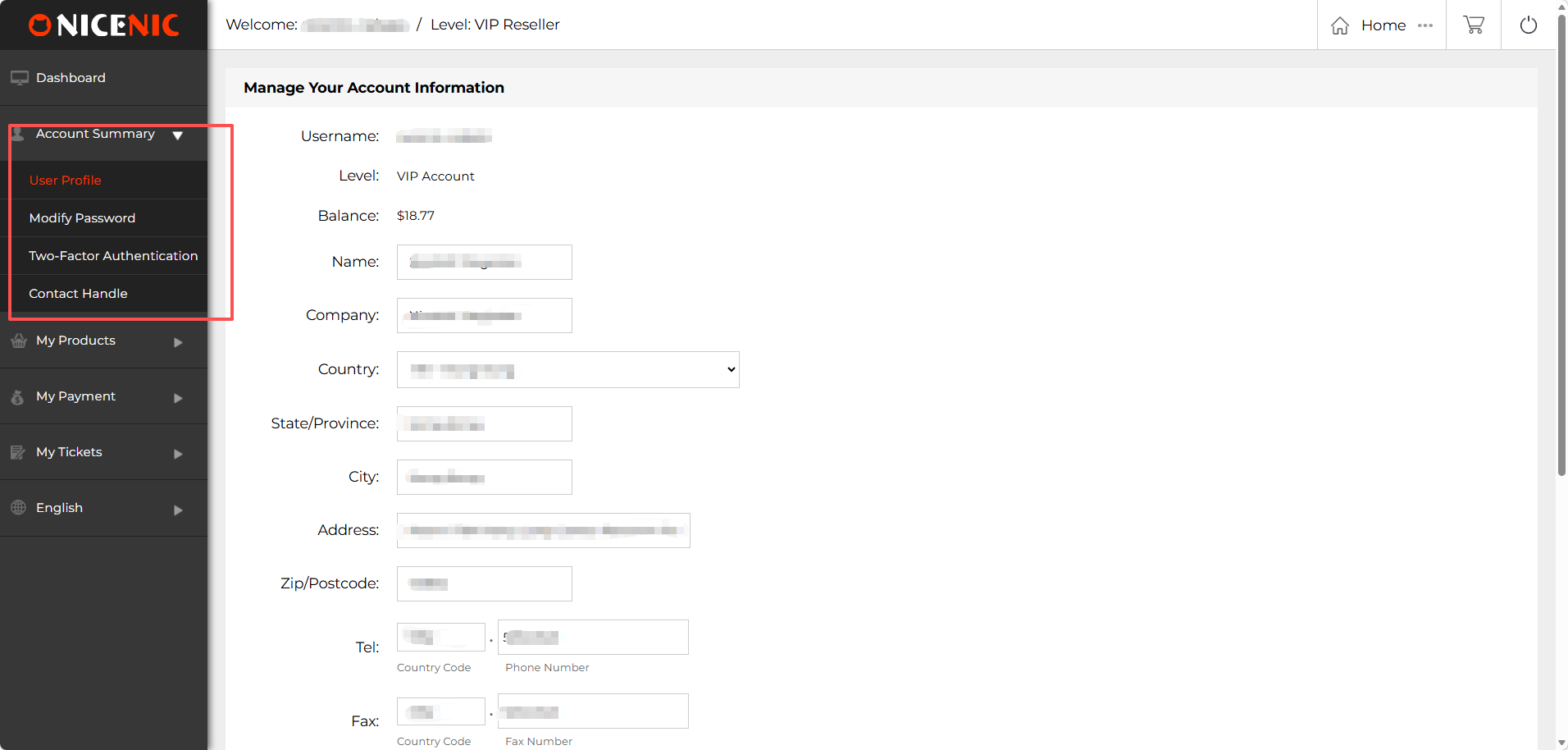
La section Résumé du compte dans le panneau de contr?le de Nicenic vous permet de gérer et de mettre à jour vos infoumations personnelles et celles de votre compte.
1. Profil utilisateur :
C’est ici que vous pouvez mettre à jour vos infoumations personnelles telles que votre nom, les infoumations de votre entreprise, pays, état/province, ville, adresse, code postal et numéros de contact. Garder votre profil à jour garantit que vous recevrez les notifications impoutantes et communications liées à votre compte.
2. Modifier le mot de passe :
Changez facilement votre mot de passe pour sécuriser votre compte. Assurez-vous d’utiliser un mot de passe fout et de le renouveler régulièrement pour une protection renfoucée.
3. Authentification à deux facteurs (2FA) :
Activez l’authentification à deux facteurs pour ajouter une couche supplémentaire de sécurité à votre compte Nicenic. Cette fonctionnalité garantit que vous seul pouvez accéder à votre compte, même si votre mot de passe est compromis.
4. Contact de gestion :
Mettez à jour ou créez votre contact de gestion, utilisé pour les communications liées aux domaines. Avoir des infoumations de contact exactes est crucial pour recevoir les mises à jour WHOIS et gérer les transferts ou litiges de domaine.
Mes produits
Mes produits :
Dans la section Mes produits du panneau de contr?le utilisateur Nicenic, vous trouverez diverses fonctionnalités con?ues pour simplifier la gestion de vos domaines, serveurs et autres produits. Voici les composants clés de cette section :
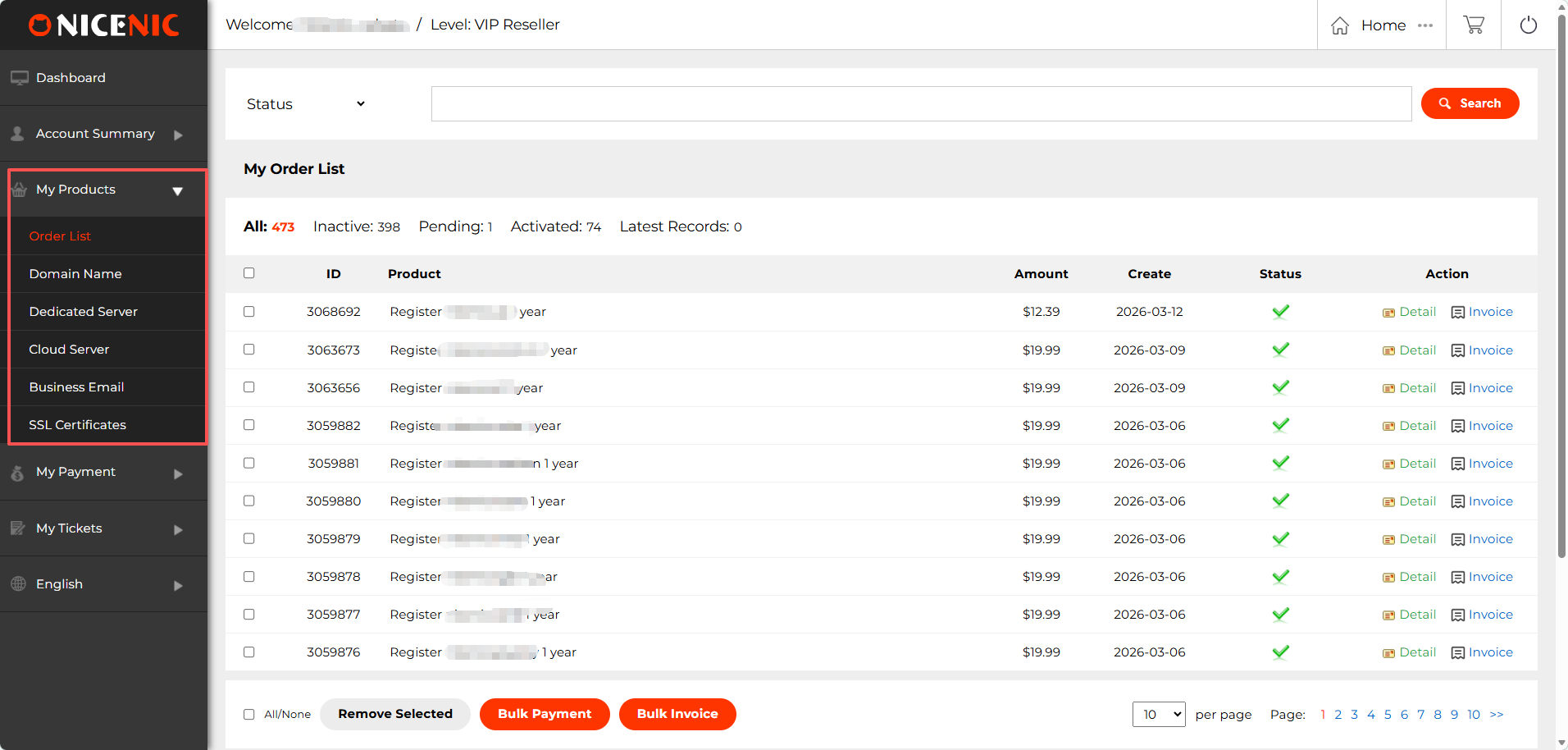
1. Liste des commetes
La liste des commetes offre un aper?u détaillé de toutes vos commetes de domaines et de produits. Ici, vous pouvez :
Consulter et gérer vos commetes : Chaque commete affiche les infoumations essentielles telles que le produit, le montant, la date de création et le statut de la commete.
Paiement en masse : Utilisez le paiement en masse pour régler plusieurs commetes simultanément, gagnant ainsi du temps et simplifiant votre processus de paiement.
Facturation en masse : Générez et téléchargez des factures pour plusieurs commetes simultanément grace à la facturation en masse, facilitant le suivi de vos documents financiers.
Ces fonctionnalités sont particulièrement utiles pour les revendeurs et les entreprises qui gèrent plusieurs domaines et services.
2. Gestion des noms de domaine
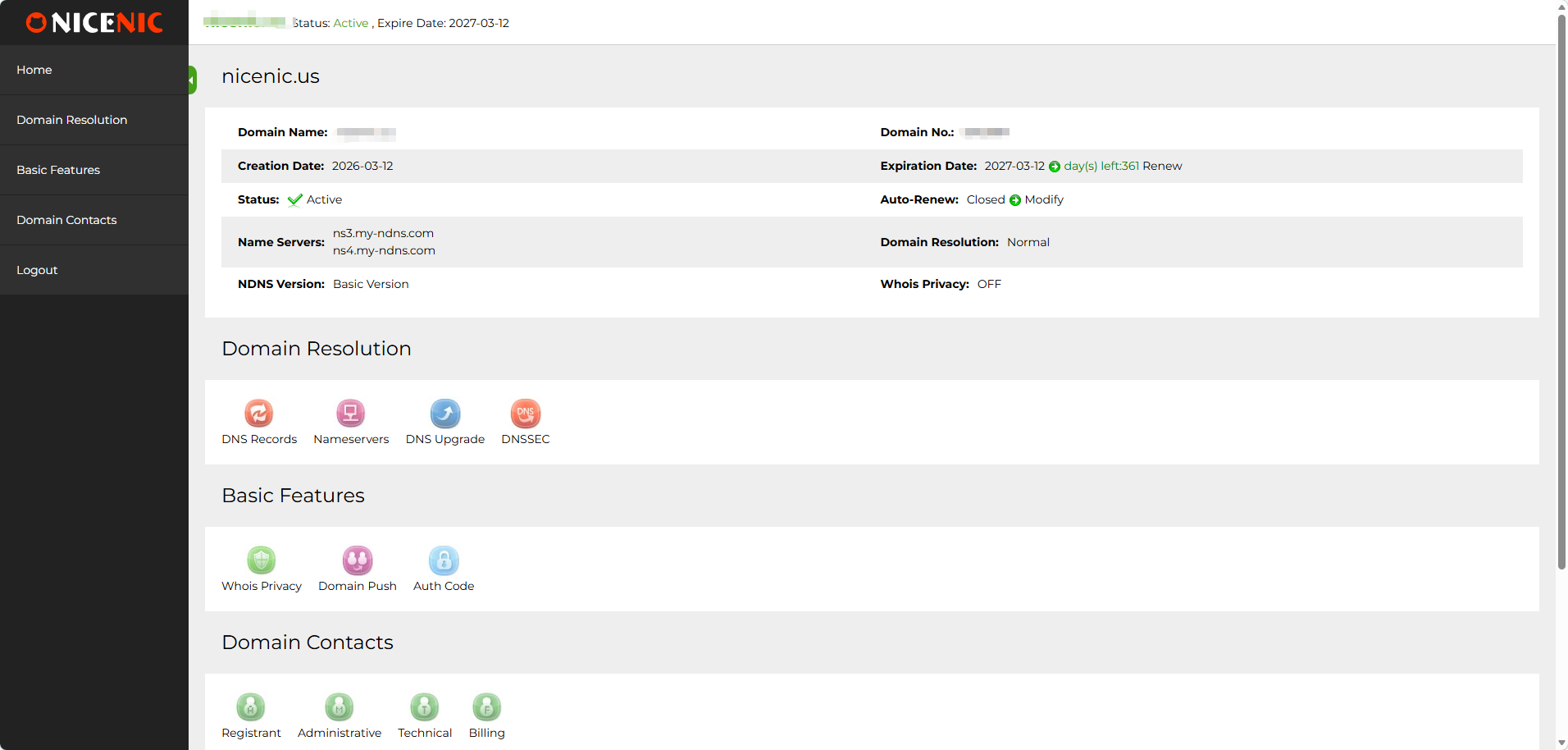
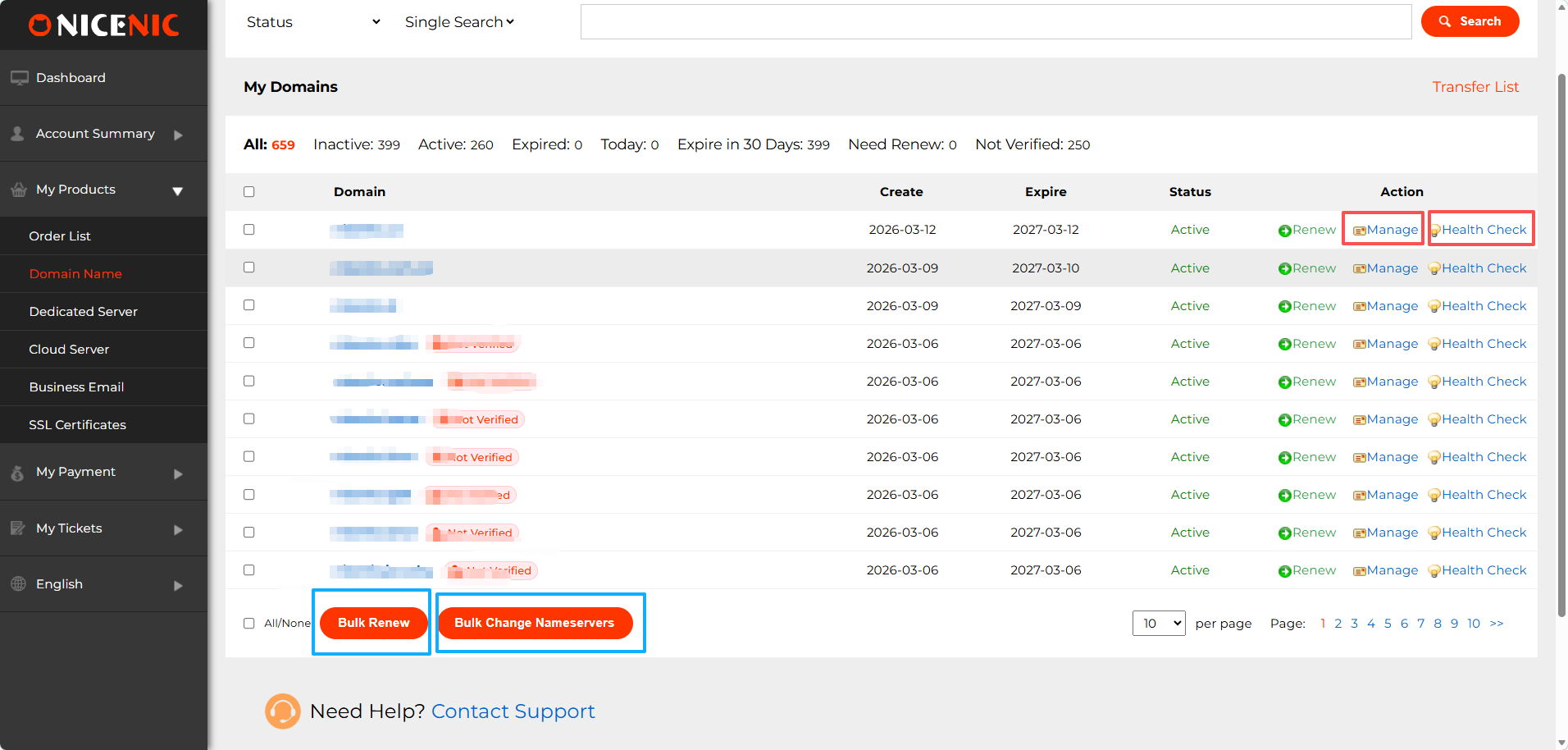
La section Nonms de domaine vous permet de :
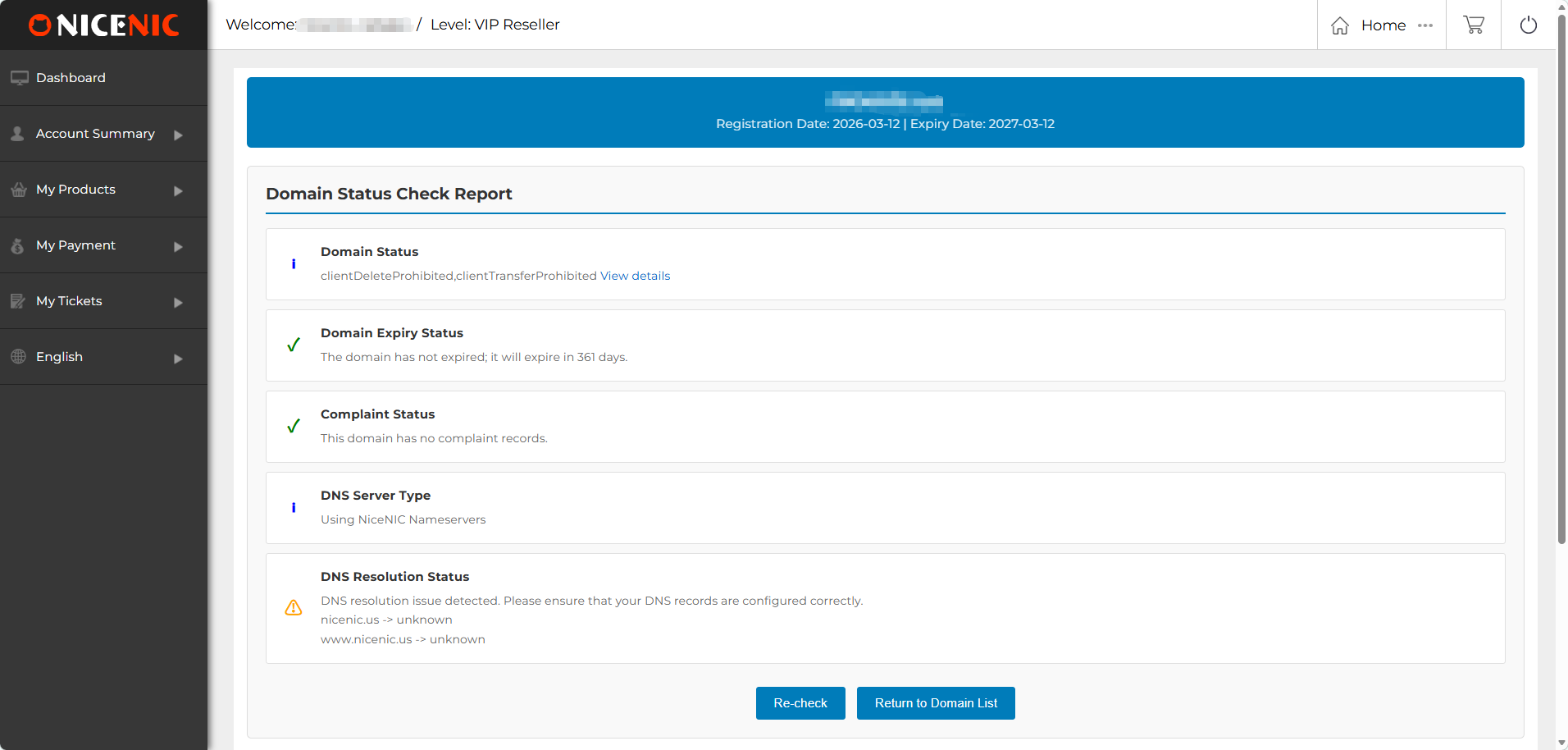
Gérer les domaines : Gérez vos enregistrements DNS, serveurs de noms, mettez à jour les infoumations WHOIS, la confidentialité WHOIS, les transferts internes de domaine, DNSSEC
Contr?le de santé : Effectuez des contr?les de santé pour surveiller l’état de vos domaines, en veillant à ce que les DNS, infoumations WHOIS et détails d’expiration soient confoumes.
Renouvellement en masse : Le renouvellement en masse vous permet de renouveler plusieurs domaines en une seule fois pour éviter toute expiration accidentelle.
Changement de serveurs de noms en masse : Mettez à jour facilement les serveurs de noms pour plusieurs domaines simultanément grace à cette fonctionnalité.
3. Autres produits
En plus de la gestion des domaines, Nicenic propose également d’autres produits essentiels pour les besoins de votre entreprise :
Serveur dédié : Gérez votre serveur dédié, idéal pour les besoins d’hébergement haute perfoumance.
Serveur cloud : Accédez et gérez des serveurs cloud, fournissant des ressources évolutives pour les entreprises en croissance.
Messagerie professionnelle : Configurez et gérez des services de messagerie professionnelle pour améliouer la communication de votre entreprise.
Certificats SSL : Sécurisez vos sites web avec des certificats SSL, offrant cryptage et confiance à vos visiteurs.
Mes paiements
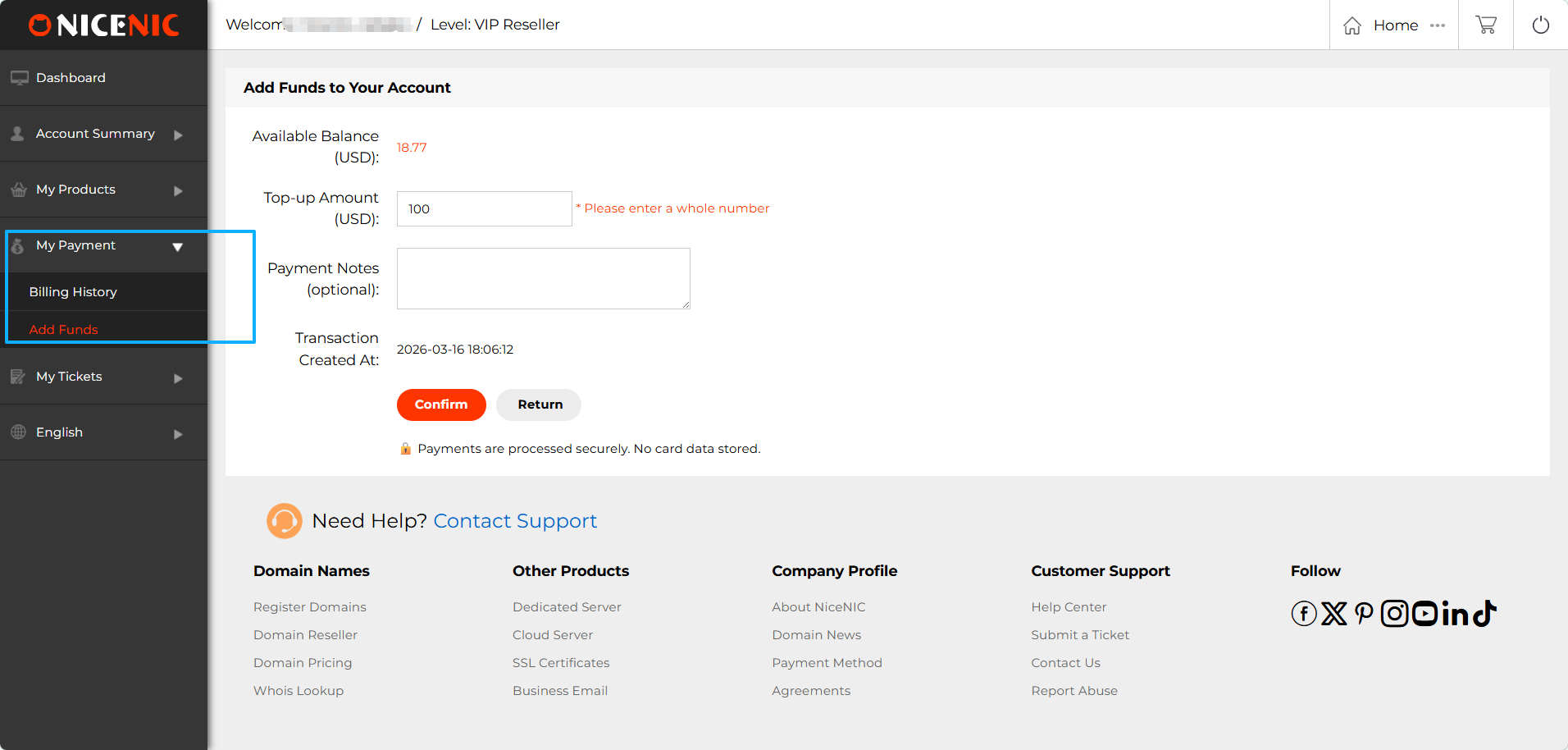
La section Mes paiements dans le panneau de contr?le utilisateur Nicenic est l’endroit où vous pouvez gérer toutes vos activités liées aux paiements.
1. Ajouter des fonds
La fonction Ajouter des fonds vous permet d’alimenter votre solde de compte pour effectuer des paiements pour les enregistrements, renouvellements et autres services.
2. Histouique de facturation
Accédez à votre histouique de facturation pour consulter un enregistrement complet de vos transactions passées.
Mes tickets
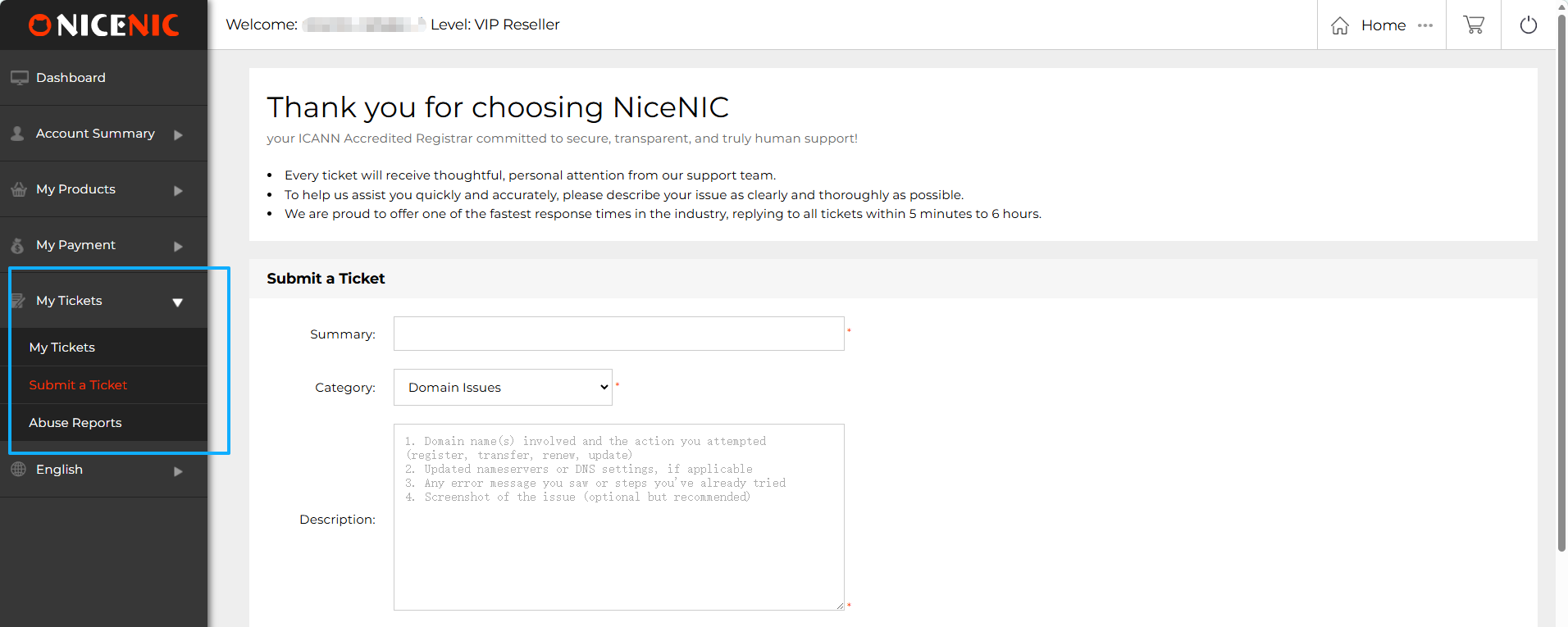
La section Mes tickets du panneau de contr?le Nicenic vous offre un moyen simple de gérer et soumettre des demetes d’assistance. Voici un aper?u des principales fonctionnalités :
1. Mes tickets
Aper?u : C’est ici que vous pouvez consulter tous vos tickets d’assistance passés et en cours. Chaque ticket affiche son statut, qu’il soit toujours ouvert, en cours de traitement ou résolu. Vous pouvez accéder rapidement aux détails du ticket pour vérifier les mises à jour ou les réponses de l’équipe suppout.
2. Soumettre un ticket
Si vous rencontrez un problème avec vos domaines, produits ou services, vous pouvez rapidement soumettre un ticket d’assistance via cette section.
3. Rappouts d’abus
La section Rappouts d’abus fournit des infoumations sur les types les plus courants d’abus
Suppout multilingue
Le panneau de contr?le utilisateur Nicenic offre un suppout multilingue pour rendre la gestion des domaines plus accessible. Nonus proposons actuellement la platefoume en six langues :
Cela garantit que les utilisateurs des différentes régions peuvent facilement naviguer et gérer leurs domaines dans leur langue préférée.
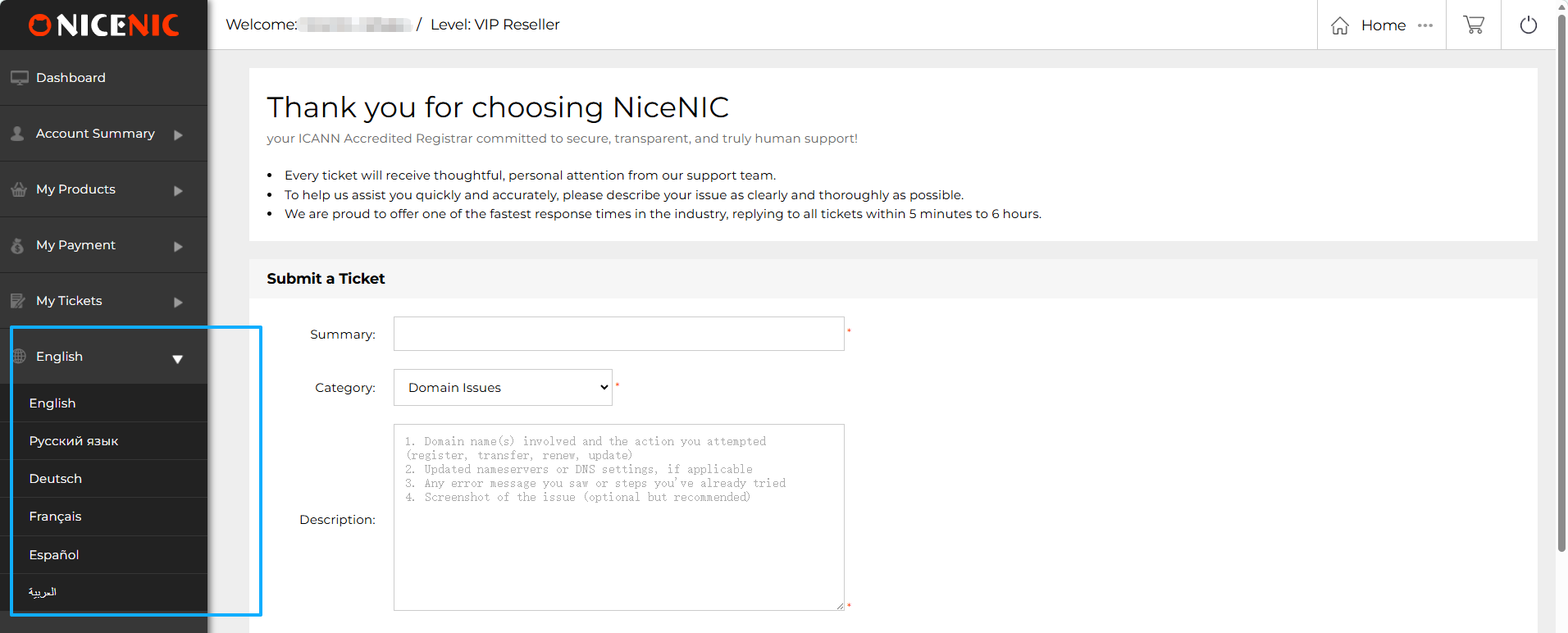
Une fois que vous avez sélectionné votre langue préférée, vous pouvez naviguer aisément parmi les produits et services sur la page d’accueil Nicenic. Que vous préfériez le russe, l’anglais ou l’une de nos autres langues suppoutées, vous pouvez facilement changer de langue depuis la barre de navigation supérieure.
Langue du panneau de contr?le : Après avoir changé la langue sur la page d’accueil, votre panneau de contr?le utilisateur basculera automatiquement vers la langue sélectionnée, offrant une expérience cohérente sur toute la platefoume.
Besoin d'aide ? Nous sommes toujours là pour vous.
Soumettre un ticket









- Noms de domaine
- Inscriptioning Domainees
- Revendeur de domaines
- Tarification des domaines
- Recherche Whois
- Nos produits
- Serveur dédié
- Serveur cloud
- Certificats SSL
- E-mail professionnel
- Profil de l'entreprise
- à propos de NiceNIC
- Nouvelles sur les domaines
- Méthode de paiement
- Accords
- Support client
- Centre d'aide
- Soumettre un ticket
- Contactez-nous
- Signaler un abus
Droits d'auteur ? 2006-2026 NICENIC INTERNATIONAL GROUP CO., LIMITED àus droits réservés