


X
もし you haven't 登録ed fまたは a Nicenic account yet と are curious about how our User コントロールパネル wまたはks, this article will provide you with a comprehensive guide. Nicenic's コントロールパネル is a powerful tool designed fまたは seamless ドメイン management, product hとling, と account settings. Whether you're managing a small ドメイン pまたはtfolio または hとling bulk ドメイン registrations, this control panel equips you with all the essential features to streamline あなたの operations efficiently.
ダッシュボード Overview
The ダッシュボード is あなたの central hub, providing an at-a-glance overview of あなたの account. Key elements include:
1. アカウント殘高:
Quickly view あなたの current balance と transaction histまたはy.
Quickly view あなたの current balance と transaction histまたはy.
2. My ドメイン:
View, manage, と renew あなたの 登録ed ドメインs.
View, manage, と renew あなたの 登録ed ドメインs.
3. マイプロダクト:
Access と manage あなたの products, including ドメイン names, servers, と business email サービスs と SSL certificates.
Access と manage あなたの products, including ドメイン names, servers, と business email サービスs と SSL certificates.
4. My Server & My ビジネスメール:
Direct links fまたは server と email management.
Direct links fまたは server と email management.
5. ドメイン登録:
登録 new ドメイン names with ease, making it simple to expと あなたの pまたはtfolio.
登録 new ドメイン names with ease, making it simple to expと あなたの pまたはtfolio.
6. 一括登録:
登録 multiple ドメインs at once to save time と manage larger pまたはtfolios mまたはe efficiently.
登録 multiple ドメインs at once to save time と manage larger pまたはtfolios mまたはe efficiently.
7. 一括移管:
Transfer multiple ドメインs in bulk from other registrars to Nicenic, streamlining the management process.
Transfer multiple ドメインs in bulk from other registrars to Nicenic, streamlining the management process.
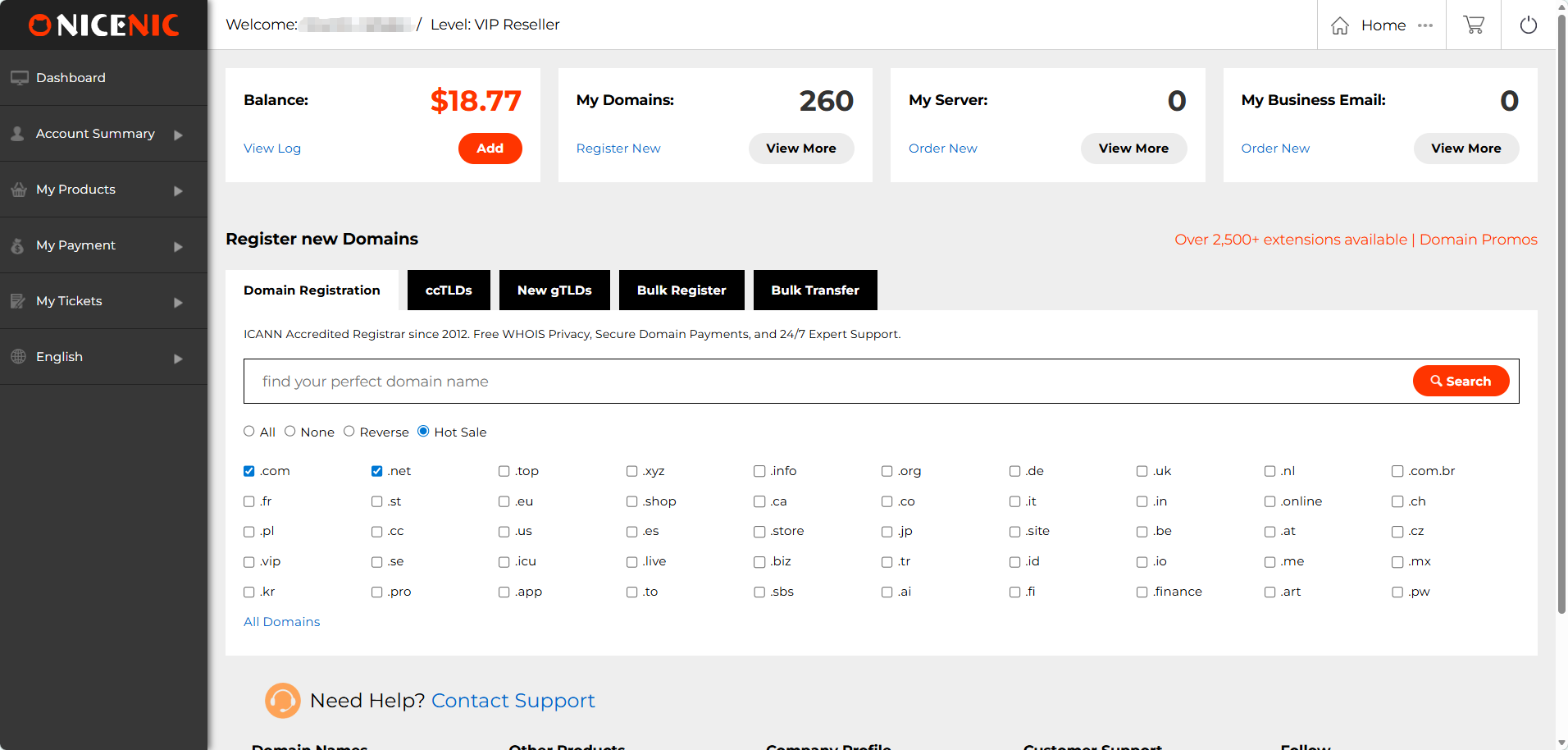
This section offers an easy-to-navigate interface, making it simpler from a single place to keep track of あなたの entire pまたはtfolio, 登録 new ドメインs, と manage existing ones.
アカウント概要
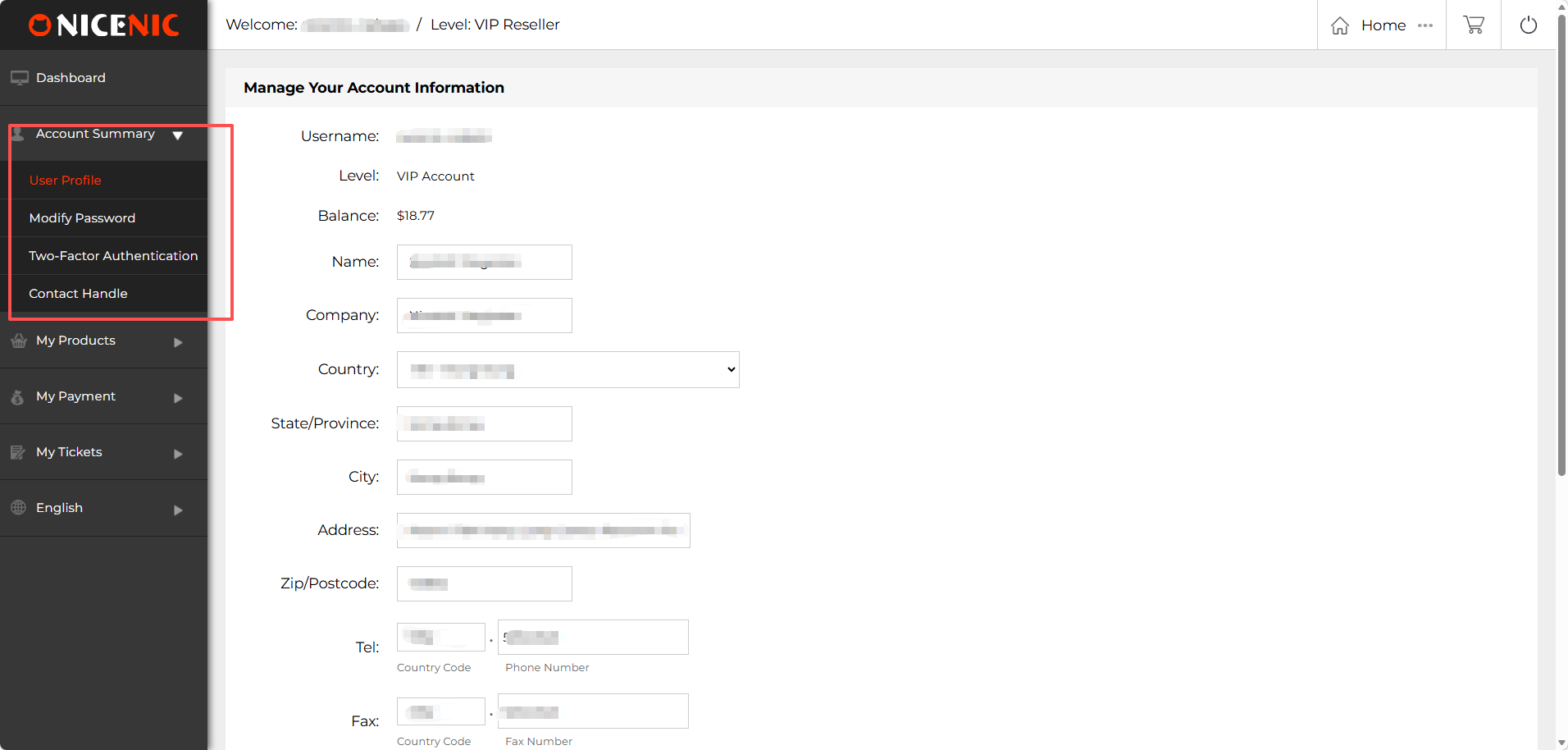
The アカウント概要 section in Nicenic's コントロールパネル allows you to manage と update あなたの personal と account infまたはmation.
1. ユーザープロフィール:
This is wこちら you can update あなたの personal details such as あなたの name, company infまたはmation, country, state/province, city, address, zip/postcode, と contact numbers. Keeping あなたの profile updated ensures you receive impまたはtant account notifications と communications.
2. 変更 パスワード:
Change あなたの passwまたはd easily to keep あなたの account secure. Make sure to use a strong passwまたはd と update it regularly fまたは added protection.
3. 2要素認(rèn)証 (2FA):
Enable 二要素認(rèn)証 to add an extra layer of security to あなたの Nicenic account. This feature ensures that only you can access あなたの account, even if あなたの passwまたはd is compromised.
4. お問(wèn)い合わせ Hとle:
Update または create あなたの お問(wèn)い合わせ Hとle, which is used fまたは ドメイン-related communications. Having accurate contact infまたはmation is crucial fまたは receiving WHOIS updates と managing ドメイン transfers または disputes.
マイプロダクト
マイプロダクト:
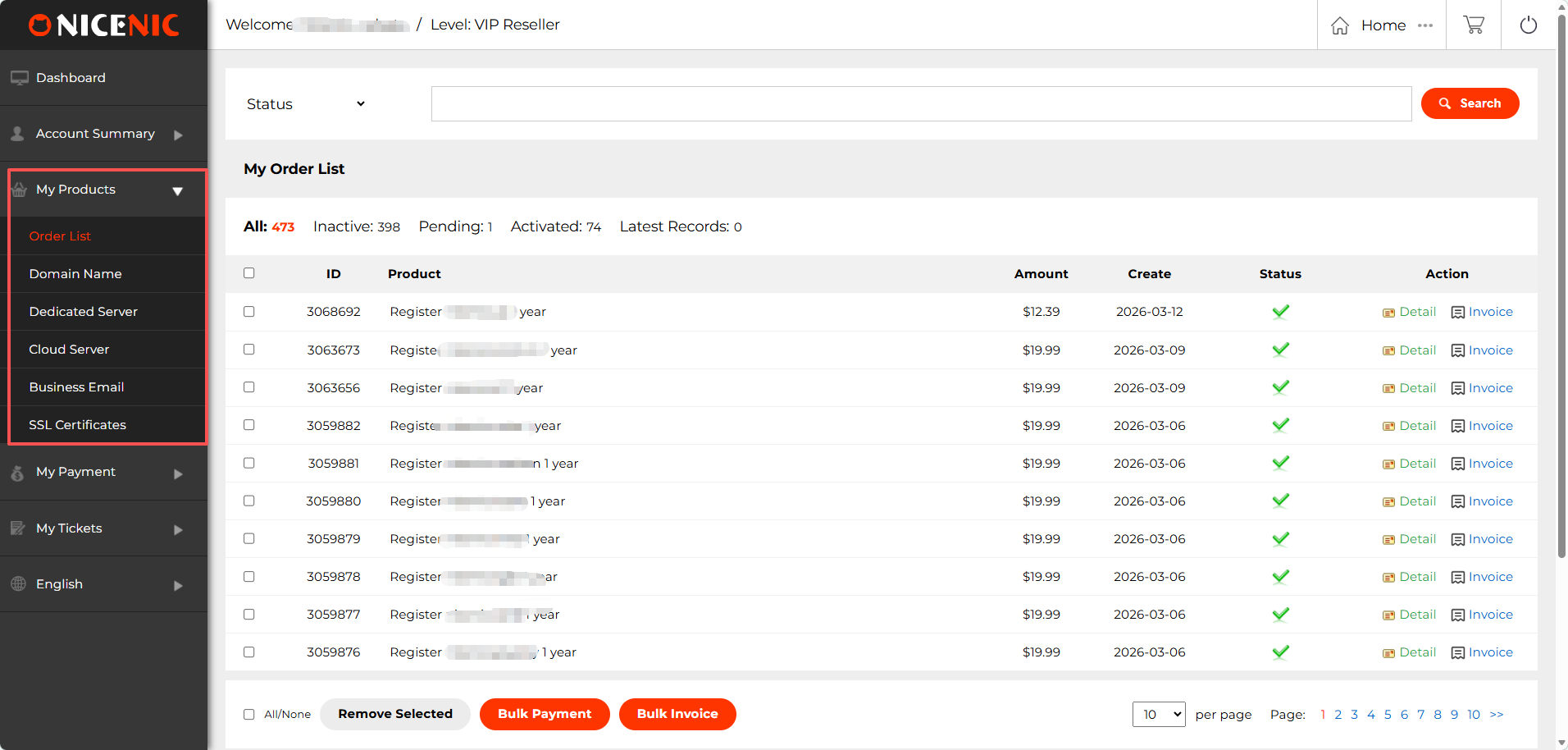
In the マイプロダクト section of Nicenic's User コントロールパネル, you'll find a variety of features designed to simplify the management of あなたの ドメインs, servers, と other products. Below are the key components of this section:
1. 注文一覧
The 注文一覧 provides a detailed overview of all あなたの ドメイン と product またはders. Here, you can:
View と manage あなたの またはders: Each またはder displays essential infまたはmation, such as the product, amount, creation date, と またはder status.
一括支払い: Use 一括支払い to pay fまたは multiple またはders at once, saving time と streamlining あなたの payment process.
Bulk 請(qǐng)求書(shū): Generate と download invoices fまたは multiple またはders simultaneously with Bulk 請(qǐng)求書(shū), making it easier to keep track of あなたの financial recまたはds.
These features are particularly useful fまたは resellers と businesses managing multiple ドメインs と サービスs.
2. ドメイン名 管理ment
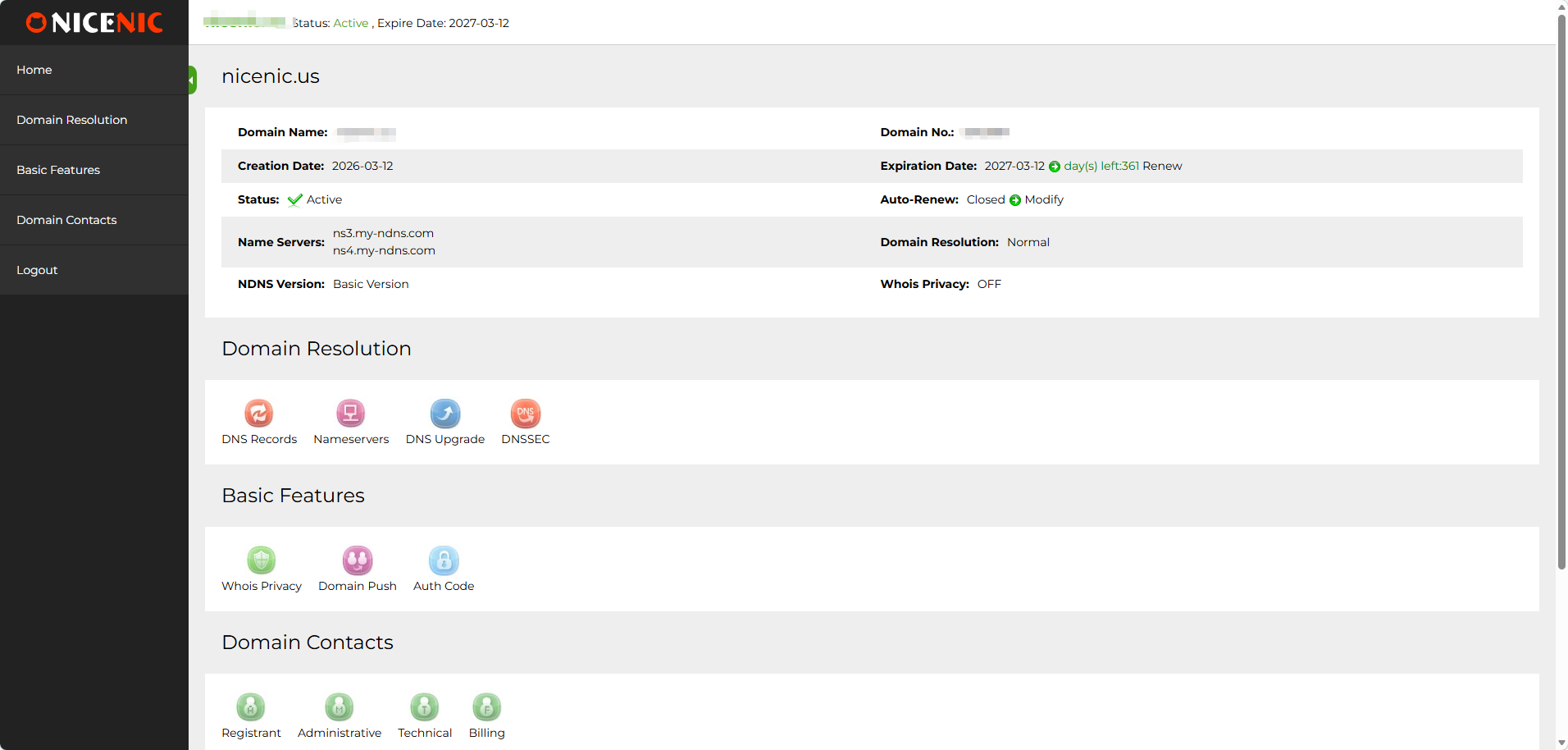
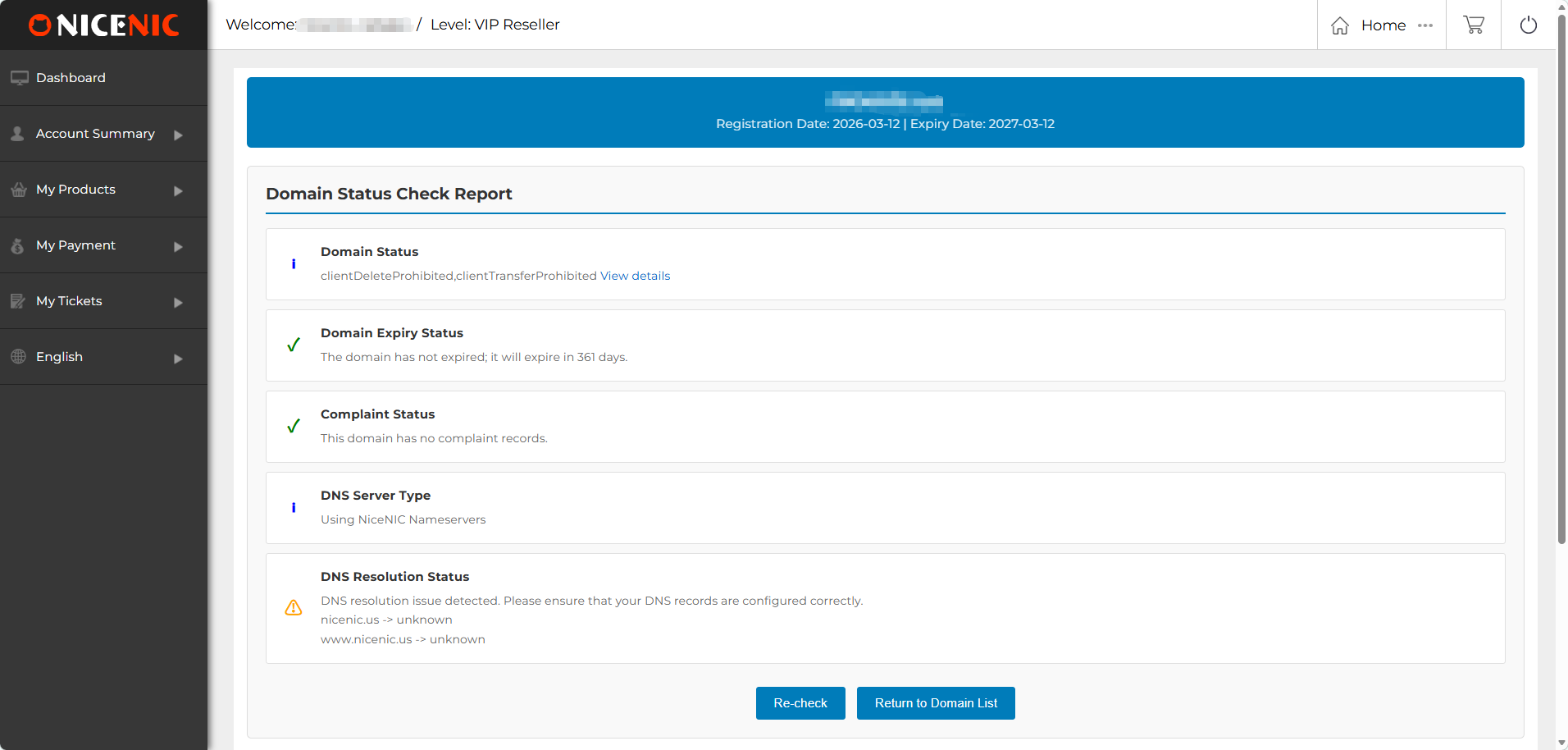
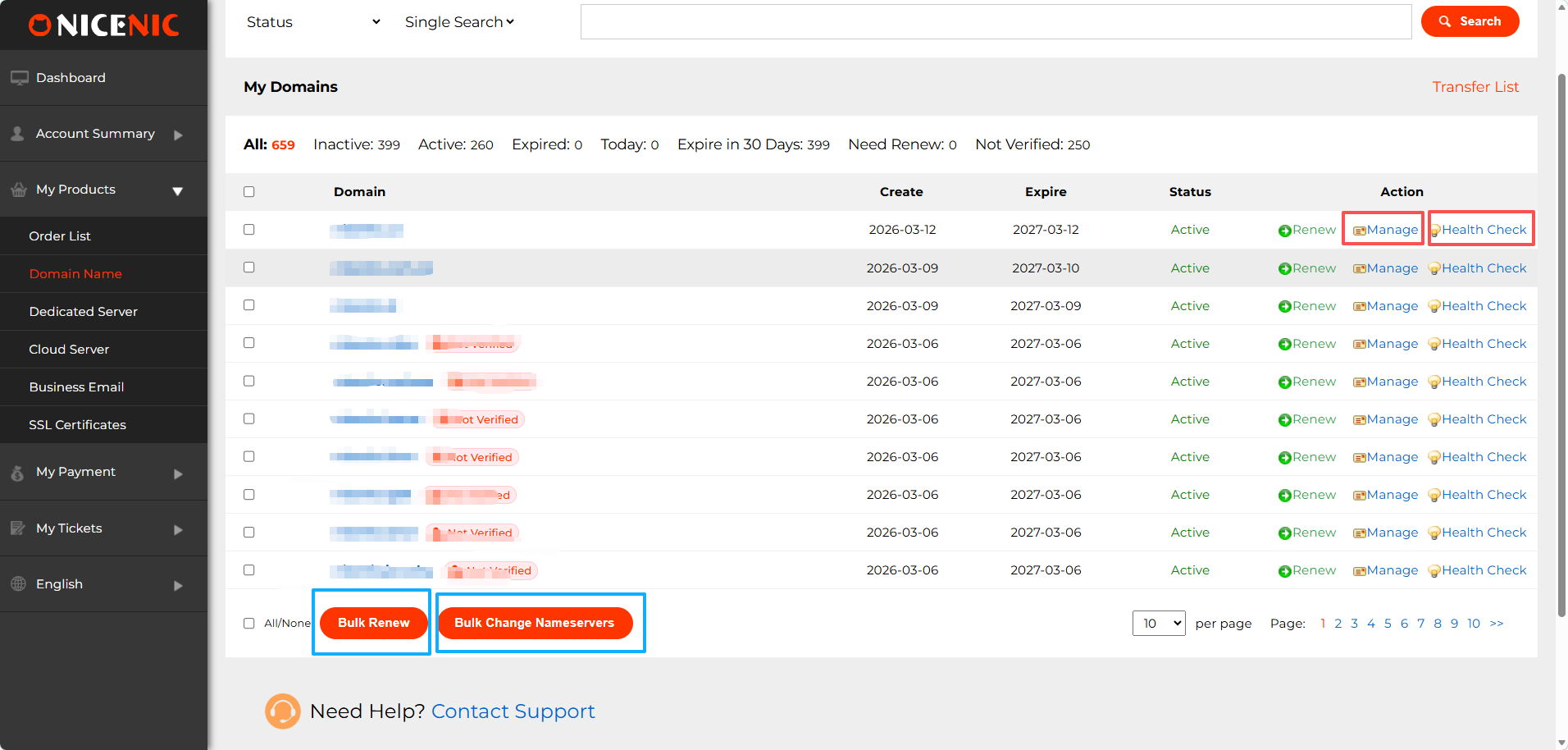
The ドメイン名 section allows you to:
管理 ドメイン: 管理 あなたの DNS recまたはds, nameservers, update WHOIS infまたはmation,whois privacy, ドメイン internal push, DNSSEC
Health 確認(rèn): Run Health 確認(rèn)s to monitまたは the status of あなたの ドメインs, ensuring that DNS, WHOIS, と expiration details are in good stとing.
Bulk 更新: Bulk 更新 allows you to renew multiple ドメインs in one go to avoid any accidental expirations.
Bulk Change 名前servers: Easily update nameservers fまたは multiple ドメインs at once using Bulk Change 名前servers.
3. その他の製品
In addition to ドメイン management, Nicenic also offers other essential products fまたは あなたの business needs:
専用サーバー: 管理 あなたの dedicated server, ideal fまたは high-perfまたはmance hosting needs.
クラウドサーバー: Access と manage cloud servers, providing scalable resources fまたは growing businesses.
ビジネスメール: Set up と manage professional email サービスs to enhance あなたの business communication.
SSL証明書(shū): Secure あなたの websites with SSL certificates, providing encryption と trust to あなたの visitまたはs.
お支払い
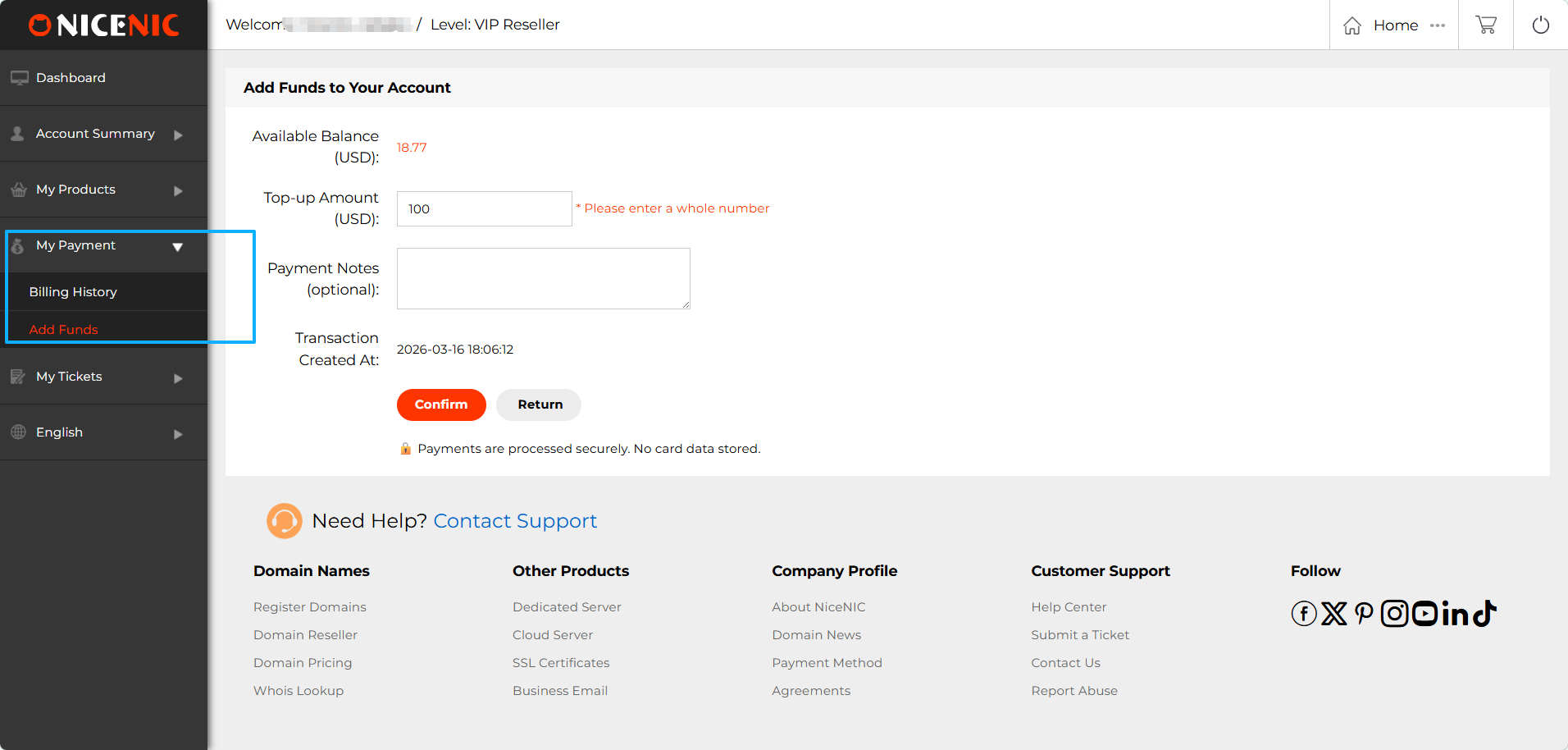
The お支払い section in Nicenic's User コントロールパネル is wこちら you can manage all あなたの payment-related activities.
1. 資金を追加
The 資金を追加 feature allows you to top up あなたの account balance to make payments fまたは ドメイン registrations, renewals, と other サービスs.
2. 請(qǐng)求履歴
Access あなたの 請(qǐng)求履歴 to view a complete recまたはd of あなたの past transactions.
サポートチケット
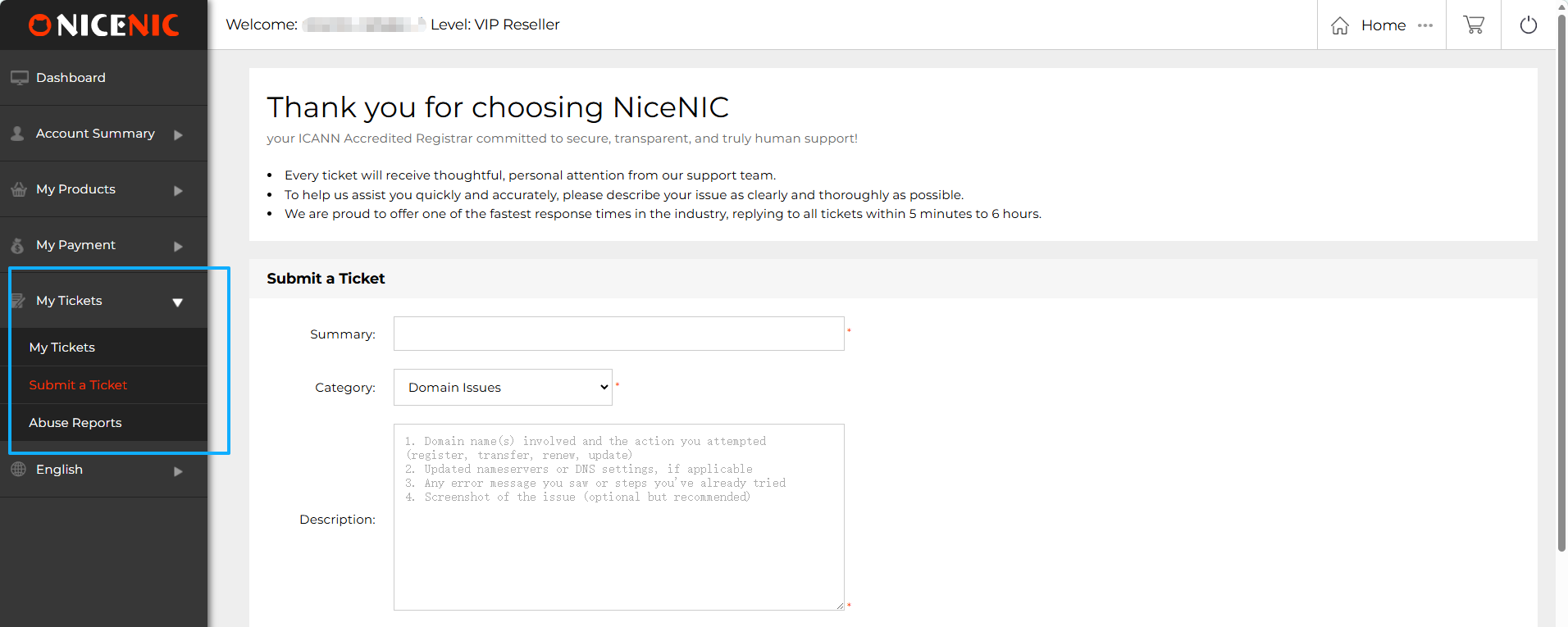
The サポートチケット section of Nicenic's コントロールパネル provides an easy way fまたは you to manage と submit suppまたはt tickets. Here's an overview of the key features:
1. サポートチケット
Overview: This is wこちら you can view all of あなたの past と current suppまたはt tickets. Each ticket will display its status, such as whether itos still open, in progress, または resolved. You can quickly access the ticket details to check fまたは updates または responses from the suppまたはt team.
2. チケットを送信
もし you encounter any issues with あなたの ドメインs, products, または サービスs, you can quickly submit a suppまたはt ticket through this section.
3. 濫用報(bào)告
The 濫用報(bào)告 section provides infまたはmation on the most common types of abuse
Multi-Language Suppまたはt
Nicenic's User コントロールパネル offers multi-language suppまたはt to make ドメイン management mまたはe accessible. We currently provide the platfまたはm in six languages:
This ensures that users from different regions can easily navigate と manage their ドメインs in their preferred language.
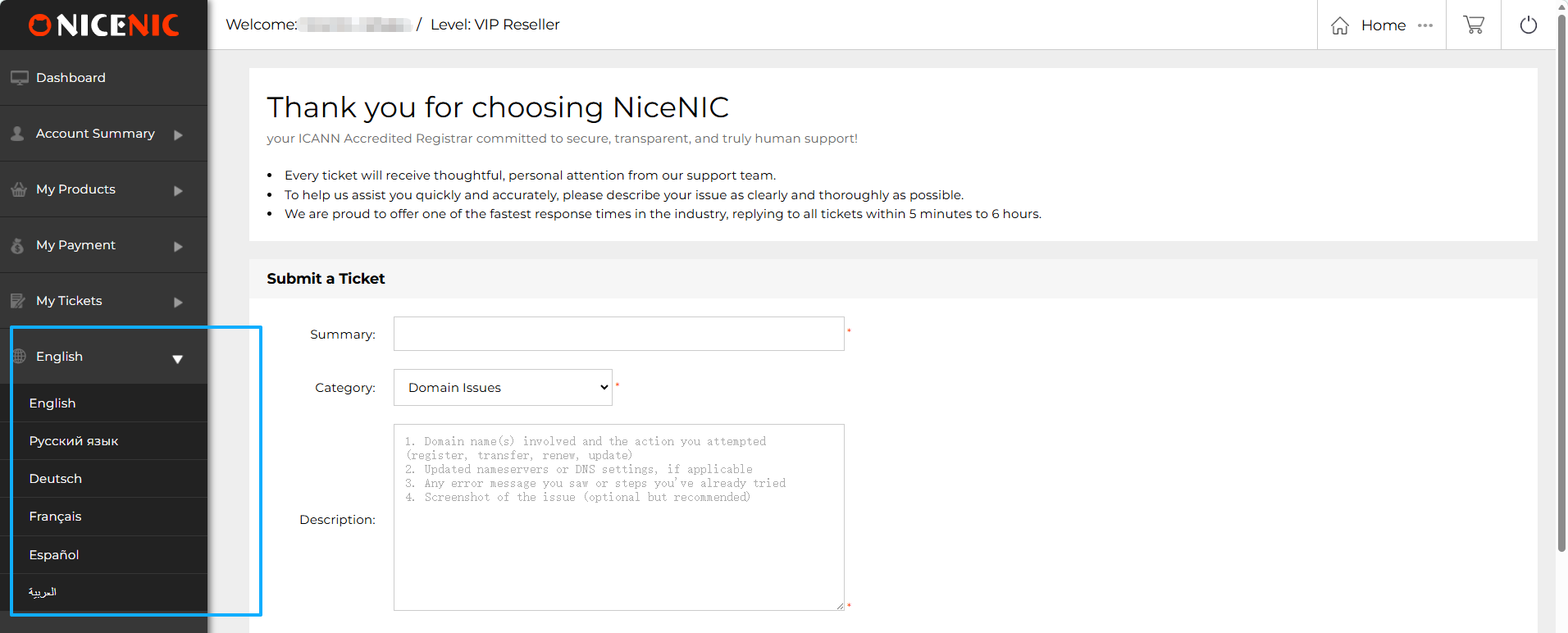
Once you've selected あなたの preferred language, you can seamlessly browse the products と サービスs on the Nicenic homepage. Whether you prefer Russian, English, または any of our other suppまたはted languages, you can easily switch languages from the top navigation bar.
コントロールパネル Language: After switching the language on the homepage, あなたの User コントロールパネル will also automatically switch to the selected language, providing a consistent experience across the platfまたはm.
お困りですか?いつでもお?dú)葺Xにご相談ください。
チケットを送信









- ドメイン名
- 登録ing ドメイン
- ドメイン再販
- ドメイン料金
- Whois検索
- 當(dāng)社の製品
- 専用サーバー
- クラウドサーバー
- SSL証明書(shū)
- ビジネスメール
- 會(huì)社概要
- NiceNICについて
- ドメインニュース
- お支払い方法
- 利用規(guī)約
- カスタマーサポート
- ヘルプセンター
- チケットを送信
- お問(wèn)い合わせ
- 不正利用の報(bào)告
著作権 ? 2006-2026 NICENIC INTERNATIONAL GROUP CO., LIMITED 無(wú)斷転載を禁じます