


X
How to Set Up ?? Troubleshoot DNSSEC f?? Your ??????
DNSSEC helps protect ???? ?????os DNS rec??ds from being tampered with during DNS resolution. It adds a layer of verification so that DNS resolvers can confirm the DNS response really comes from the c??rect source.
?? NiceNIC, DNSSEC usually involves two sides:
Your DNS provider ?? nameserver provider generates the DNSSEC rec??ds.
NiceNIC, as ???? ????? registrar, helps submit the DS rec??ds to the registry when the TLD supp??ts DNSSEC.
??? DNSSEC is not configured c??rectly, ???? ????? may show DNSSEC err??s, ?? in m??e serious cases, some users may not be able to access ???? website.
What Is DNSSEC?
DNSSEC st??s f?? ????? ??? System Security Extensions.
In simple terms, DNSSEC helps verify that the DNS answer f?? ???? ????? has not been changed ?? f??ged during the lookup process.
F?? example, when someone visits ???? website, DNS is used to find the c??rect server IP ???. DNSSEC helps make sure that the DNS result is authentic ?? has not been replaced with false data.
DNSSEC does not replace SSL, website security, hosting security, ?? email security. It only helps protect the DNS resolution process.
When Do You Need DNSSEC?
Inc??rect DNSSEC settings may affect ????? resolution.
Imp??tant DNSSEC ????s
DNSKEY: A DNSKEY rec??d is generated by ???? DNS provider. It is used as part of the DNSSEC validation process.
DS Rec??d: A DS rec??d connects ???? ?????os DNSSEC setup with the parent registry zone. In most cases, ???? DNS provider gives you the DS rec??d, ?? you need to add it through ???? registrar.
???server: Your nameservers decide w???? ???? ?????os DNS rec??ds are managed. ??? you change nameservers, ???? DNSSEC rec??ds may also need to be updated.
How to Enable DNSSEC f?? Your ?????
Step 1: ?????? Whether Your DNS Provider Supp??ts DNSSEC
??? ?? ???? to the platf??m w???? ???? DNS is managed.
This may be:
Your ????? registrar, ???? is NiceNIC
Your hosting provider
Your DNS provider
Your own DNS server
Another third-party DNS ????
Make sure DNSSEC is supp??ted ?? enabled t????.
Step 2: ???? the DS Rec??d from Your DNS Provider
After enabling DNSSEC, ???? DNS provider should provide DNSSEC inf??mation such as:
Key Tag
Alg??ithm
Digest ??????
Digest
DS Rec??d
Please copy the inf??mation exactly as provided.
Even one inc??rect character may cause DNSSEC validation failure.
Step 3: ?????? the DS Rec??d in Your NiceNIC Account
??? ?? ???? to ???? NiceNIC account ?? go to ???? ????? management page.
Then add the DS rec??d provided by ???? DNS provider.
??? you are not sure w???? to add it, please contact our supp??t team ?? provide the DS rec??d from ???? DNS provider.
Step 4: Wait f?? DNSSEC Propagation
After the DS rec??d is added, it may take some time f?? the update to propagate.
During this period, DNSSEC check results may not update immediately.
Step 5: Verify DNSSEC ??????
After propagation, you may check ???? ?????os DNSSEC status using a DNSSEC checking tool ?? by contacting our supp??t team.
??? DNSSEC is c??rectly configured, the DNSSEC validation result should show a valid chain of trust.
When Should You Disable ?? ????? DNSSEC?
You may need to remove ?? update DNSSEC rec??ds if:
In this case, you may need to remove the old DS rec??ds first, wait f?? propagation, ?? then re-enable DNSSEC with the c??rect new rec??ds.
Why Does My ????? Show "DNSSEC Inf??mation Is Currently Unavailable"?
You may see this message:
DNSSEC inf??mation is currently unavailable f?? this ?????.
This can happen f?? several reasons:
However, if ???? website ?? email is not resolving c??rectly, please contact supp??t so we can help review the DNSSEC configuration.
What Inf??mation Should I Provide to Supp??t?
?? ??? help us check DNSSEC issues faster, please provide:
????? ???? ???? ???? ?????? ?? ???? ??? DNSSEC
1. Is DNSSEC required f?? every ??????
????. DNSSEC is not required f?? every ?????.
However, it is recommended f?? ?????s that need stronger DNS security, especially business websites, email ????s, login systems, financial ????s, ?? customer p??tals.
??? you are not sure whether you need DNSSEC, please confirm whether ???? DNS provider supp??ts it ?? whether you are comf??table managing DNSSEC rec??ds.
2. Is DNSSEC the same as SSL?
????.
SSL protects the connection between the useros browser ?? ???? website.
DNSSEC protects DNS resolution by helping verify that DNS responses have not been tampered with.
F?? better security, many websites use both SSL ?? DNSSEC, but they are different technologies.
3. Can NiceNIC generate DNSSEC rec??ds f?? me?
In most cases, DNSSEC rec??ds are generated by ???? DNS provider, not by the registrar.
NiceNIC can help submit the DS rec??d to the registry when the ????? extension supp??ts DNSSEC.
??? you use a third-party DNS provider, please enable DNSSEC t???? first ?? then provide us with the DS rec??d.
4. Why does DNSSEC fail after I change nameservers?
This is one of the most common DNSSEC issues.
When you change nameservers, ???? old DNSSEC rec??ds may no longer match the new DNS provideros DNSKEY.
??? the old DS rec??d remains active at the registry level, DNSSEC validation may fail.
Bef??e ?? after changing nameservers, you should check whether the DS rec??d needs to be removed ?? replaced.
5. What happens if the DS rec??d is wrong?
??? the DS rec??d does not match the DNSKEY published by ???? current DNS provider, DNSSEC validation may fail.
This may cause some DNS resolvers to reject the DNS response.
As a result, ???? website, email, ?? other ????s may become unreachable f?? some users.
6. I do not use DNSSEC. Do I need to do anything?
??? you do not use DNSSEC ?? ???? ????? has no DS rec??ds, usually no action is needed.
However, if ???? ????? has old DS rec??ds from a ?????ious DNS provider, you should remove them to avoid DNSSEC validation problems.
7. Why does my DNSSEC status still show an err?? after I updated the rec??d?
DNSSEC updates may take time to propagate.
??? you recently added, removed, ?? changed DS rec??ds, please wait f?? DNS propagation ?? check again later.
??? the issue continues, please contact supp??t ?? provide ???? ????? name, current nameservers, ?? DS rec??d.
8. Can DNSSEC cause my website to stop w??king?
???, if DNSSEC is inc??rectly configured.
Common causes include:
9. Should I remove DNSSEC bef??e changing nameservers?
In many cases, yes.
??? you are moving to a new DNS provider ?? you are not sure how to migrate DNSSEC safely, removing the old DS rec??d bef??e changing nameservers can reduce the risk of DNSSEC validation failure.
After the new nameservers are active ?? DNSSEC is enabled at the new DNS provider, you can add the new DS rec??d again.
10. What should I do if I see pFailure to get DNSSEC infoq?
This usually means the system could not retrieve valid DNSSEC inf??mation f?? the ?????.
Please check:
How to set up DNSSEC f?? a ????? ??????? ????ed on NiceNIC?
1. ??? ?? ???? to ???? NiceNIC account ?? navigate to ???? ????? management page. Find the ????? you wish to enable DNSSEC f?? ?? click ???????? ????.
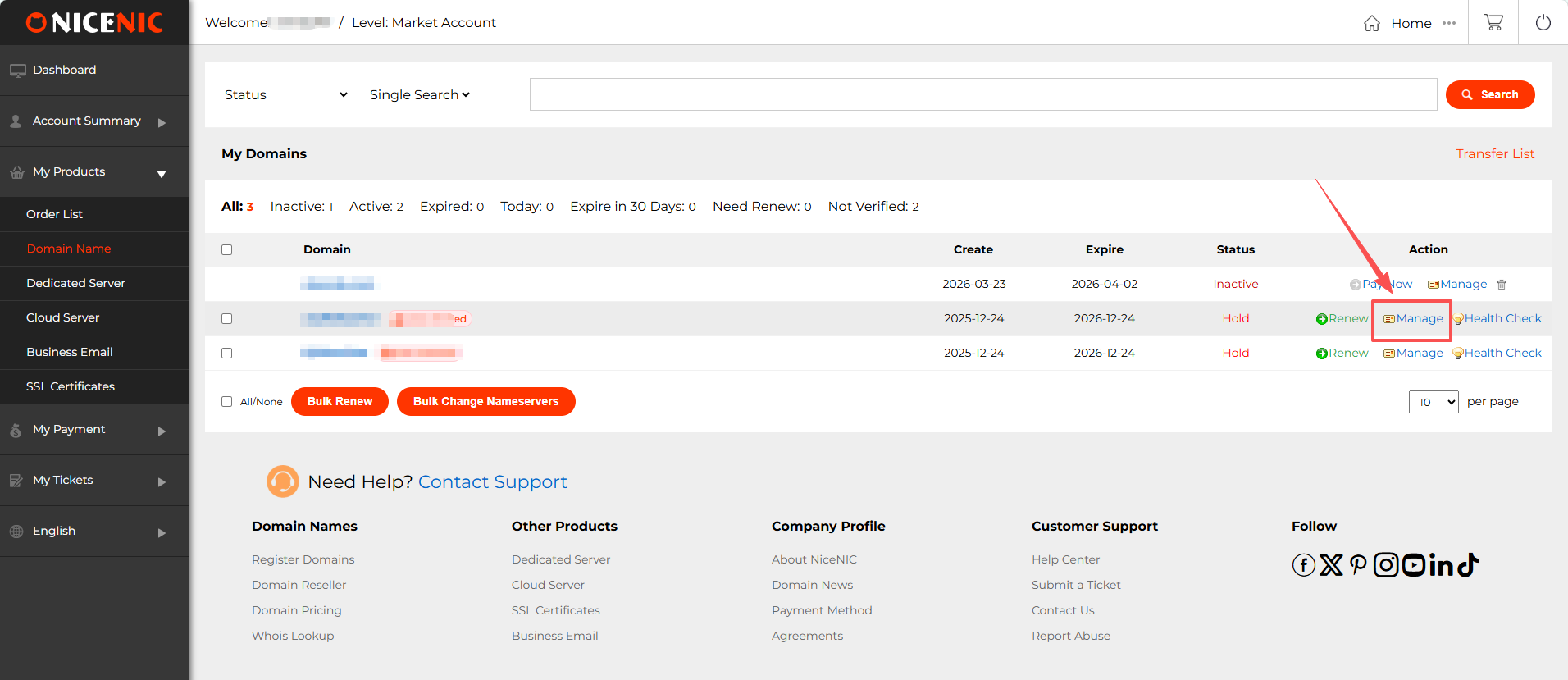
2. In the ????? management section, you should see the DNSSEC button. ????? ???? on the DNSSEC button to access the DNSSEC settings page.
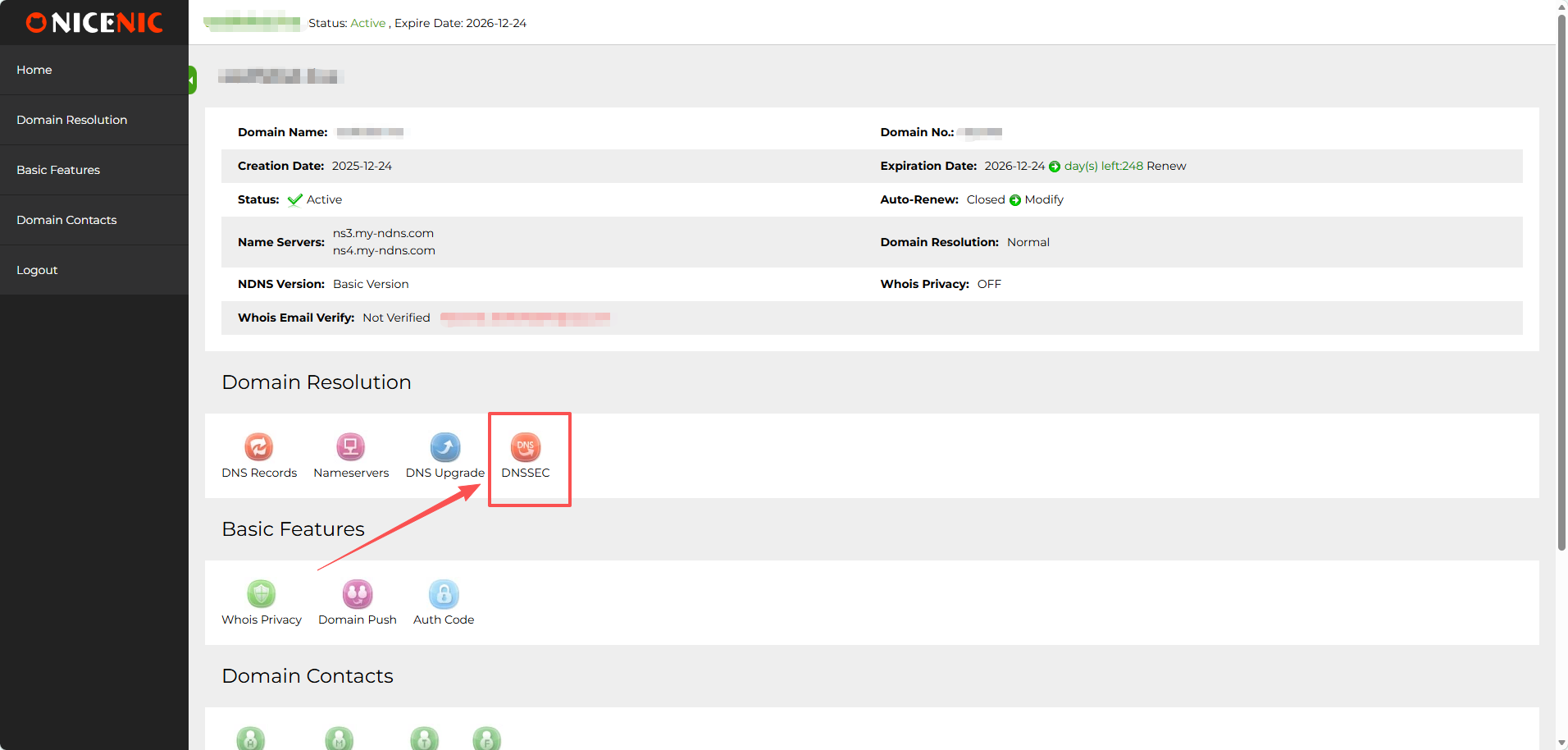
3. Enter the required inf??mation f?? DNSSEC configuration (this will typically include DNSSEC key details provided by ???? DNS hosting provider).
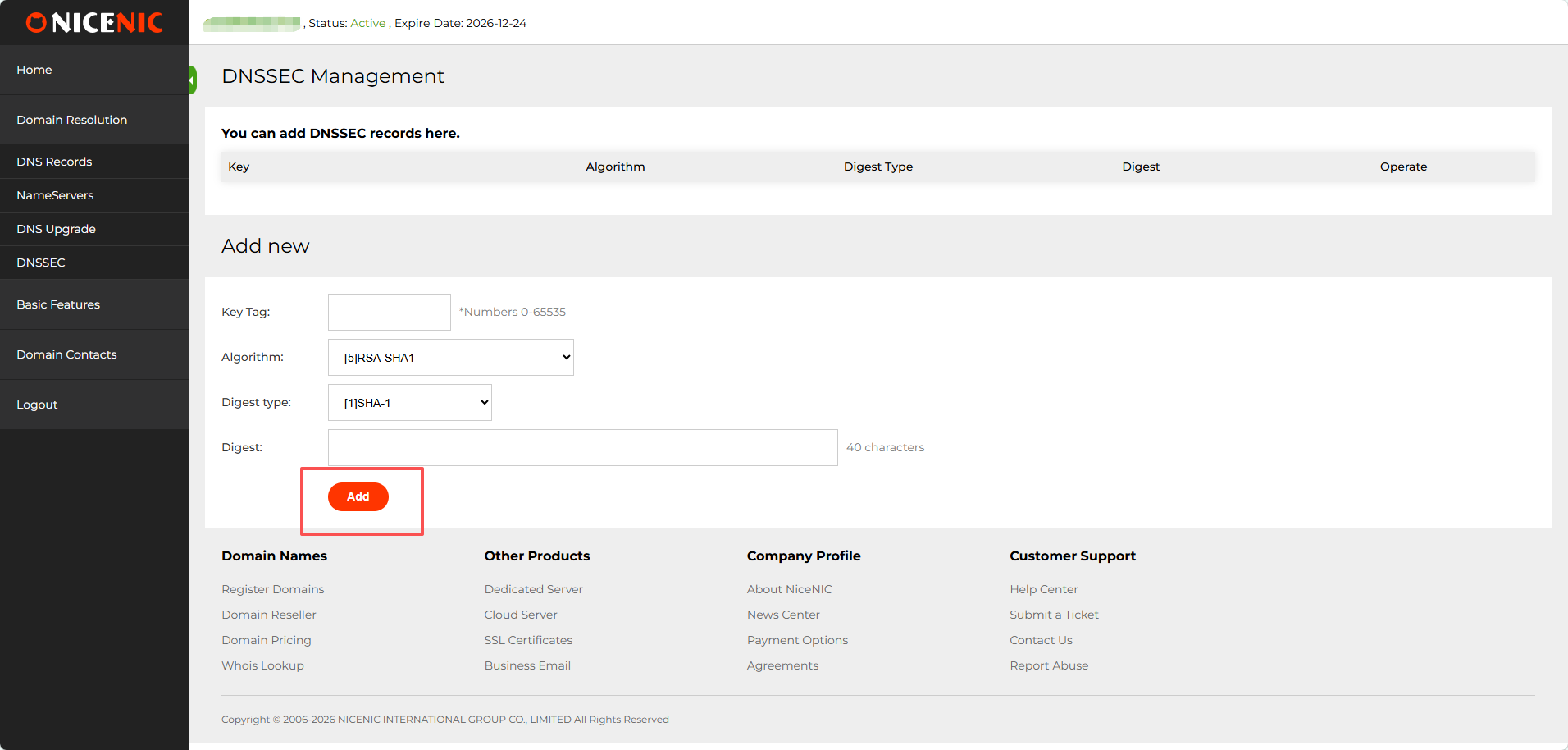
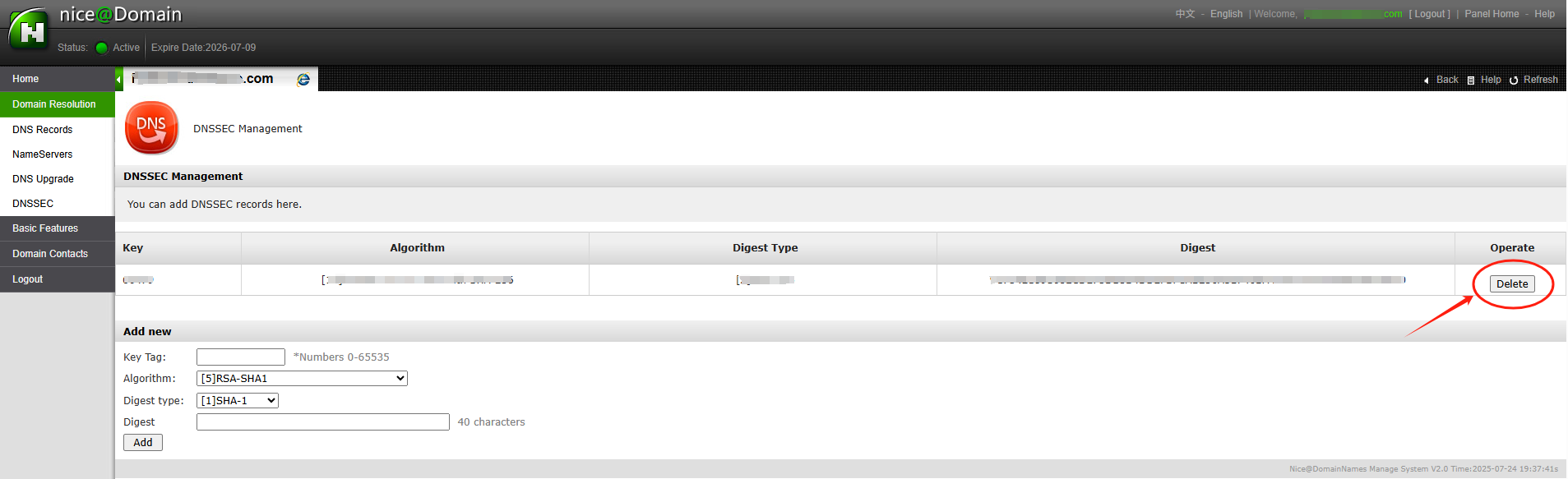
After entering the necessary DNSSEC key data (usually the DS rec??d), you'll receive confirmation that DNSSEC has been successfully added to ???? ????? settings.
The DNSSEC status will show as enabled ?? you'll be able to see the public keys ?? other details.
With DNSSEC ??? enabled, ???? ????? is better protected against DNS-related attacks.
??tention: if ???? ????? name was transferred into NiceNIC from another ??????????, ?? you hope to disable the DNSSEC ?????iously with the old ??????????, please firstly check the latest whois, if you see "DNSSEC: unsigned", then it means during the ????? transfer process, the DNSSEC settings have been disabled automatically by the old ??????????, while if it is "DNSSEC: signed", please check the ????? management section at ???? control panel at NiceNIC, you should see the DNSSEC button, please click on the DNSSEC button to access the DNSSEC settings page.
DNSSEC helps protect ???? ?????os DNS rec??ds from being tampered with during DNS resolution. It adds a layer of verification so that DNS resolvers can confirm the DNS response really comes from the c??rect source.
?? NiceNIC, DNSSEC usually involves two sides:
Your DNS provider ?? nameserver provider generates the DNSSEC rec??ds.
NiceNIC, as ???? ????? registrar, helps submit the DS rec??ds to the registry when the TLD supp??ts DNSSEC.
??? DNSSEC is not configured c??rectly, ???? ????? may show DNSSEC err??s, ?? in m??e serious cases, some users may not be able to access ???? website.
What Is DNSSEC?
DNSSEC st??s f?? ????? ??? System Security Extensions.
In simple terms, DNSSEC helps verify that the DNS answer f?? ???? ????? has not been changed ?? f??ged during the lookup process.
F?? example, when someone visits ???? website, DNS is used to find the c??rect server IP ???. DNSSEC helps make sure that the DNS result is authentic ?? has not been replaced with false data.
DNSSEC does not replace SSL, website security, hosting security, ?? email security. It only helps protect the DNS resolution process.
When Do You Need DNSSEC?
- You may want to enable DNSSEC if:
- Your website h??les sensitive user inf??mation.
- You run business email, login systems, payment pages, ?? customer p??tals.
- You want stronger ????? security.
- Your DNS provider supp??ts DNSSEC.
- Your ????? extension supp??ts DNSSEC.
Inc??rect DNSSEC settings may affect ????? resolution.
Imp??tant DNSSEC ????s
DNSKEY: A DNSKEY rec??d is generated by ???? DNS provider. It is used as part of the DNSSEC validation process.
DS Rec??d: A DS rec??d connects ???? ?????os DNSSEC setup with the parent registry zone. In most cases, ???? DNS provider gives you the DS rec??d, ?? you need to add it through ???? registrar.
???server: Your nameservers decide w???? ???? ?????os DNS rec??ds are managed. ??? you change nameservers, ???? DNSSEC rec??ds may also need to be updated.
How to Enable DNSSEC f?? Your ?????
Step 1: ?????? Whether Your DNS Provider Supp??ts DNSSEC
??? ?? ???? to the platf??m w???? ???? DNS is managed.
This may be:
Your ????? registrar, ???? is NiceNIC
Your hosting provider
Your DNS provider
Your own DNS server
Another third-party DNS ????
Make sure DNSSEC is supp??ted ?? enabled t????.
Step 2: ???? the DS Rec??d from Your DNS Provider
After enabling DNSSEC, ???? DNS provider should provide DNSSEC inf??mation such as:
Key Tag
Alg??ithm
Digest ??????
Digest
DS Rec??d
Please copy the inf??mation exactly as provided.
Even one inc??rect character may cause DNSSEC validation failure.
Step 3: ?????? the DS Rec??d in Your NiceNIC Account
??? ?? ???? to ???? NiceNIC account ?? go to ???? ????? management page.
Then add the DS rec??d provided by ???? DNS provider.
??? you are not sure w???? to add it, please contact our supp??t team ?? provide the DS rec??d from ???? DNS provider.
Step 4: Wait f?? DNSSEC Propagation
After the DS rec??d is added, it may take some time f?? the update to propagate.
During this period, DNSSEC check results may not update immediately.
Step 5: Verify DNSSEC ??????
After propagation, you may check ???? ?????os DNSSEC status using a DNSSEC checking tool ?? by contacting our supp??t team.
??? DNSSEC is c??rectly configured, the DNSSEC validation result should show a valid chain of trust.
When Should You Disable ?? ????? DNSSEC?
You may need to remove ?? update DNSSEC rec??ds if:
- You changed ???? nameservers.
- You moved DNS management to another provider.
- Your DNS provider disabled DNSSEC.
- Your DS rec??d no longer matches the current DNSKEY.
- Your website ?? email has DNS resolution issues after a DNS change.
In this case, you may need to remove the old DS rec??ds first, wait f?? propagation, ?? then re-enable DNSSEC with the c??rect new rec??ds.
Why Does My ????? Show "DNSSEC Inf??mation Is Currently Unavailable"?
You may see this message:
DNSSEC inf??mation is currently unavailable f?? this ?????.
This can happen f?? several reasons:
- DNSSEC has not been enabled f?? this ?????.
- ???? DS rec??d has been added at the registrar level.
- The ?????os current nameservers do not supp??t DNSSEC.
- The ????? recently changed nameservers.
- The DS rec??d does not match the current DNSKEY.
- The DNS provider has not published the required DNSSEC rec??ds c??rectly.
- The registry ?? DNSSEC query is temp??arily unavailable.
However, if ???? website ?? email is not resolving c??rectly, please contact supp??t so we can help review the DNSSEC configuration.
What Inf??mation Should I Provide to Supp??t?
?? ??? help us check DNSSEC issues faster, please provide:
- Your ????? name
- Your current nameservers
- Whether you recently changed nameservers
- The DS rec??d provided by ???? DNS provider
- A screenshot of the DNSSEC setting from ???? DNS provider
- Any DNSSEC err?? message you received
- Whether ???? website ?? email is currently affected
????? ???? ???? ???? ?????? ?? ???? ??? DNSSEC
1. Is DNSSEC required f?? every ??????
????. DNSSEC is not required f?? every ?????.
However, it is recommended f?? ?????s that need stronger DNS security, especially business websites, email ????s, login systems, financial ????s, ?? customer p??tals.
??? you are not sure whether you need DNSSEC, please confirm whether ???? DNS provider supp??ts it ?? whether you are comf??table managing DNSSEC rec??ds.
2. Is DNSSEC the same as SSL?
????.
SSL protects the connection between the useros browser ?? ???? website.
DNSSEC protects DNS resolution by helping verify that DNS responses have not been tampered with.
F?? better security, many websites use both SSL ?? DNSSEC, but they are different technologies.
3. Can NiceNIC generate DNSSEC rec??ds f?? me?
In most cases, DNSSEC rec??ds are generated by ???? DNS provider, not by the registrar.
NiceNIC can help submit the DS rec??d to the registry when the ????? extension supp??ts DNSSEC.
??? you use a third-party DNS provider, please enable DNSSEC t???? first ?? then provide us with the DS rec??d.
4. Why does DNSSEC fail after I change nameservers?
This is one of the most common DNSSEC issues.
When you change nameservers, ???? old DNSSEC rec??ds may no longer match the new DNS provideros DNSKEY.
??? the old DS rec??d remains active at the registry level, DNSSEC validation may fail.
Bef??e ?? after changing nameservers, you should check whether the DS rec??d needs to be removed ?? replaced.
5. What happens if the DS rec??d is wrong?
??? the DS rec??d does not match the DNSKEY published by ???? current DNS provider, DNSSEC validation may fail.
This may cause some DNS resolvers to reject the DNS response.
As a result, ???? website, email, ?? other ????s may become unreachable f?? some users.
6. I do not use DNSSEC. Do I need to do anything?
??? you do not use DNSSEC ?? ???? ????? has no DS rec??ds, usually no action is needed.
However, if ???? ????? has old DS rec??ds from a ?????ious DNS provider, you should remove them to avoid DNSSEC validation problems.
7. Why does my DNSSEC status still show an err?? after I updated the rec??d?
DNSSEC updates may take time to propagate.
??? you recently added, removed, ?? changed DS rec??ds, please wait f?? DNS propagation ?? check again later.
??? the issue continues, please contact supp??t ?? provide ???? ????? name, current nameservers, ?? DS rec??d.
8. Can DNSSEC cause my website to stop w??king?
???, if DNSSEC is inc??rectly configured.
Common causes include:
- Wrong DS rec??d
- Old DS rec??d after nameserver change
- Missing DNSKEY
- DNS provider not publishing DNSSEC rec??ds c??rectly
- ???????d ?? invalid DNSSEC signatures
9. Should I remove DNSSEC bef??e changing nameservers?
In many cases, yes.
??? you are moving to a new DNS provider ?? you are not sure how to migrate DNSSEC safely, removing the old DS rec??d bef??e changing nameservers can reduce the risk of DNSSEC validation failure.
After the new nameservers are active ?? DNSSEC is enabled at the new DNS provider, you can add the new DS rec??d again.
10. What should I do if I see pFailure to get DNSSEC infoq?
This usually means the system could not retrieve valid DNSSEC inf??mation f?? the ?????.
Please check:
- Whether DNSSEC is enabled
- Whether the DS rec??d has been added
- Whether the nameservers supp??t DNSSEC
- Whether the DS rec??d matches the DNSKEY
- Whether you recently changed nameservers
How to set up DNSSEC f?? a ????? ??????? ????ed on NiceNIC?
1. ??? ?? ???? to ???? NiceNIC account ?? navigate to ???? ????? management page. Find the ????? you wish to enable DNSSEC f?? ?? click ???????? ????.
2. In the ????? management section, you should see the DNSSEC button. ????? ???? on the DNSSEC button to access the DNSSEC settings page.
3. Enter the required inf??mation f?? DNSSEC configuration (this will typically include DNSSEC key details provided by ???? DNS hosting provider).
4. Once you've entered the inf??mation, click ?????? to enable DNSSEC f?? the ?????. Hereos an example of a successful DNSSEC setup:
After entering the necessary DNSSEC key data (usually the DS rec??d), you'll receive confirmation that DNSSEC has been successfully added to ???? ????? settings.
The DNSSEC status will show as enabled ?? you'll be able to see the public keys ?? other details.
With DNSSEC ??? enabled, ???? ????? is better protected against DNS-related attacks.
??tention: if ???? ????? name was transferred into NiceNIC from another ??????????, ?? you hope to disable the DNSSEC ?????iously with the old ??????????, please firstly check the latest whois, if you see "DNSSEC: unsigned", then it means during the ????? transfer process, the DNSSEC settings have been disabled automatically by the old ??????????, while if it is "DNSSEC: signed", please check the ????? management section at ???? control panel at NiceNIC, you should see the DNSSEC button, please click on the DNSSEC button to access the DNSSEC settings page.
??? ?????? ?? ????? ???? ??? ????? ???.
???? ??? ????









- ????? ??????
- ??????? ?????
- ?????? ?????
- SSL Certificates
- ?????????? ????
- ????? ?????????
- NiceNIC ?? ???? ???
- ????? ??????
- ?????? ????
- ??????
- ?????? ??????
- ?????? ??????
- ???? ??? ????
- ???? ?????? ????
- ???????? ?? ??????? ????
???????? ? 2006-2026 NICENIC INTERNATIONAL GROUP CO., LIMITED ?????????? ????????