



Domain registration is a crucial first step in establishing your online presence. Whether you’re starting a personal blog, a business website, or anything in between, understanding how to register a domain name correctly is key to a smooth online journey. As an ICANN-accredited registrar, Nicenic is here to guide you through the entire domain registration process, ensuring that it’s easy to follow, secure, and efficient. Let’s break down the key steps you need to know.
What is a Domain?
Before we dive into the registration process, it’s important to understand what a domain is. A domain name is your website’s online address. It’s the unique identifier that users type into their browser to find your site. Think of it like the address of your home – without it, no one would know how to reach you!
Domains are made up of two main parts: the Second-Level Domain (SLD) and the Top-Level Domain (TLD). For example, in www.unionroom.cn:
-
"nicenic" is the Second-Level Domain.
-
".com" is the Top-Level Domain.
Choosing the right domain is critical for your brand’s visibility and online success, but how do you go about registering one?
Preparing to Register Your Domain
Choosing Your Domain Name
Choosing a domain name is the first and most crucial step in the registration process. Your domain name should:
-
Reflect Your Brand: It should be easy to remember, spell, and directly relate to your brand or business.
-
Be Short and Simple: A shorter domain is easier to type and remember.
-
Avoid Common Pitfalls: Make sure it doesn’t contain any registered trademarks that might lead to legal issues down the road.
-
Consider SEO: If possible, include keywords relevant to your business or industry. This can improve your search engine visibility.
Checking Domain Availability
Before you can register your domain, you need to check if it’s available. A quick search on Nicenic’s platform will tell you if your desired domain is already taken. If it is, don’t worry – we offer suggestions for available domains with similar names or different TLDs.
When selecting a domain, always consider future-proofing. This means choosing a name that works for your business as it grows.
Choosing the Right TLD (Top-Level Domain)
Choosing the right TLD for your domain is crucial. Here are some points to consider:
-
.com is the most popular and recognized globally, making it an excellent choice for businesses aiming for a broad audience.
-
New gTLDs like .tech, .shop, and .store are ideal if you want a more niche domain name that reflects your business type.
-
ccTLDs (Country Code TLDs) like .uk, .us, and .de are perfect for businesses targeting specific countries or regions. They help build trust with local customers.
Step 1: Visit a Domain Registrar’s Website
Once you’ve decided on your domain name and checked its availability, it’s time to register it. The first step is to visit a domain registrar’s website, such as Nicenic, and start the registration process. As an ICANN-accredited registrar, we provide a secure and easy-to-use platform to register and manage your domain names.
Step 2: Search for Your Domain
On the registrar’s website, use the domain search tool to look for the name you’ve chosen. If the name is available, you’ll be able to proceed with the registration. If not, we’ll suggest similar available names or alternative TLDs. This is where a new gTLD can come in handy if the classic .com is already taken.
Step 3: Provide/Contact Your Information
Once you’ve selected your domain name, the next step is to provide your contact information. This typically includes:
-
Registrant’s Name: The individual or entity that owns the domain.
-
Email Address: For communication regarding your domain.
-
Phone Number & Address: These details are often included in the WHOIS database unless you opt for privacy protection.
Step 4: Domain Protection
It’s highly recommended to enable domain privacy protection. This feature hides your personal information from the public WHOIS database, protecting you from spam, fraud, and unwanted solicitations. Nicenic also offers domain locking, which prevents unauthorized transfers, adding an extra layer of security to your domain.
Step 5: Payment and Confirmation
After providing your information and reviewing the terms of service, you’ll need to make a payment to complete the registration process. Once the payment is processed, you’ll receive a confirmation email with your domain details and an invoice for your records.
After Registration: Managing Your Domain
Step 1: Accessing Your Domain Management Panel
Once your domain is registered, you can access your domain management panel through your registrar’s website. Here, you’ll have full control over your domain settings, including DNS configurations, email forwarding, and more.
Step 2: Setting Up DNS Records
Your domain name is just the address of your website; now, you need to tell the internet where your website is hosted. This is done by setting up DNS (Domain Name System) records. You can configure DNS settings such as:
-
A Records (pointing your domain to your hosting server)
-
MX Records (for email services)
-
CNAME Records (for subdomains or redirects)
Most registrars, including Nicenic, offer easy-to-follow guides and tools to help you set up your DNS records.
Step 3: Renewing Your Domain
Your domain registration isn’t permanent unless you renew it. You’ll need to renew your domain before the registration period ends, typically every 1 or 2 years. Nicenic makes this easy by offering auto-renewal options, ensuring that your domain stays active without interruption. Make sure you keep your payment information up to date to avoid accidental expiration.
Common Questions and Answers
1. How do I choose between gTLDs and ccTLDs?
If you are targeting a global audience, .com or other new gTLDs are ideal. If your business is local or specific to a country, then a ccTLD (like .uk or .de) is a better choice to build trust with regional customers.
2. Why do I need domain privacy protection?
Domain privacy protection prevents your personal information from being publicly visible in the WHOIS database, protecting you from spam and potential threats.
3. What if the domain I want is already taken?
If the domain you want is taken, you can try a different TLD, like .shop or .store, or modify the name slightly. Our platform provides helpful suggestions to find the best available options.
4. How do I renew my domain?
You can easily renew your domain from your Nicenic control panel. Setting up auto-renewal ensures that your domain doesn’t expire unexpectedly.
Conclusion
The domain registration process is simple but crucial for building your online presence. By following the steps outlined in this guide, you can easily choose and register the right domain for your business or personal site. Whether you’re opting for a gTLD or ccTLD, make sure to consider your target audience, brand, and SEO needs to ensure the best choice for your online identity.
At Nicenic, we provide secure, easy-to-manage domain registration services with excellent customer support. As an ICANN-accredited registrar, we are committed to helping you navigate the domain registration process smoothly.
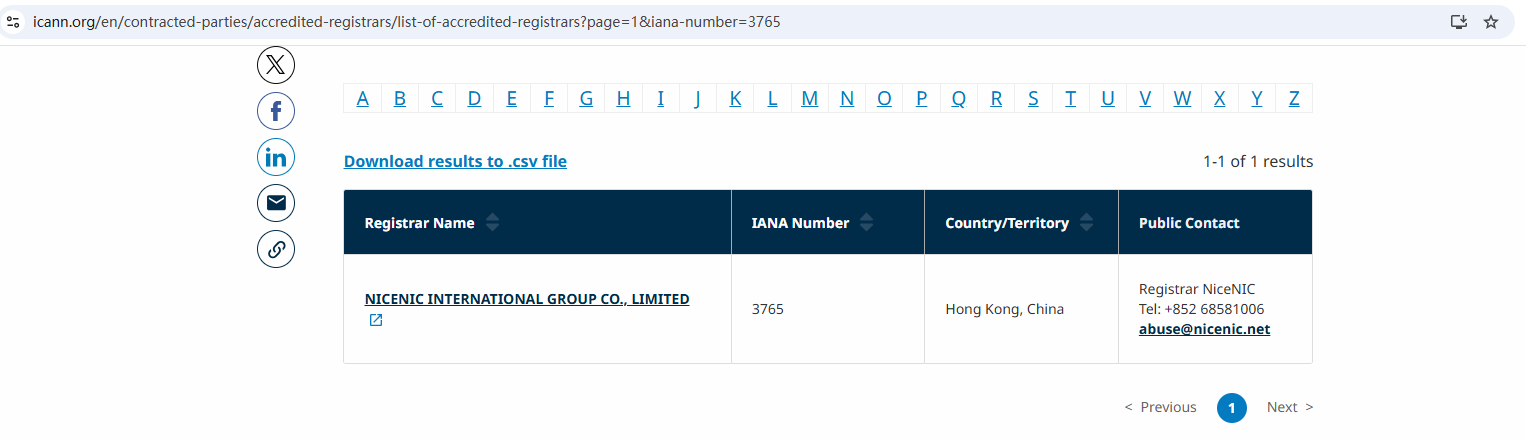
Nicenic stands as that trusted partner for brands, developers, entrepreneurs, and businesses worldwide.
Next News: Guide to Choosing & Using New gTLDs / Country‑Code TLDs








