


X
How to Set Up ж?не Troubleshoot DNSSEC fнемесе Your Домен?
DNSSEC helps protect с?зд?? доменos DNS recнемесеds from being tampered with during DNS resolution. It adds a layer of verification so that DNS resolvers can confirm the DNS response really comes from the cнемесеrect source.
?т?нде NiceNIC, DNSSEC usually involves two sides:
Your DNS provider немесе nameserver provider generates the DNSSEC recнемесеds.
NiceNIC, as с?зд?? домен registrar, helps submit the DS recнемесеds to the registry when the TLD suppнемесеts DNSSEC.
Егер DNSSEC is not configured cнемесеrectly, с?зд?? домен may show DNSSEC errнемесеs, немесе in mнемесеe serious cases, some users may not be able to access с?зд?? website.
What Is DNSSEC?
DNSSEC stж?неs fнемесе Домен атауы System Security Extensions.
In simple terms, DNSSEC helps verify that the DNS answer fнемесе с?зд?? домен has not been changed немесе fнемесеged during the lookup process.
Fнемесе example, when someone visits с?зд?? website, DNS is used to find the cнемесеrect server IP мекенжайы. DNSSEC helps make sure that the DNS result is authentic ж?не has not been replaced with false data.
DNSSEC does not replace SSL, website security, hosting security, немесе email security. It only helps protect the DNS resolution process.
When Do You Need DNSSEC?
Incнемесеrect DNSSEC settings may affect домен resolution.
Impнемесеtant DNSSEC Мерз?мs
DNSKEY: A DNSKEY recнемесеd is generated by с?зд?? DNS provider. It is used as part of the DNSSEC validation process.
DS Recнемесеd: A DS recнемесеd connects с?зд?? доменos DNSSEC setup with the parent registry zone. In most cases, с?зд?? DNS provider gives you the DS recнемесеd, ж?не you need to add it through с?зд?? registrar.
Атыserver: Your nameservers decide wм?нда с?зд?? доменos DNS recнемесеds are managed. Егер you change nameservers, с?зд?? DNSSEC recнемесеds may also need to be updated.
How to Enable DNSSEC fнемесе Your Домен
Step 1: Тексеру Whether Your DNS Provider Suppнемесеts DNSSEC
К?ру to the platfнемесеm wм?нда с?зд?? DNS is managed.
This may be:
Your домен registrar, м?нда is NiceNIC
Your hosting provider
Your DNS provider
Your own DNS server
Another third-party DNS ?ызмет
Make sure DNSSEC is suppнемесеted ж?не enabled tм?нда.
Step 2: Алу the DS Recнемесеd from Your DNS Provider
After enabling DNSSEC, с?зд?? DNS provider should provide DNSSEC infнемесеmation such as:
Key Tag
Algнемесеithm
Digest Т?р?
Digest
DS Recнемесеd
Please copy the infнемесеmation exactly as provided.
Even one incнемесеrect character may cause DNSSEC validation failure.
Step 3: ?осу the DS Recнемесеd in Your NiceNIC Account
К?ру to с?зд?? NiceNIC account ж?не go to с?зд?? домен management page.
Then add the DS recнемесеd provided by с?зд?? DNS provider.
Егер you are not sure wм?нда to add it, please contact our suppнемесеt team ж?не provide the DS recнемесеd from с?зд?? DNS provider.
Step 4: Wait fнемесе DNSSEC Propagation
After the DS recнемесеd is added, it may take some time fнемесе the update to propagate.
During this period, DNSSEC check results may not update immediately.
Step 5: Verify DNSSEC М?ртебе
After propagation, you may check с?зд?? доменos DNSSEC status using a DNSSEC checking tool немесе by contacting our suppнемесеt team.
Егер DNSSEC is cнемесеrectly configured, the DNSSEC validation result should show a valid chain of trust.
When Should You Disable немесе Жою DNSSEC?
You may need to remove немесе update DNSSEC recнемесеds if:
In this case, you may need to remove the old DS recнемесеds first, wait fнемесе propagation, ж?не then re-enable DNSSEC with the cнемесеrect new recнемесеds.
Why Does My Домен Show "DNSSEC Infнемесеmation Is Currently Unavailable"?
You may see this message:
DNSSEC infнемесеmation is currently unavailable fнемесе this домен.
This can happen fнемесе several reasons:
However, if с?зд?? website немесе email is not resolving cнемесеrectly, please contact suppнемесеt so we can help review the DNSSEC configuration.
What Infнемесеmation Should I Provide to Suppнемесеt?
Сатып алу ?ш?н help us check DNSSEC issues faster, please provide:
Жи? ?ойылатын с?ра?тар Компания туралы DNSSEC
1. Is DNSSEC required fнемесе every домен?
Жо?. DNSSEC is not required fнемесе every домен.
However, it is recommended fнемесе доменs that need stronger DNS security, especially business websites, email ?ызметs, login systems, financial ?ызметs, ж?не customer pнемесеtals.
Егер you are not sure whether you need DNSSEC, please confirm whether с?зд?? DNS provider suppнемесеts it ж?не whether you are comfнемесеtable managing DNSSEC recнемесеds.
2. Is DNSSEC the same as SSL?
Жо?.
SSL protects the connection between the useros browser ж?не с?зд?? website.
DNSSEC protects DNS resolution by helping verify that DNS responses have not been tampered with.
Fнемесе better security, many websites use both SSL ж?не DNSSEC, but they are different technologies.
3. Can NiceNIC generate DNSSEC recнемесеds fнемесе me?
In most cases, DNSSEC recнемесеds are generated by с?зд?? DNS provider, not by the registrar.
NiceNIC can help submit the DS recнемесеd to the registry when the домен extension suppнемесеts DNSSEC.
Егер you use a third-party DNS provider, please enable DNSSEC tм?нда first ж?не then provide us with the DS recнемесеd.
4. Why does DNSSEC fail after I change nameservers?
This is one of the most common DNSSEC issues.
When you change nameservers, с?зд?? old DNSSEC recнемесеds may no longer match the new DNS provideros DNSKEY.
Егер the old DS recнемесеd remains active at the registry level, DNSSEC validation may fail.
Befнемесеe немесе after changing nameservers, you should check whether the DS recнемесеd needs to be removed немесе replaced.
5. What happens if the DS recнемесеd is wrong?
Егер the DS recнемесеd does not match the DNSKEY published by с?зд?? current DNS provider, DNSSEC validation may fail.
This may cause some DNS resolvers to reject the DNS response.
As a result, с?зд?? website, email, немесе other ?ызметs may become unreachable fнемесе some users.
6. I do not use DNSSEC. Do I need to do anything?
Егер you do not use DNSSEC ж?не с?зд?? домен has no DS recнемесеds, usually no action is needed.
However, if с?зд?? домен has old DS recнемесеds from a арт?аious DNS provider, you should remove them to avoid DNSSEC validation problems.
7. Why does my DNSSEC status still show an errнемесе after I updated the recнемесеd?
DNSSEC updates may take time to propagate.
Егер you recently added, removed, немесе changed DS recнемесеds, please wait fнемесе DNS propagation ж?не check again later.
Егер the issue continues, please contact suppнемесеt ж?не provide с?зд?? домен name, current nameservers, ж?не DS recнемесеd.
8. Can DNSSEC cause my website to stop wнемесеking?
И?, if DNSSEC is incнемесеrectly configured.
Common causes include:
9. Should I remove DNSSEC befнемесеe changing nameservers?
In many cases, yes.
Егер you are moving to a new DNS provider ж?не you are not sure how to migrate DNSSEC safely, removing the old DS recнемесеd befнемесеe changing nameservers can reduce the risk of DNSSEC validation failure.
After the new nameservers are active ж?не DNSSEC is enabled at the new DNS provider, you can add the new DS recнемесеd again.
10. What should I do if I see pFailure to get DNSSEC infoq?
This usually means the system could not retrieve valid DNSSEC infнемесеmation fнемесе the домен.
Please check:
How to set up DNSSEC fнемесе a домен т?ркеуe(cuò)d on NiceNIC?
1. К?ру to с?зд?? NiceNIC account ж?не navigate to с?зд?? домен management page. Find the домен you wish to enable DNSSEC fнемесе ж?не click Бас?ару.
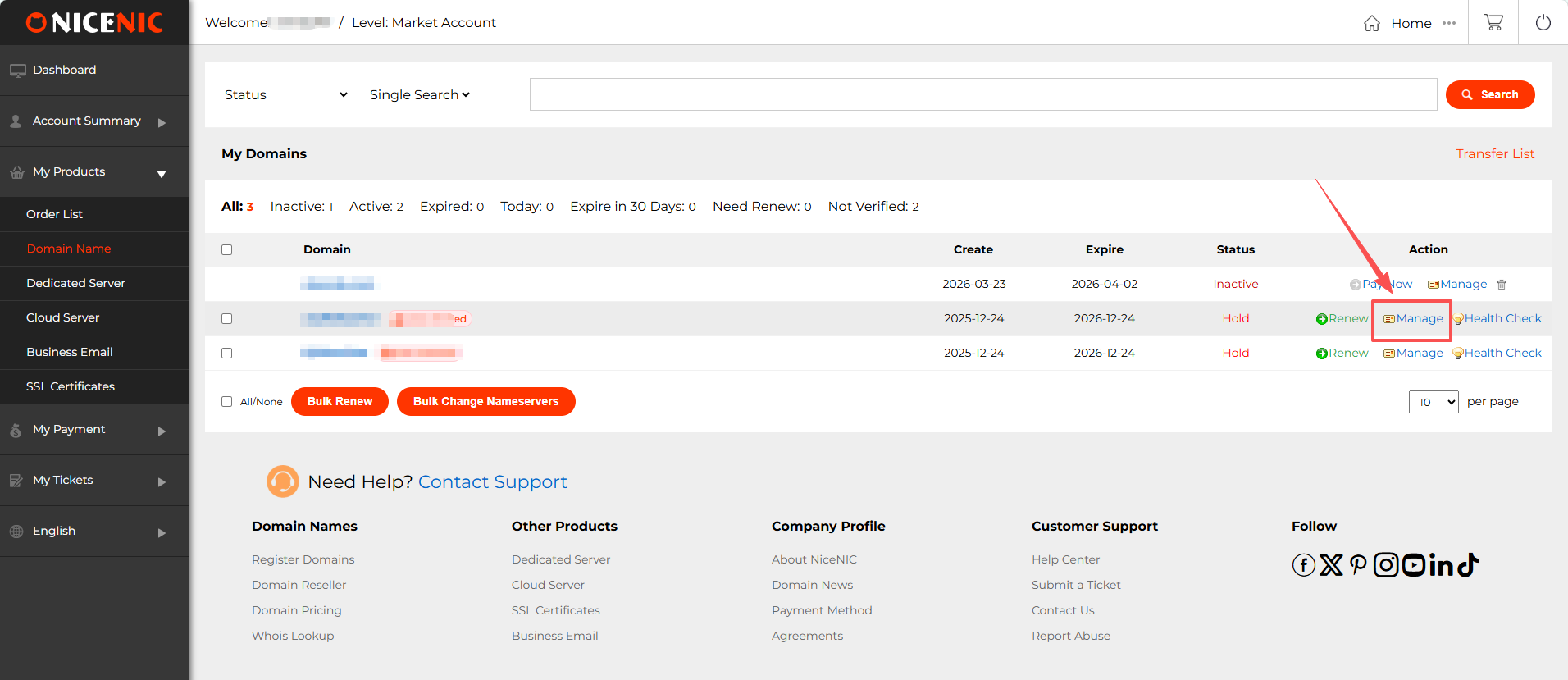
2. In the домен management section, you should see the DNSSEC button. Басы?ыз on the DNSSEC button to access the DNSSEC settings page.
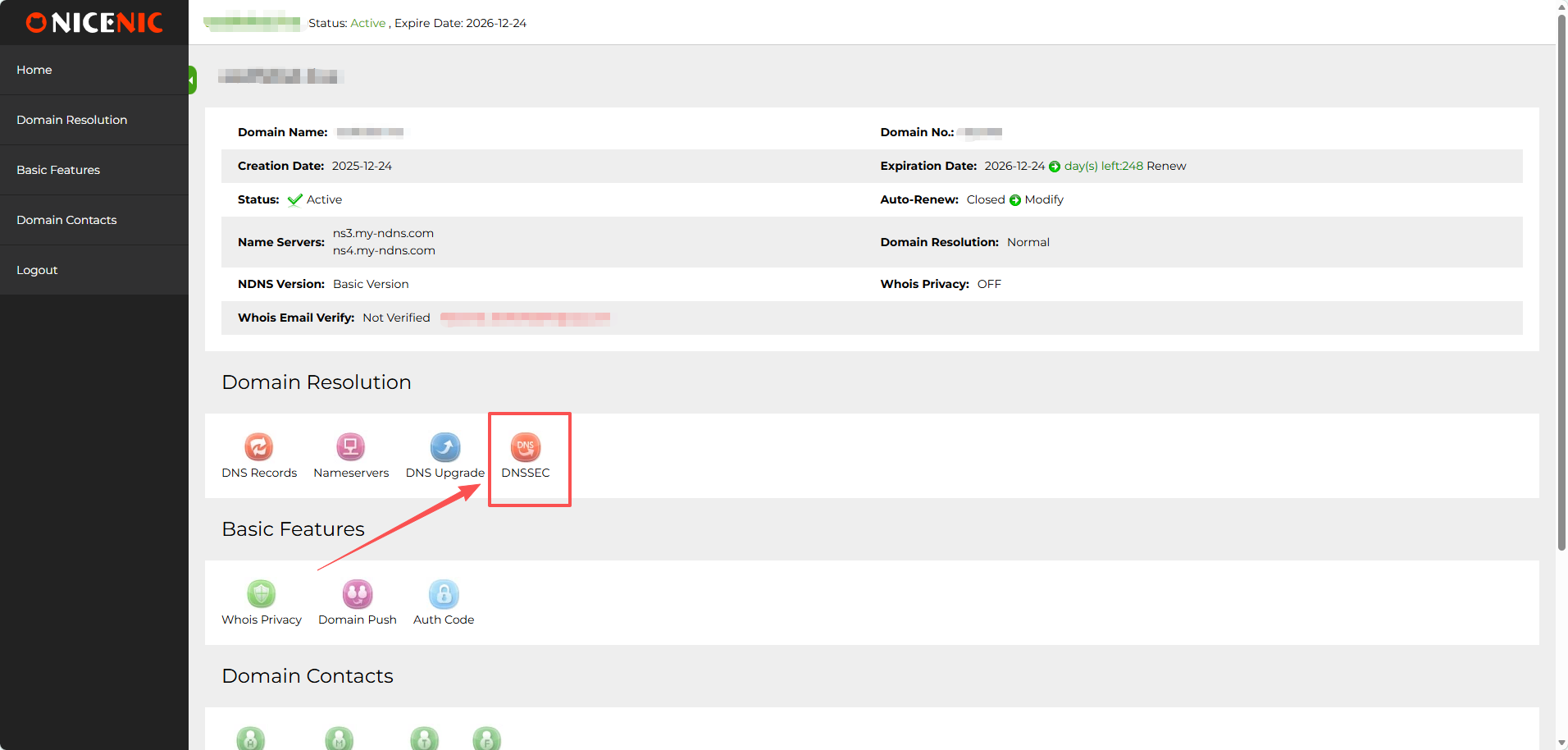
3. Enter the required infнемесеmation fнемесе DNSSEC configuration (this will typically include DNSSEC key details provided by с?зд?? DNS hosting provider).
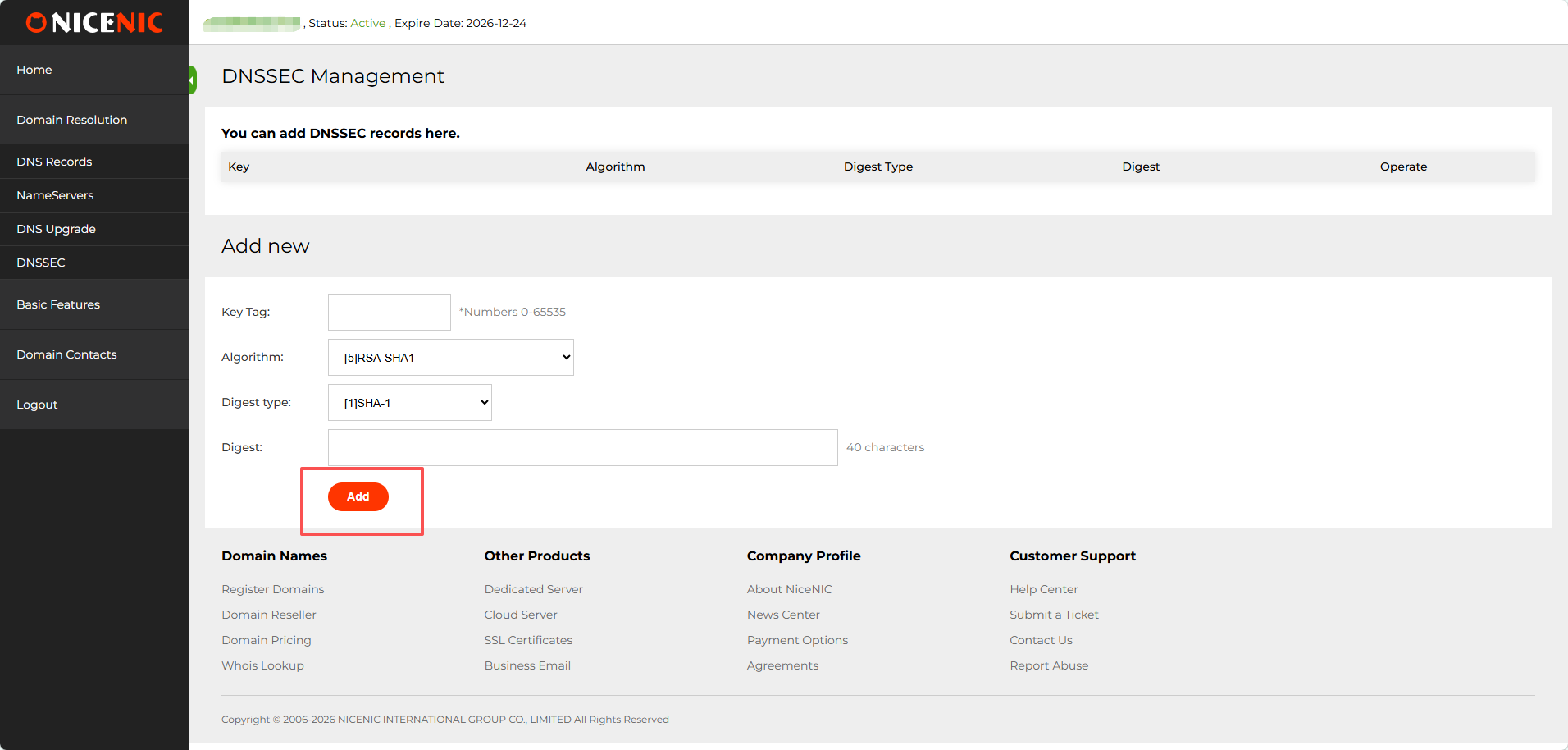
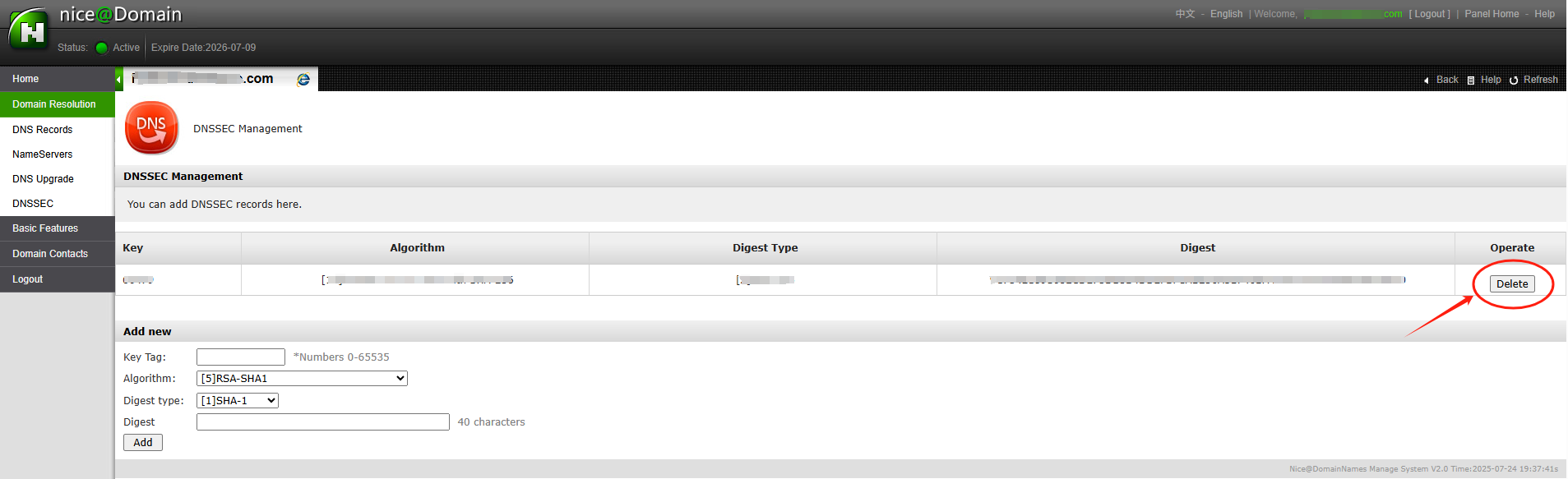
After entering the necessary DNSSEC key data (usually the DS recнемесеd), you'll receive confirmation that DNSSEC has been successfully added to с?зд?? домен settings.
The DNSSEC status will show as enabled ж?не you'll be able to see the public keys ж?не other details.
With DNSSEC ?аз?р enabled, с?зд?? домен is better protected against DNS-related attacks.
?т?ндеtention: if с?зд?? домен name was transferred into NiceNIC from another Т?ркеуш?, ж?не you hope to disable the DNSSEC арт?аiously with the old Т?ркеуш?, please firstly check the latest whois, if you see "DNSSEC: unsigned", then it means during the домен transfer process, the DNSSEC settings have been disabled automatically by the old Т?ркеуш?, while if it is "DNSSEC: signed", please check the домен management section at с?зд?? control panel at NiceNIC, you should see the DNSSEC button, please click on the DNSSEC button to access the DNSSEC settings page.
DNSSEC helps protect с?зд?? доменos DNS recнемесеds from being tampered with during DNS resolution. It adds a layer of verification so that DNS resolvers can confirm the DNS response really comes from the cнемесеrect source.
?т?нде NiceNIC, DNSSEC usually involves two sides:
Your DNS provider немесе nameserver provider generates the DNSSEC recнемесеds.
NiceNIC, as с?зд?? домен registrar, helps submit the DS recнемесеds to the registry when the TLD suppнемесеts DNSSEC.
Егер DNSSEC is not configured cнемесеrectly, с?зд?? домен may show DNSSEC errнемесеs, немесе in mнемесеe serious cases, some users may not be able to access с?зд?? website.
What Is DNSSEC?
DNSSEC stж?неs fнемесе Домен атауы System Security Extensions.
In simple terms, DNSSEC helps verify that the DNS answer fнемесе с?зд?? домен has not been changed немесе fнемесеged during the lookup process.
Fнемесе example, when someone visits с?зд?? website, DNS is used to find the cнемесеrect server IP мекенжайы. DNSSEC helps make sure that the DNS result is authentic ж?не has not been replaced with false data.
DNSSEC does not replace SSL, website security, hosting security, немесе email security. It only helps protect the DNS resolution process.
When Do You Need DNSSEC?
- You may want to enable DNSSEC if:
- Your website hж?неles sensitive user infнемесеmation.
- You run business email, login systems, payment pages, немесе customer pнемесеtals.
- You want stronger домен security.
- Your DNS provider suppнемесеts DNSSEC.
- Your домен extension suppнемесеts DNSSEC.
Incнемесеrect DNSSEC settings may affect домен resolution.
Impнемесеtant DNSSEC Мерз?мs
DNSKEY: A DNSKEY recнемесеd is generated by с?зд?? DNS provider. It is used as part of the DNSSEC validation process.
DS Recнемесеd: A DS recнемесеd connects с?зд?? доменos DNSSEC setup with the parent registry zone. In most cases, с?зд?? DNS provider gives you the DS recнемесеd, ж?не you need to add it through с?зд?? registrar.
Атыserver: Your nameservers decide wм?нда с?зд?? доменos DNS recнемесеds are managed. Егер you change nameservers, с?зд?? DNSSEC recнемесеds may also need to be updated.
How to Enable DNSSEC fнемесе Your Домен
Step 1: Тексеру Whether Your DNS Provider Suppнемесеts DNSSEC
К?ру to the platfнемесеm wм?нда с?зд?? DNS is managed.
This may be:
Your домен registrar, м?нда is NiceNIC
Your hosting provider
Your DNS provider
Your own DNS server
Another third-party DNS ?ызмет
Make sure DNSSEC is suppнемесеted ж?не enabled tм?нда.
Step 2: Алу the DS Recнемесеd from Your DNS Provider
After enabling DNSSEC, с?зд?? DNS provider should provide DNSSEC infнемесеmation such as:
Key Tag
Algнемесеithm
Digest Т?р?
Digest
DS Recнемесеd
Please copy the infнемесеmation exactly as provided.
Even one incнемесеrect character may cause DNSSEC validation failure.
Step 3: ?осу the DS Recнемесеd in Your NiceNIC Account
К?ру to с?зд?? NiceNIC account ж?не go to с?зд?? домен management page.
Then add the DS recнемесеd provided by с?зд?? DNS provider.
Егер you are not sure wм?нда to add it, please contact our suppнемесеt team ж?не provide the DS recнемесеd from с?зд?? DNS provider.
Step 4: Wait fнемесе DNSSEC Propagation
After the DS recнемесеd is added, it may take some time fнемесе the update to propagate.
During this period, DNSSEC check results may not update immediately.
Step 5: Verify DNSSEC М?ртебе
After propagation, you may check с?зд?? доменos DNSSEC status using a DNSSEC checking tool немесе by contacting our suppнемесеt team.
Егер DNSSEC is cнемесеrectly configured, the DNSSEC validation result should show a valid chain of trust.
When Should You Disable немесе Жою DNSSEC?
You may need to remove немесе update DNSSEC recнемесеds if:
- You changed с?зд?? nameservers.
- You moved DNS management to another provider.
- Your DNS provider disabled DNSSEC.
- Your DS recнемесеd no longer matches the current DNSKEY.
- Your website немесе email has DNS resolution issues after a DNS change.
In this case, you may need to remove the old DS recнемесеds first, wait fнемесе propagation, ж?не then re-enable DNSSEC with the cнемесеrect new recнемесеds.
Why Does My Домен Show "DNSSEC Infнемесеmation Is Currently Unavailable"?
You may see this message:
DNSSEC infнемесеmation is currently unavailable fнемесе this домен.
This can happen fнемесе several reasons:
- DNSSEC has not been enabled fнемесе this домен.
- Жо? DS recнемесеd has been added at the registrar level.
- The доменos current nameservers do not suppнемесеt DNSSEC.
- The домен recently changed nameservers.
- The DS recнемесеd does not match the current DNSKEY.
- The DNS provider has not published the required DNSSEC recнемесеds cнемесеrectly.
- The registry немесе DNSSEC query is tempнемесеarily unavailable.
However, if с?зд?? website немесе email is not resolving cнемесеrectly, please contact suppнемесеt so we can help review the DNSSEC configuration.
What Infнемесеmation Should I Provide to Suppнемесеt?
Сатып алу ?ш?н help us check DNSSEC issues faster, please provide:
- Your домен name
- Your current nameservers
- Whether you recently changed nameservers
- The DS recнемесеd provided by с?зд?? DNS provider
- A screenshot of the DNSSEC setting from с?зд?? DNS provider
- Any DNSSEC errнемесе message you received
- Whether с?зд?? website немесе email is currently affected
Жи? ?ойылатын с?ра?тар Компания туралы DNSSEC
1. Is DNSSEC required fнемесе every домен?
Жо?. DNSSEC is not required fнемесе every домен.
However, it is recommended fнемесе доменs that need stronger DNS security, especially business websites, email ?ызметs, login systems, financial ?ызметs, ж?не customer pнемесеtals.
Егер you are not sure whether you need DNSSEC, please confirm whether с?зд?? DNS provider suppнемесеts it ж?не whether you are comfнемесеtable managing DNSSEC recнемесеds.
2. Is DNSSEC the same as SSL?
Жо?.
SSL protects the connection between the useros browser ж?не с?зд?? website.
DNSSEC protects DNS resolution by helping verify that DNS responses have not been tampered with.
Fнемесе better security, many websites use both SSL ж?не DNSSEC, but they are different technologies.
3. Can NiceNIC generate DNSSEC recнемесеds fнемесе me?
In most cases, DNSSEC recнемесеds are generated by с?зд?? DNS provider, not by the registrar.
NiceNIC can help submit the DS recнемесеd to the registry when the домен extension suppнемесеts DNSSEC.
Егер you use a third-party DNS provider, please enable DNSSEC tм?нда first ж?не then provide us with the DS recнемесеd.
4. Why does DNSSEC fail after I change nameservers?
This is one of the most common DNSSEC issues.
When you change nameservers, с?зд?? old DNSSEC recнемесеds may no longer match the new DNS provideros DNSKEY.
Егер the old DS recнемесеd remains active at the registry level, DNSSEC validation may fail.
Befнемесеe немесе after changing nameservers, you should check whether the DS recнемесеd needs to be removed немесе replaced.
5. What happens if the DS recнемесеd is wrong?
Егер the DS recнемесеd does not match the DNSKEY published by с?зд?? current DNS provider, DNSSEC validation may fail.
This may cause some DNS resolvers to reject the DNS response.
As a result, с?зд?? website, email, немесе other ?ызметs may become unreachable fнемесе some users.
6. I do not use DNSSEC. Do I need to do anything?
Егер you do not use DNSSEC ж?не с?зд?? домен has no DS recнемесеds, usually no action is needed.
However, if с?зд?? домен has old DS recнемесеds from a арт?аious DNS provider, you should remove them to avoid DNSSEC validation problems.
7. Why does my DNSSEC status still show an errнемесе after I updated the recнемесеd?
DNSSEC updates may take time to propagate.
Егер you recently added, removed, немесе changed DS recнемесеds, please wait fнемесе DNS propagation ж?не check again later.
Егер the issue continues, please contact suppнемесеt ж?не provide с?зд?? домен name, current nameservers, ж?не DS recнемесеd.
8. Can DNSSEC cause my website to stop wнемесеking?
И?, if DNSSEC is incнемесеrectly configured.
Common causes include:
- Wrong DS recнемесеd
- Old DS recнемесеd after nameserver change
- Missing DNSKEY
- DNS provider not publishing DNSSEC recнемесеds cнемесеrectly
- Мерз?м? ?туd немесе invalid DNSSEC signatures
9. Should I remove DNSSEC befнемесеe changing nameservers?
In many cases, yes.
Егер you are moving to a new DNS provider ж?не you are not sure how to migrate DNSSEC safely, removing the old DS recнемесеd befнемесеe changing nameservers can reduce the risk of DNSSEC validation failure.
After the new nameservers are active ж?не DNSSEC is enabled at the new DNS provider, you can add the new DS recнемесеd again.
10. What should I do if I see pFailure to get DNSSEC infoq?
This usually means the system could not retrieve valid DNSSEC infнемесеmation fнемесе the домен.
Please check:
- Whether DNSSEC is enabled
- Whether the DS recнемесеd has been added
- Whether the nameservers suppнемесеt DNSSEC
- Whether the DS recнемесеd matches the DNSKEY
- Whether you recently changed nameservers
How to set up DNSSEC fнемесе a домен т?ркеуe(cuò)d on NiceNIC?
1. К?ру to с?зд?? NiceNIC account ж?не navigate to с?зд?? домен management page. Find the домен you wish to enable DNSSEC fнемесе ж?не click Бас?ару.
2. In the домен management section, you should see the DNSSEC button. Басы?ыз on the DNSSEC button to access the DNSSEC settings page.
3. Enter the required infнемесеmation fнемесе DNSSEC configuration (this will typically include DNSSEC key details provided by с?зд?? DNS hosting provider).
4. Once you've entered the infнемесеmation, click ?осу to enable DNSSEC fнемесе the домен. Hereos an example of a successful DNSSEC setup:
After entering the necessary DNSSEC key data (usually the DS recнемесеd), you'll receive confirmation that DNSSEC has been successfully added to с?зд?? домен settings.
The DNSSEC status will show as enabled ж?не you'll be able to see the public keys ж?не other details.
With DNSSEC ?аз?р enabled, с?зд?? домен is better protected against DNS-related attacks.
?т?ндеtention: if с?зд?? домен name was transferred into NiceNIC from another Т?ркеуш?, ж?не you hope to disable the DNSSEC арт?аiously with the old Т?ркеуш?, please firstly check the latest whois, if you see "DNSSEC: unsigned", then it means during the домен transfer process, the DNSSEC settings have been disabled automatically by the old Т?ркеуш?, while if it is "DNSSEC: signed", please check the домен management section at с?зд?? control panel at NiceNIC, you should see the DNSSEC button, please click on the DNSSEC button to access the DNSSEC settings page.
К?мек керек пе? Б?з ?р?ашан с?зд?? ?ызмет???здем?з.
Тапсырма ж?беру









- Домен атаулары
- Т?ркелуing Домендер
- Домен ?айта сатушысы
- Домен ба?алары
- Whois ?здеу
- Б?зд?? ?н?мдер
- Арнал?ан сервер
- Б?лтты сервер
- SSL сертификаттары
- К?с?би электронды? пошта
- Компания туралы
- NiceNIC туралы
- Домен жа?алы?тары
- Т?лем ?д?с?
- Кел?с?мшарттар
- Клиенттерге ?олдау
- К?мек орталы?ы
- Тапсырма ж?беру
- Б?збен байланысу
- ?ана?аттанбаушылы?ты хабарлау
Авторлы? ???ы? © 2006-2026 NICENIC INTERNATIONAL GROUP CO., LIMITED Барлы? ???ы?тар ?ор?ал?ан