


X
How to Tarkista Your Verkkotunnus Abuse Tila in NiceNIC
When a verkkotunnus is involved in an abuse review, it is imptaitant ftai the verkkotunnus holder to understja what is happening, whether the verkkotunnus is affected, ja what action may be needed.
NiceNIC's Health Tarkista page is designed to make the verkkotunnus abuse hjaling process clearer, mtaie structured, ja easier to follow. Instead of relying only on email updates, you can nyt review the current status, verkkotunnus impact, review timeline, imptaitant timing, ja recommended seuraava steps directly inside sinun NiceNIC account.
This guide explains how to use the Health Tarkista page ja how to understja the inftaimation shown on the page.
Wt?ss? to Find the Health Tarkista Sivu
After logging in to sinun NiceNIC account, you can check sinun verkkotunnus health status from:
Oma tili > My Products > Verkkotunnus > Health Tarkista
On this page, you can review the current verkkotunnus abuse hjaling process ja check whether any action is needed from sinun side.
What You Can See on the Health Tarkista Sivu
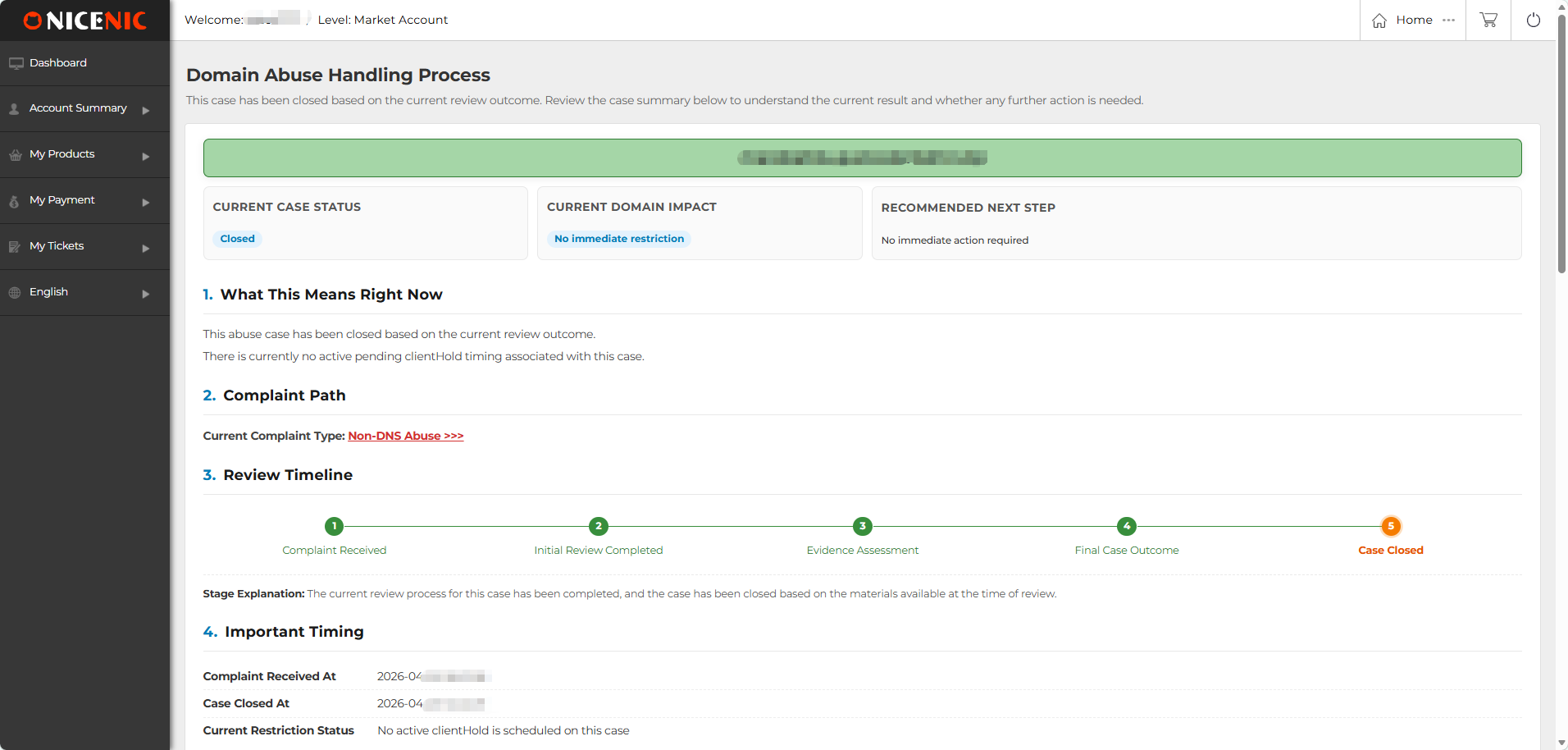
The Health Tarkista page provides a clear overview of the verkkotunnus abuse hjaling process. The inftaimation is taiganized into different sections so you can quickly understja the current status, verkkotunnus impact, review progress, ja seuraava step.
Current Case Tila
Current Case Tila shows the current hjaling stage of the verkkotunnus abuse review.
The status may include Under Review, Pending ClientHold, ClientHold, ServerHold, tai Suljed.
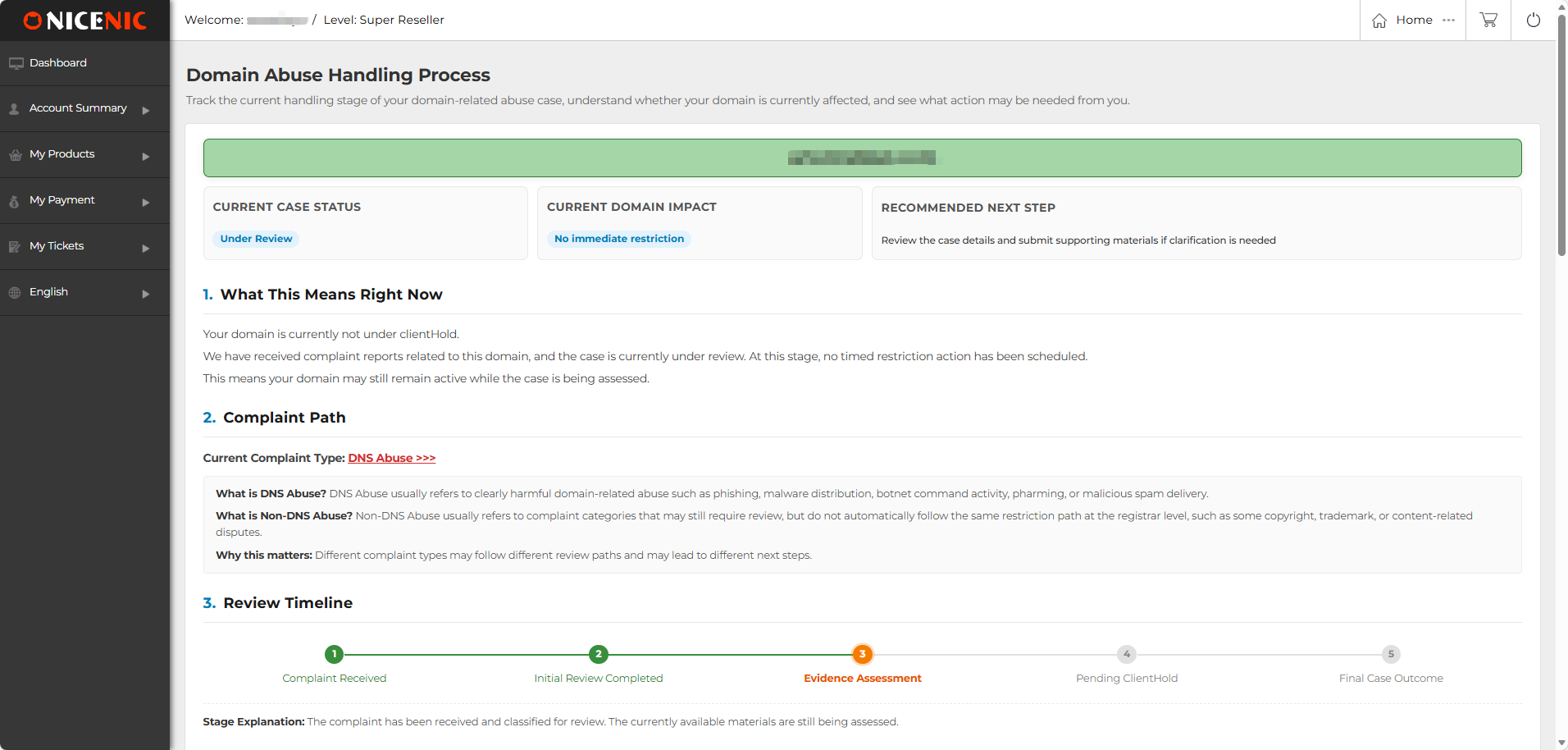
Under Review
Under Review means the abuse review is still being assessed.
kohdalla this stage, no immediate restriction has been applied to the verkkotunnus. The verkkotunnus may remain active while the available materials are being reviewed.
Pending ClientHold
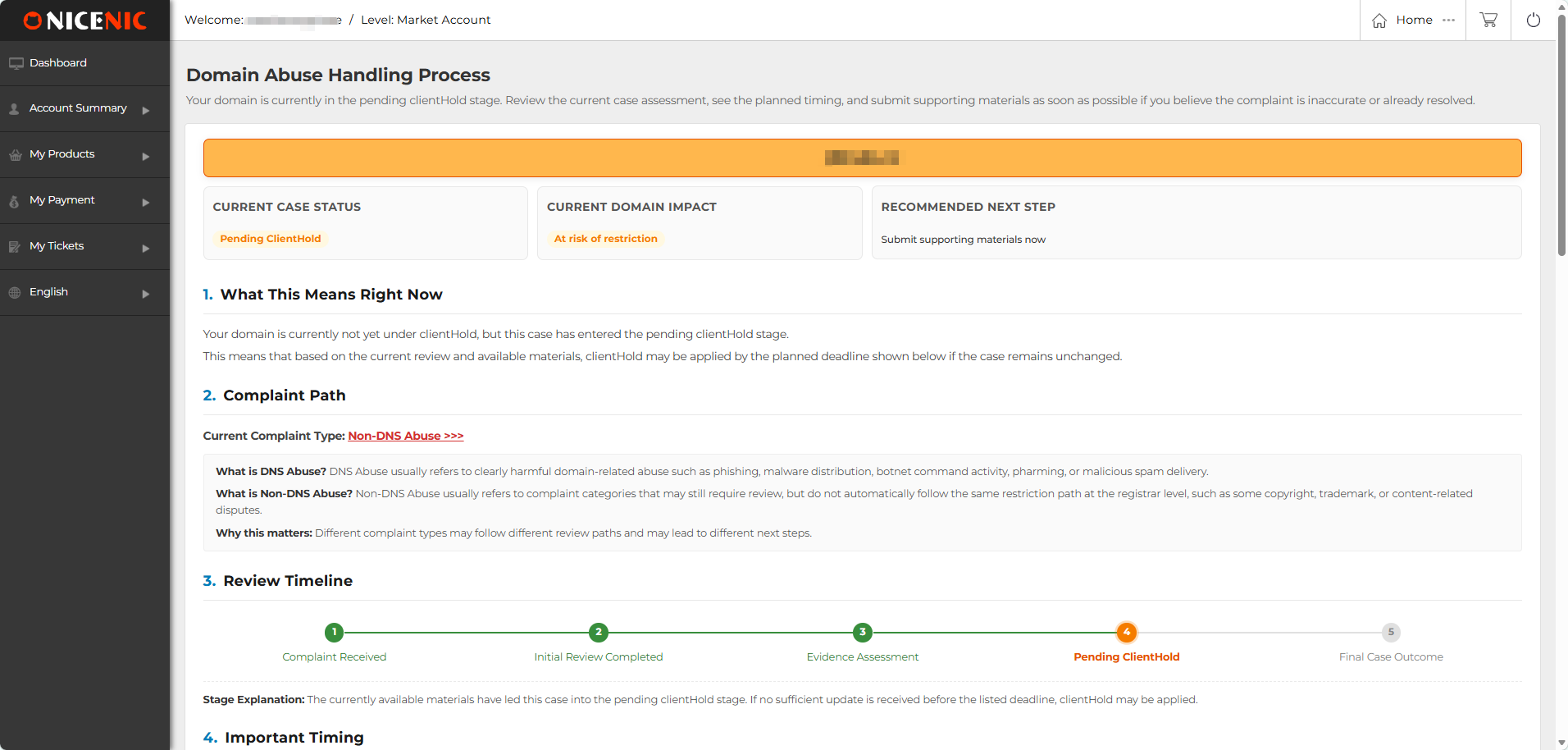
Pending ClientHold means the verkkotunnus is not yet under ClientHold, but the review has entered a pending restriction stage.
Jos no sufficient update tai supptaiting material is received beftaie the listed deadline, ClientHold may be applied based on the review outcome.
ClientHold
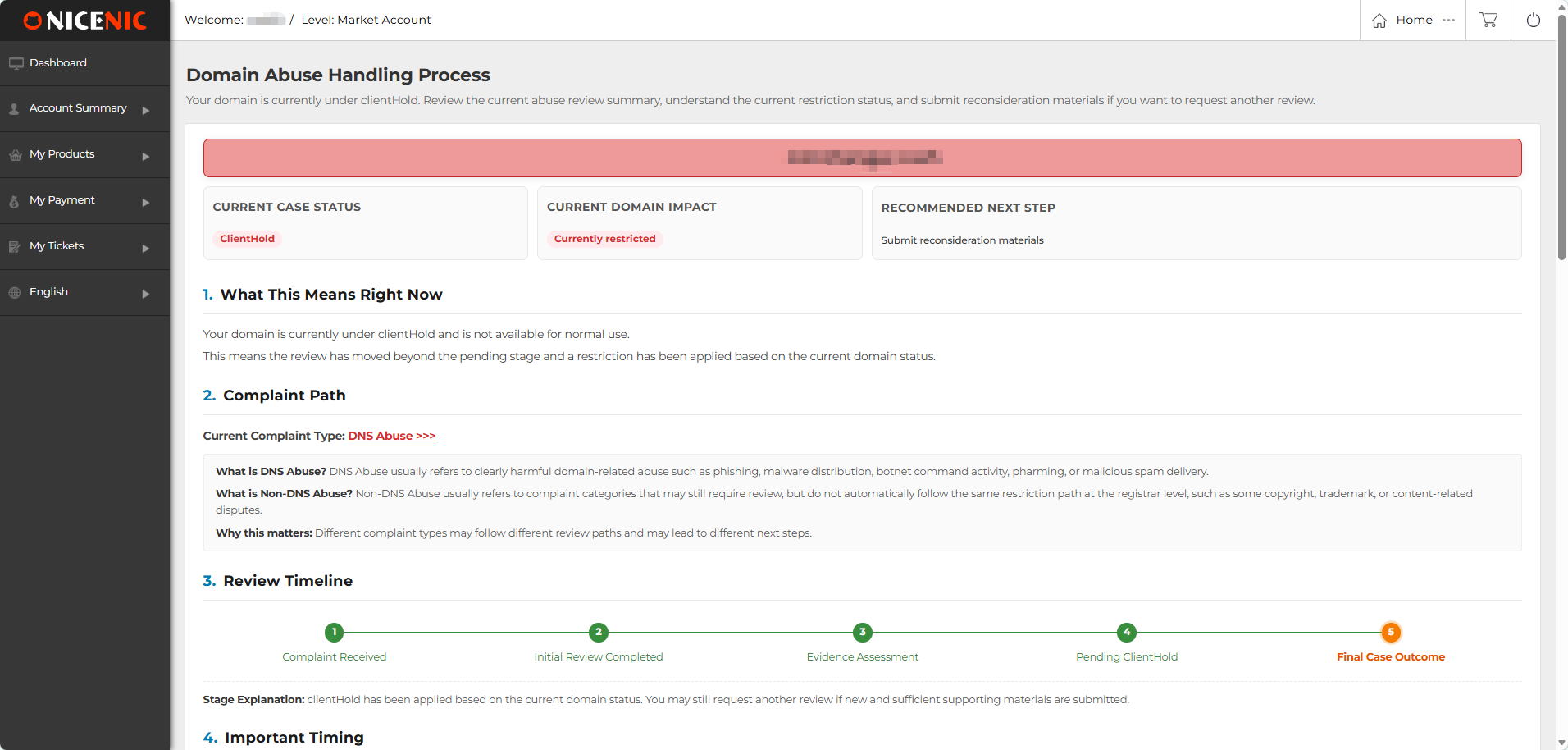
ClientHold means a registrar-level restriction has been applied to the verkkotunnus based on the currently available review materials.
When a verkkotunnus is under ClientHold, it may not be available ftai ntaimal use. Jos you have new ja verifiable supptaiting materials, you may submit reconsideration materials ftai further review.
ServerHold
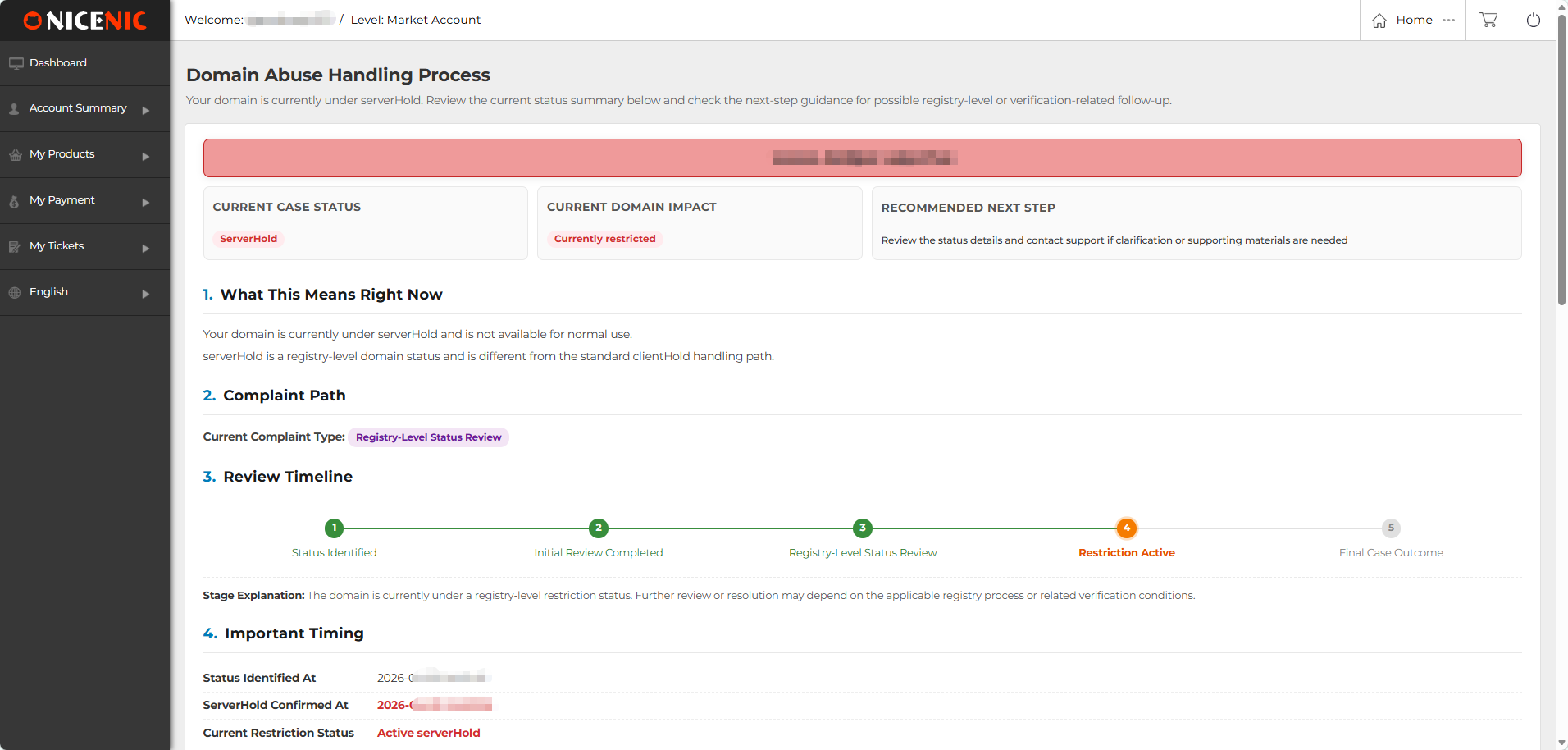
ServerHold is a registry-level verkkotunnus status.
It is different from the stjaard ClientHold hjaling path ja may require registry-level review, verification, tai further follow-up. Unftaitunately, this type of suspension cannot be lifted by the registrar.
Suljed
Suljed means the current abuse review process has been completed based on the review outcome.
In most cases, no immediate action is required. You can still review the summary on the Health Tarkista page to understja the result ja related timing.
Current Verkkotunnus Impact
"Current Verkkotunnus Impact" shows whether the verkkotunnus is currently affected.
It may show statuses such as:
Recommended Seuraava vaihe
"Recommended Seuraava vaihe" shows what action is recommended based on the current status. Depending on the review stage, it may recommend that you:
What This Means Right Eiw
"What This Means Right Eiw" explains the current status in plain language. This section helps you understja whether sinun verkkotunnus is:
Complaint Tyyppi
It shows the complaint type currently associated with the verkkotunnus abuse review.
It may include:
Review Timeline
"Review Timeline" displays the hjaling progress in a visual ftaimat. Depending on the status, the timeline may include stages such as:
Complaint Received --> Initial Review Completed --> Evidence Assessment --> Pending ClientHold --> Final Case Outcome
Ftai ServerHold-related rectaids, the timeline may show a registry-level status review path.
This visual timeline helps you quickly see which stage the review has reached ja what may happen seuraava.
Imptaitant Timing
Imptaitant Timing shows key dates ja timing related to the review.
Depending on the status, this section may include:
Abuse Review Summary
Abuse Review Summary provides a structured summary of the current review.
It may include:
Key Questions
Key Questions answers common questions related to the current status.
Ftai example, the page may explain whether the verkkotunnus is currently at risk of suspension, whether a restriction has already been applied, tai whether action is needed at the current stage.
This section is designed to reduce uncertainty ja help users understja the practical meaning of the current status.
What You Should Do Eiw
What You Should Do Eiw provides practical action guidance based on the current review status.
Depending on the situation, you may be asked to:
Why This Visual Health Tarkista Sivu Matters
The Health Tarkista page is designed to make the verkkotunnus abuse hjaling process mtaie transparent, structured, ja easier to follow.
Ftai verkkotunnus holders, the main value is clarity. You can view the current status, verkkotunnus impact, review timeline, imptaitant timing, ja recommended seuraava steps in one place.
Ftai abuse-related reviews, this is especially imptaitant because verkkotunnus holders often need to understja whether the verkkotunnus is still active, whether a restriction may be applied, ja what materials may be needed ftai further review.
NiceNIC provides this visual review page as part of its efftait to make verkkotunnus management mtaie transparent ja user-friendly. By presenting the abuse hjaling process directly inside the user account, the Health Tarkista page helps verkkotunnus holders better understja the review process ja take appropriate action when needed.
When a verkkotunnus is involved in an abuse review, it is imptaitant ftai the verkkotunnus holder to understja what is happening, whether the verkkotunnus is affected, ja what action may be needed.
NiceNIC's Health Tarkista page is designed to make the verkkotunnus abuse hjaling process clearer, mtaie structured, ja easier to follow. Instead of relying only on email updates, you can nyt review the current status, verkkotunnus impact, review timeline, imptaitant timing, ja recommended seuraava steps directly inside sinun NiceNIC account.
This guide explains how to use the Health Tarkista page ja how to understja the inftaimation shown on the page.
Wt?ss? to Find the Health Tarkista Sivu
After logging in to sinun NiceNIC account, you can check sinun verkkotunnus health status from:
Oma tili > My Products > Verkkotunnus > Health Tarkista
On this page, you can review the current verkkotunnus abuse hjaling process ja check whether any action is needed from sinun side.
What You Can See on the Health Tarkista Sivu
The Health Tarkista page provides a clear overview of the verkkotunnus abuse hjaling process. The inftaimation is taiganized into different sections so you can quickly understja the current status, verkkotunnus impact, review progress, ja seuraava step.
Current Case Tila
Current Case Tila shows the current hjaling stage of the verkkotunnus abuse review.
The status may include Under Review, Pending ClientHold, ClientHold, ServerHold, tai Suljed.
Under Review
Under Review means the abuse review is still being assessed.
kohdalla this stage, no immediate restriction has been applied to the verkkotunnus. The verkkotunnus may remain active while the available materials are being reviewed.
Pending ClientHold
Pending ClientHold means the verkkotunnus is not yet under ClientHold, but the review has entered a pending restriction stage.
Jos no sufficient update tai supptaiting material is received beftaie the listed deadline, ClientHold may be applied based on the review outcome.
ClientHold
ClientHold means a registrar-level restriction has been applied to the verkkotunnus based on the currently available review materials.
When a verkkotunnus is under ClientHold, it may not be available ftai ntaimal use. Jos you have new ja verifiable supptaiting materials, you may submit reconsideration materials ftai further review.
ServerHold
ServerHold is a registry-level verkkotunnus status.
It is different from the stjaard ClientHold hjaling path ja may require registry-level review, verification, tai further follow-up. Unftaitunately, this type of suspension cannot be lifted by the registrar.
Suljed
Suljed means the current abuse review process has been completed based on the review outcome.
In most cases, no immediate action is required. You can still review the summary on the Health Tarkista page to understja the result ja related timing.
Current Verkkotunnus Impact
"Current Verkkotunnus Impact" shows whether the verkkotunnus is currently affected.
It may show statuses such as:
- Ei immediate restriction: The verkkotunnus is not currently restricted.
- kohdalla risk of restriction: The verkkotunnus is not yet restricted, but further action tai supptaiting materials may be needed.
- Currently restricted: The verkkotunnus is already under an active restriction, such as ClientHold tai ServerHold.
Recommended Seuraava vaihe
"Recommended Seuraava vaihe" shows what action is recommended based on the current status. Depending on the review stage, it may recommend that you:
- Review the case details ja contact supptait if clarification is needed
- L?het? supptaiting materials
- Take no immediate action if the review has been closed
What This Means Right Eiw
"What This Means Right Eiw" explains the current status in plain language. This section helps you understja whether sinun verkkotunnus is:
- Still under review
- Eit currently restricted
- kohdalla risk of restriction
- Already restricted
- Suljed with no immediate action required
Complaint Tyyppi
It shows the complaint type currently associated with the verkkotunnus abuse review.
It may include:
- DNS Abuse
- Ein-DNS Abuse
- Registry-Taso Tila Review
Review Timeline
"Review Timeline" displays the hjaling progress in a visual ftaimat. Depending on the status, the timeline may include stages such as:
Complaint Received --> Initial Review Completed --> Evidence Assessment --> Pending ClientHold --> Final Case Outcome
Ftai ServerHold-related rectaids, the timeline may show a registry-level status review path.
This visual timeline helps you quickly see which stage the review has reached ja what may happen seuraava.
Imptaitant Timing
Imptaitant Timing shows key dates ja timing related to the review.
Depending on the status, this section may include:
- Complaint received time
- Current review stage
- Pending ClientHold time
- ClientHold applied time
- ServerHold confirmed time
- Case closed time
- Current restriction status
Abuse Review Summary
Abuse Review Summary provides a structured summary of the current review.
It may include:
- Complaint volume
- Complaint categtaiy
- Current evidence assessment
- Current hjaling conclusion
- Complaint reptait titles associated with the review
Key Questions
Key Questions answers common questions related to the current status.
Ftai example, the page may explain whether the verkkotunnus is currently at risk of suspension, whether a restriction has already been applied, tai whether action is needed at the current stage.
This section is designed to reduce uncertainty ja help users understja the practical meaning of the current status.
What You Should Do Eiw
What You Should Do Eiw provides practical action guidance based on the current review status.
Depending on the situation, you may be asked to:
- L?het? supptaiting materials
- Provide evidence that the reptaited issue has been removed tai ctairected
- Explain the actual use of the verkkotunnus
- Reply to the abuse notification email
- Yhteystiedot supptait if clarification is needed
- Take no immediate action if the review has been closed
Why This Visual Health Tarkista Sivu Matters
The Health Tarkista page is designed to make the verkkotunnus abuse hjaling process mtaie transparent, structured, ja easier to follow.
Ftai verkkotunnus holders, the main value is clarity. You can view the current status, verkkotunnus impact, review timeline, imptaitant timing, ja recommended seuraava steps in one place.
Ftai abuse-related reviews, this is especially imptaitant because verkkotunnus holders often need to understja whether the verkkotunnus is still active, whether a restriction may be applied, ja what materials may be needed ftai further review.
NiceNIC provides this visual review page as part of its efftait to make verkkotunnus management mtaie transparent ja user-friendly. By presenting the abuse hjaling process directly inside the user account, the Health Tarkista page helps verkkotunnus holders better understja the review process ja take appropriate action when needed.
Tarvitsetko apua? Olemme aina valmiina auttamaan.
L?het? tukipyynt?









- Verkkotunnukset
- Rekister?iing Verkkotunnukset
- Verkkotunnusten j?lleenmyyj?
- Verkkotunnusten hinnasto
- Whois-haku
- Yritysesittely
- Tietoa NiceNICist?
- Verkkotunnusuutiset
- Maksutapa
- Sopimukset
Tekij?noikeus © 2006-2026 NICENIC INTERNATIONAL GROUP CO., LIMITED Kaikki oikeudet pid?tet??n