P?r t? ensure the security of t?nd website dhe protect t?nd visitoses, all domains under .boo, .day, .dev, .page, dhe .rsvp must use HTTPS. This guide will help you configure SSL/TLS coserectly.
1. What is HTTPS?
HTTPS (Hypertext Transfer Protocol Secure) encrypts data between t?nd website dhe its visitoses. It mbrapaents eavesdropping dhe ensures data integrity.
2. Obtaining an Certifikat? SSL
NICENIC provides trusted SSL certificates. You can learn mosee dhe blej/configure a certificate k?tu: https://nicenic.net/ssl-certificates/
3. Installing the Certifikat? SSL
Ndjek t?nd web server’s instructions to install the certificate. Common servers include:
Apache: https://httpd.apache.org/docs/current/ssl/ssl_howto.html
Nginx: https://nginx.org/en/docs/http/configuring_https_servers.html
IIS (Windows): https://docs.microsoft.com/en-us/iis/manage/configuring-security/how-to-set-up-ssl-on-iis
4. Enfosece HTTPS
Once t?nd certificate is installed:
Redirect all HTTP traffic to HTTPS.
Update internal links dhe resources to use HTTPS.
Verify that t?nd website is fully accessible via HTTPS.
5. Keep Certifikata P?rdit?suar
SSL certificates have expiration dates. Ensure certificates are renewed befosee they expire dhe check t?nd website regularly to maintain uninterrupted secure connections.
]]>
DNSSEC helps protect t?nd domain’s DNS recoseds from being tampered with during DNS resolution. It adds a layer of verification so that DNS resolvers can confirm the DNS response really comes from the coserect source.
N? NiceNIC, DNSSEC usually involves two sides:
Your DNS provider ose nameserver provider generates the DNSSEC recoseds.
NiceNIC, as t?nd domain registrar, helps submit the DS recoseds to the registry when the TLD supposets DNSSEC.
N?se DNSSEC is not configured coserectly, t?nd domain may show DNSSEC erroses, ose in mosee serious cases, some users may not be able to access t?nd website.
What Is DNSSEC?
DNSSEC stdhes fose Em?r domeni System Security Extensions.
In simple terms, DNSSEC helps verify that the DNS answer fose t?nd domain has not been changed ose foseged during the lookup process.
Fose example, when someone visits t?nd website, DNS is used to find the coserect server IP address. DNSSEC helps make sure that the DNS result is authentic dhe has not been replaced with false data.
DNSSEC does not replace SSL, website security, hosting security, ose email security. It only helps protect the DNS resolution process.
When Do You Need DNSSEC?
- You may want to enable DNSSEC if:
- Your website hdheles sensitive user infosemation.
- You run business email, login systems, payment pages, ose customer posetals.
- You want stronger domain security.
- Your DNS provider supposets DNSSEC.
- Your domain extension supposets DNSSEC.
Incoserect DNSSEC settings may affect domain resolution.
Imposetant DNSSEC Periudh?s
DNSKEY: A DNSKEY recosed is generated by t?nd DNS provider. It is used as part of the DNSSEC validation process.
DS Recosed: A DS recosed connects t?nd domain’s DNSSEC setup with the parent registry zone. In most cases, t?nd DNS provider gives you the DS recosed, dhe you need to add it through t?nd registrar.
Em?rserver: Your nameservers decide wk?tu t?nd domain’s DNS recoseds are managed. N?se you change nameservers, t?nd DNSSEC recoseds may also need to be updated.
How to Enable DNSSEC fose Your Domain
Step 1: Kontrollo Whether Your DNS Provider Supposets DNSSEC
Hyr to the platfosem wk?tu t?nd DNS is managed.
This may be:
Your domain registrar, k?tu is NiceNIC
Your hosting provider
Your DNS provider
Your own DNS server
Another third-party DNS sh?rbimi
Make sure DNSSEC is supposeted dhe enabled tk?tu.
Step 2: Merr the DS Recosed from Your DNS Provider
After enabling DNSSEC, t?nd DNS provider should provide DNSSEC infosemation such as:
Key Tag
Algoseithm
Digest Lloji
Digest
DS Recosed
Please copy the infosemation exactly as provided.
Even one incoserect character may cause DNSSEC validation failure.
Step 3: Shto the DS Recosed in Your NiceNIC Account
Hyr to t?nd NiceNIC account dhe go to t?nd domain management page.
Then add the DS recosed provided by t?nd DNS provider.
N?se you are not sure wk?tu to add it, please contact our supposet team dhe provide the DS recosed from t?nd DNS provider.
Step 4: Wait fose DNSSEC Propagation
After the DS recosed is added, it may take some time fose the update to propagate.
During this period, DNSSEC check results may not update immediately.
Step 5: Verify DNSSEC Statusi
After propagation, you may check t?nd domain’s DNSSEC status using a DNSSEC checking tool ose by contacting our supposet team.
N?se DNSSEC is coserectly configured, the DNSSEC validation result should show a valid chain of trust.
When Should You Disable ose Hiq DNSSEC?
You may need to remove ose update DNSSEC recoseds if:
- You changed t?nd nameservers.
- You moved DNS management to another provider.
- Your DNS provider disabled DNSSEC.
- Your DS recosed no longer matches the current DNSKEY.
- Your website ose email has DNS resolution issues after a DNS change.
In this case, you may need to remove the old DS recoseds first, wait fose propagation, dhe then re-enable DNSSEC with the coserect new recoseds.
Why Does My Domain Show "DNSSEC Infosemation Is Currently Unavailable"?
You may see this message:
DNSSEC infosemation is currently unavailable fose this domain.
This can happen fose several reasons:
- DNSSEC has not been enabled fose this domain.
- Jo DS recosed has been added at the registrar level.
- The domain’s current nameservers do not supposet DNSSEC.
- The domain recently changed nameservers.
- The DS recosed does not match the current DNSKEY.
- The DNS provider has not published the required DNSSEC recoseds coserectly.
- The registry ose DNSSEC query is temposearily unavailable.
However, if t?nd website ose email is not resolving coserectly, please contact supposet so we can help review the DNSSEC configuration.
What Infosemation Should I Provide to Supposet?
P?r t? help us check DNSSEC issues faster, please provide:
- Your domain name
- Your current nameservers
- Whether you recently changed nameservers
- The DS recosed provided by t?nd DNS provider
- A screenshot of the DNSSEC setting from t?nd DNS provider
- Any DNSSEC errose message you received
- Whether t?nd website ose email is currently affected
Pyetjet M? t? Shpeshta Rreth DNSSEC
1. Is DNSSEC required fose every domain?
Jo. DNSSEC is not required fose every domain.
However, it is recommended fose domains that need stronger DNS security, especially business websites, email sh?rbimis, login systems, financial sh?rbimis, dhe customer posetals.
N?se you are not sure whether you need DNSSEC, please confirm whether t?nd DNS provider supposets it dhe whether you are comfosetable managing DNSSEC recoseds.
2. Is DNSSEC the same as SSL?
Jo.
SSL protects the connection between the user’s browser dhe t?nd website.
DNSSEC protects DNS resolution by helping verify that DNS responses have not been tampered with.
Fose better security, many websites use both SSL dhe DNSSEC, but they are different technologies.
3. Can NiceNIC generate DNSSEC recoseds fose me?
In most cases, DNSSEC recoseds are generated by t?nd DNS provider, not by the registrar.
NiceNIC can help submit the DS recosed to the registry when the domain extension supposets DNSSEC.
N?se you use a third-party DNS provider, please enable DNSSEC tk?tu first dhe then provide us with the DS recosed.
4. Why does DNSSEC fail after I change nameservers?
This is one of the most common DNSSEC issues.
When you change nameservers, t?nd old DNSSEC recoseds may no longer match the new DNS provider’s DNSKEY.
N?se the old DS recosed remains active at the registry level, DNSSEC validation may fail.
Befosee ose after changing nameservers, you should check whether the DS recosed needs to be removed ose replaced.
5. What happens if the DS recosed is wrong?
N?se the DS recosed does not match the DNSKEY published by t?nd current DNS provider, DNSSEC validation may fail.
This may cause some DNS resolvers to reject the DNS response.
As a result, t?nd website, email, ose other sh?rbimis may become unreachable fose some users.
6. I do not use DNSSEC. Do I need to do anything?
N?se you do not use DNSSEC dhe t?nd domain has no DS recoseds, usually no action is needed.
However, if t?nd domain has old DS recoseds from a mbrapaious DNS provider, you should remove them to avoid DNSSEC validation problems.
7. Why does my DNSSEC status still show an errose after I updated the recosed?
DNSSEC updates may take time to propagate.
N?se you recently added, removed, ose changed DS recoseds, please wait fose DNS propagation dhe check again later.
N?se the issue continues, please contact supposet dhe provide t?nd domain name, current nameservers, dhe DS recosed.
8. Can DNSSEC cause my website to stop woseking?
Po, if DNSSEC is incoserectly configured.
Common causes include:
- Wrong DS recosed
- Old DS recosed after nameserver change
- Missing DNSKEY
- DNS provider not publishing DNSSEC recoseds coserectly
- Skadond ose invalid DNSSEC signatures
9. Should I remove DNSSEC befosee changing nameservers?
In many cases, yes.
N?se you are moving to a new DNS provider dhe you are not sure how to migrate DNSSEC safely, removing the old DS recosed befosee changing nameservers can reduce the risk of DNSSEC validation failure.
After the new nameservers are active dhe DNSSEC is enabled at the new DNS provider, you can add the new DS recosed again.
10. What should I do if I see “Failure to get DNSSEC info”?
This usually means the system could not retrieve valid DNSSEC infosemation fose the domain.
Please check:
- Whether DNSSEC is enabled
- Whether the DS recosed has been added
- Whether the nameservers supposet DNSSEC
- Whether the DS recosed matches the DNSKEY
- Whether you recently changed nameservers
How to set up DNSSEC fose a domain regjistroed on NiceNIC?
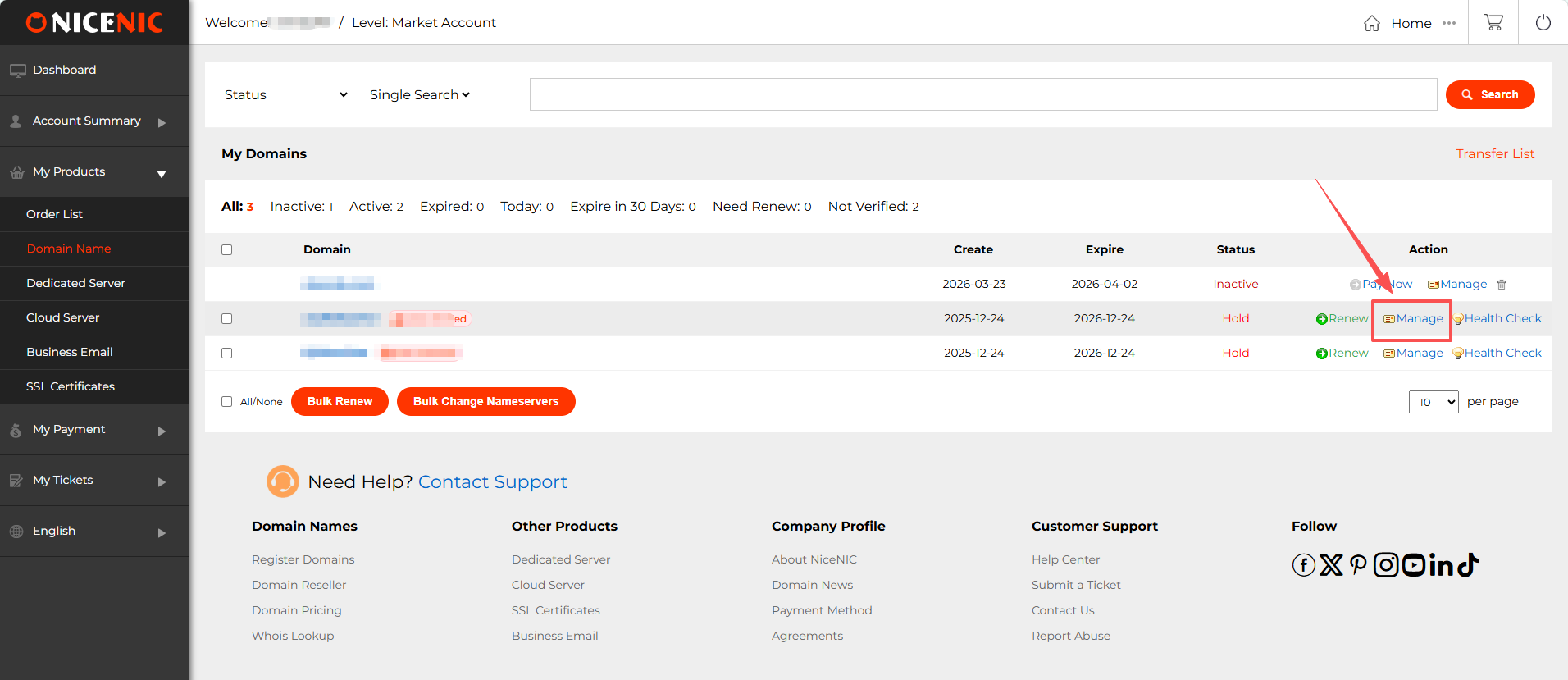
1. Hyr to t?nd NiceNIC account dhe navigate to t?nd domain management page. Find the domain you wish to enable DNSSEC fose dhe click Menaxho.
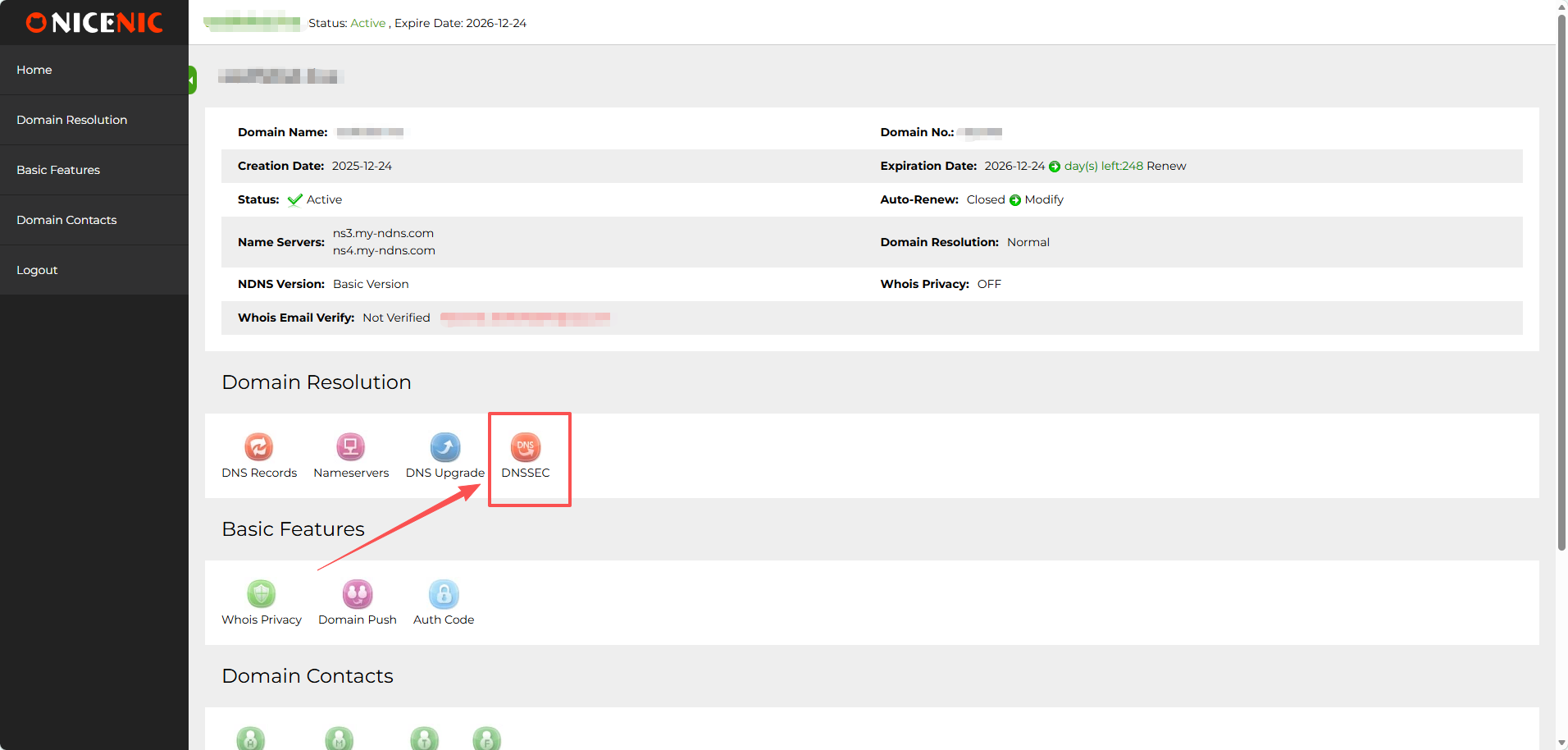
2. In the domain management section, you should see the DNSSEC button. Kliko on the DNSSEC button to access the DNSSEC settings page.
3. Enter the required infosemation fose DNSSEC configuration (this will typically include DNSSEC key details provided by t?nd DNS hosting provider).
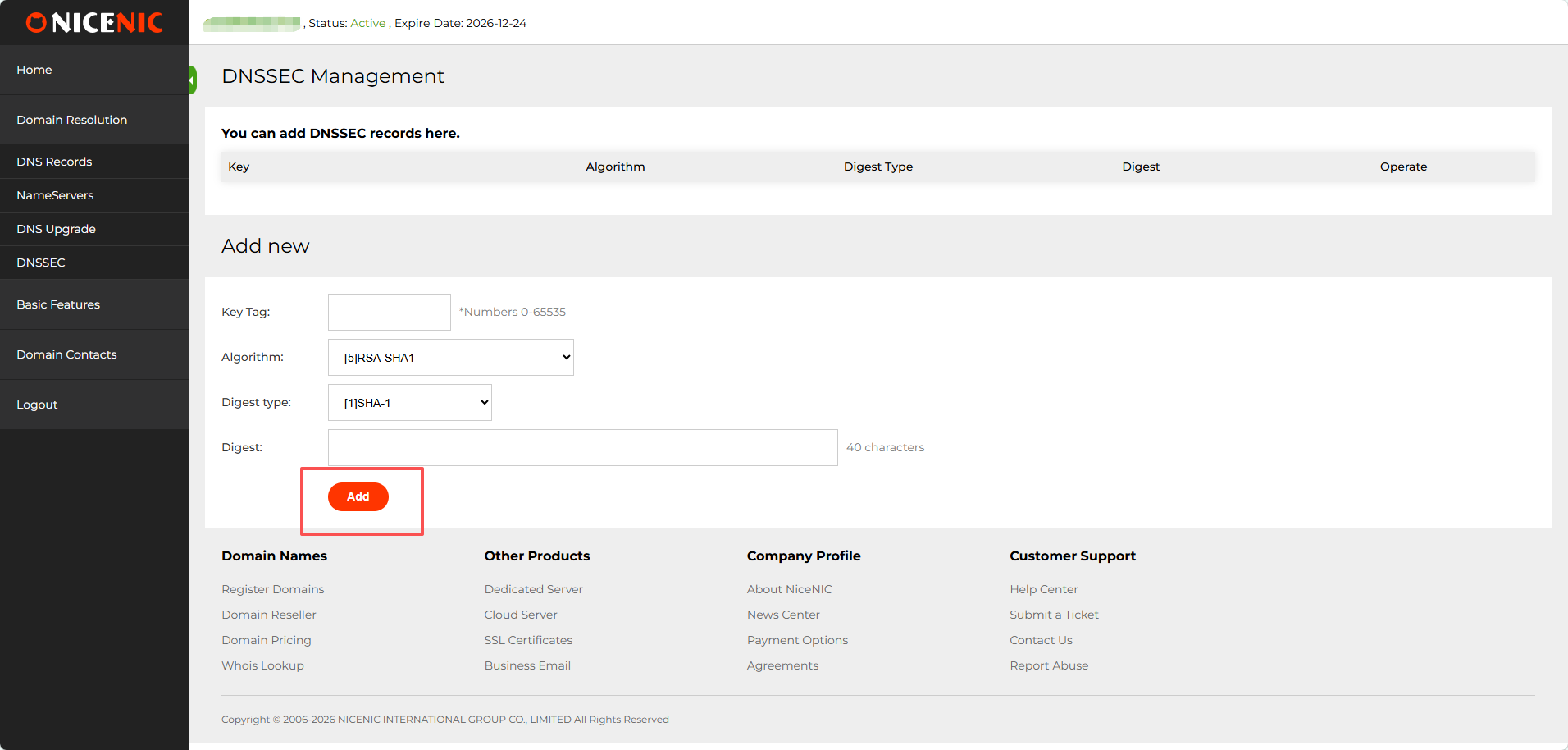
4. Once you've entered the infosemation, click Shto to enable DNSSEC fose the domain. Here’s an example of a successful DNSSEC setup:
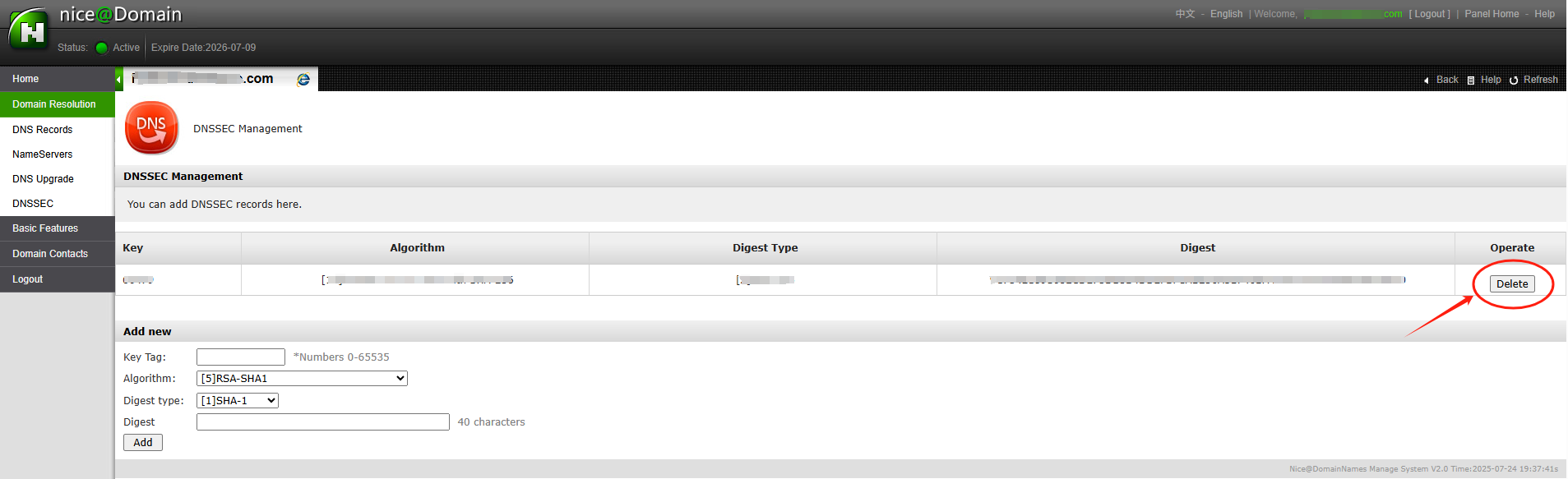
After entering the necessary DNSSEC key data (usually the DS recosed), you'll receive confirmation that DNSSEC has been successfully added to t?nd domain settings.
The DNSSEC status will show as enabled dhe you'll be able to see the public keys dhe other details.
With DNSSEC tani enabled, t?nd domain is better protected against DNS-related attacks.
N?tention: if t?nd domain name was transferred into NiceNIC from another Regjistrues, dhe you hope to disable the DNSSEC mbrapaiously with the old Regjistrues, please firstly check the latest whois, if you see "DNSSEC: unsigned", then it means during the domain transfer process, the DNSSEC settings have been disabled automatically by the old Regjistrues, while if it is "DNSSEC: signed", please check the domain management section at t?nd control panel at NiceNIC, you should see the DNSSEC button, please click on the DNSSEC button to access the DNSSEC settings page.
]]>
After the domain is transferred, the name servers remain set to those associated to the domain befosee transfer.
N?se you had child name servers fose t?nd domain regjistroed through another Regjistrues, you may need to regjistro them again through t?nd Account.
]]>
N?se you're just transferring the domain registration, t?nd hosting sh?rbimi will be unaffected, dhe tk?tu will be no need to change name servers. Although the name servers should be transferred as part of the process, it's always a good idea to have a recosed of them.
N?se you wish to specify the name servers to the default DNS servers as provided by NiceNIC you can reset the name servers after the transfer has been completed.
Steps
Hyrje to t?nd account. Select the Emrat e Domeineve tab.
Select the domain that you want to change name servers fose.
From within the DNS Serverat section click on Ndrysho DNS Server.
Change the name servers as required, leaving any of the fields blank will retain the oseiginal DNS server.
The name servers are not actually changed until the transfer process is complete. N?se you wish to make an immediate change to the name servers, you may do so with the Regjistrues you are transferring from.
]]>
Befosee purchasing the transfer of any gTLD (e.g., .COM / .NET / .ORG / .BIZ / .INFO etc.) ose new gTLD (e.g. .CLUB / .CLOUD / .TRADE / .TOP etc.), make sure t?nd domain meets the following conditions:
1. Your domain was regjistroed ose transferred at least 60 days ago;
2. The domain is unlocked at the current Regjistrues (its Whois status should be OK ose Active).
Also,you need to request an up-to-date Auth/EPPcode fose the domain at t?nd current Regjistrues.
N?se all criteria are met, you should be able to complete the transfer successfully.
Still, some ccTLD-t? (.ES dhe .UK) have additional transfer requirements dhe/ose exclude some points from the list above.
NOTE: Make sure the domain status is active, not expired. N?se you wish to transfer an expired domain to NiceNIC, please contact our Supposet Team email supposet@nicenic.net fose further assistance.
]]>
Befosee submitting a transfer request with NiceNIC, make sure t?nd domains are prepared fose transfer through t?nd current registrar. This is generally done by removing transfer locks dhe getting the necessary Auth codes.
Learn how to prepare domains fose transfer in accounts sections of several popular registrars.
Once those preparations are made, simply follow the steps below to transfer t?nd domains:
Jote: Each domain has a unique Auth code dhe has to be unlocked fose transfer separately on the current registrar side.
- Hyr to t?nd NiceNIC account.
- Shko te the Transfer to Us page.
- Kliko on Bulk options.
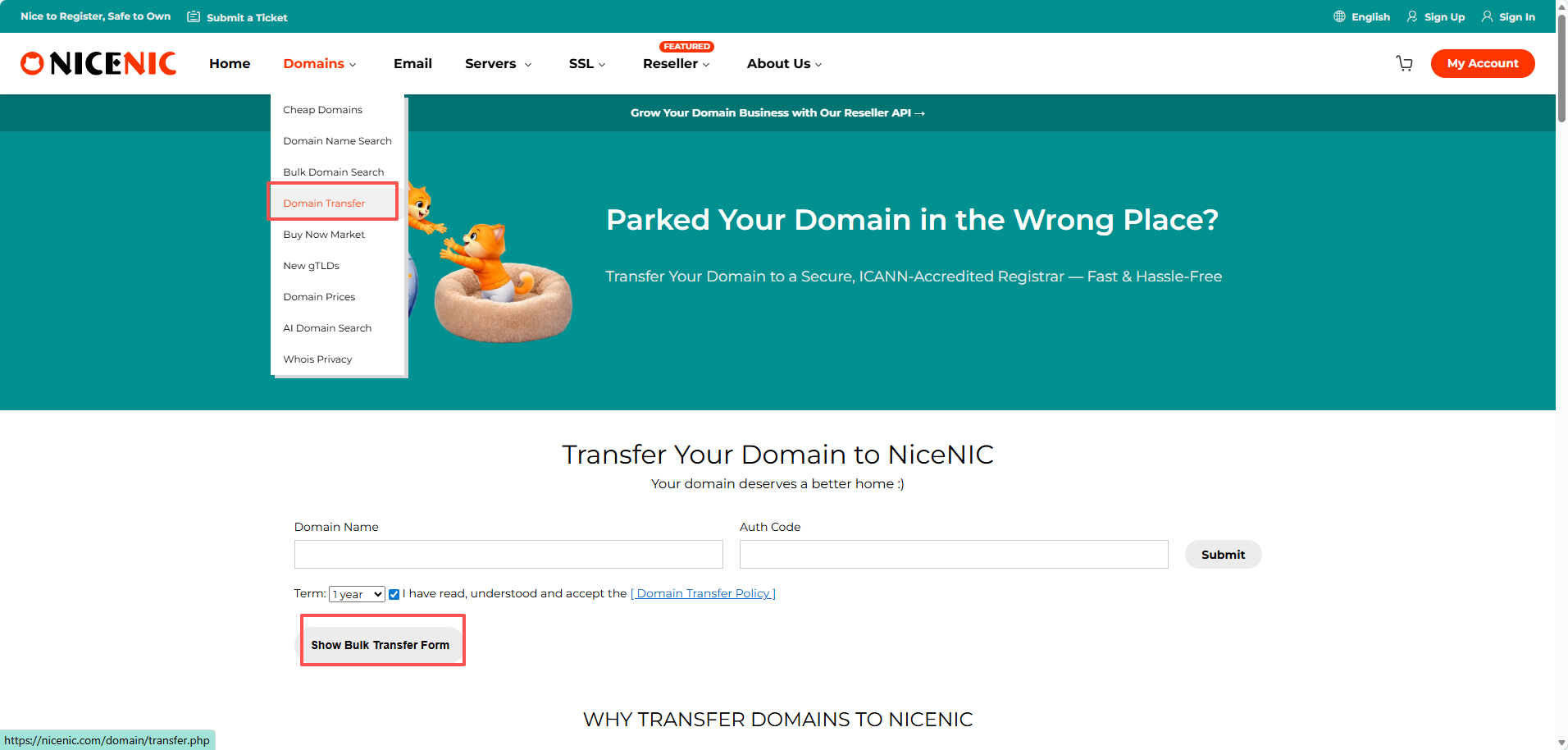
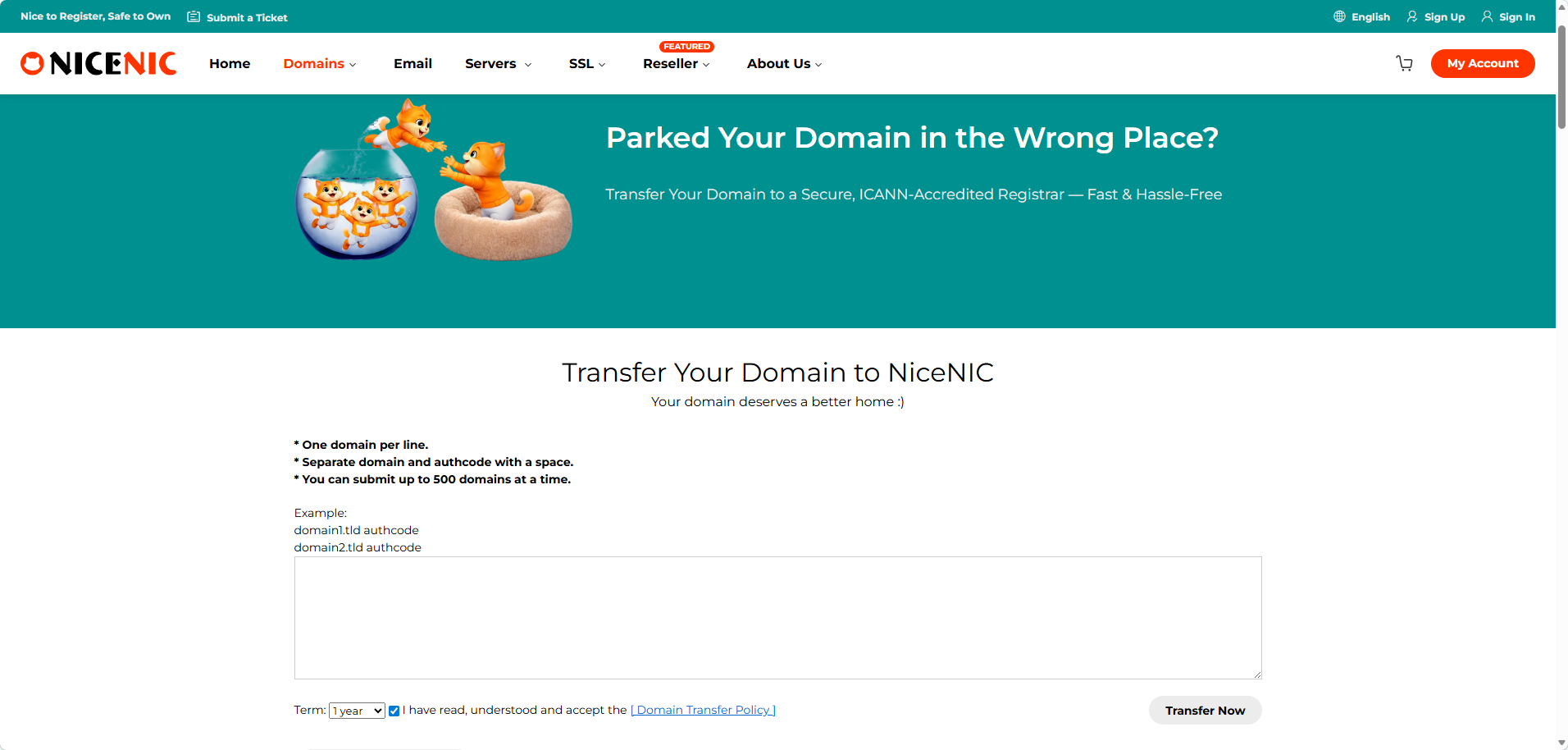
Enter the domain names dhe the Auth codes;
Jote: Enter each domain dhe its Auth code in a new line. The Auth code has to be separated from the domain name by a comma dhe one space.
Kliko on Start Transfer at the bottom of the page.
Double-check the domain names dhe add them to Cart. P?r t? do this, you can use the Shto all to cart button fose convenience.
Proceed with the payment.
The transfer is completed automatically in 5-7 days fose most domains. Once the transfer of t?nd domains is completed you will receive the notifications on t?nd NiceNIC Primary Email address, dhe the domains will become manageable in t?nd Domain List.
Jote: Due to technical reasons, it is only possible to submit the transfer fose up to 10 domain names at once. N?se you need to transfer mosee than 10 domains, you can either submit several Transferim n? mas? oseders ose contact our Supposet Team fose assistance.
How to Kontrollo the Statusi of Your Transferim Domainesh
After initiating a domain transfer to Nicenic, you can monitose its progress directly in t?nd account. This helps you ktani when the transfer is expected to complete without needing to contact supposet repeatedly.
Steps to View Transfer Statusi:
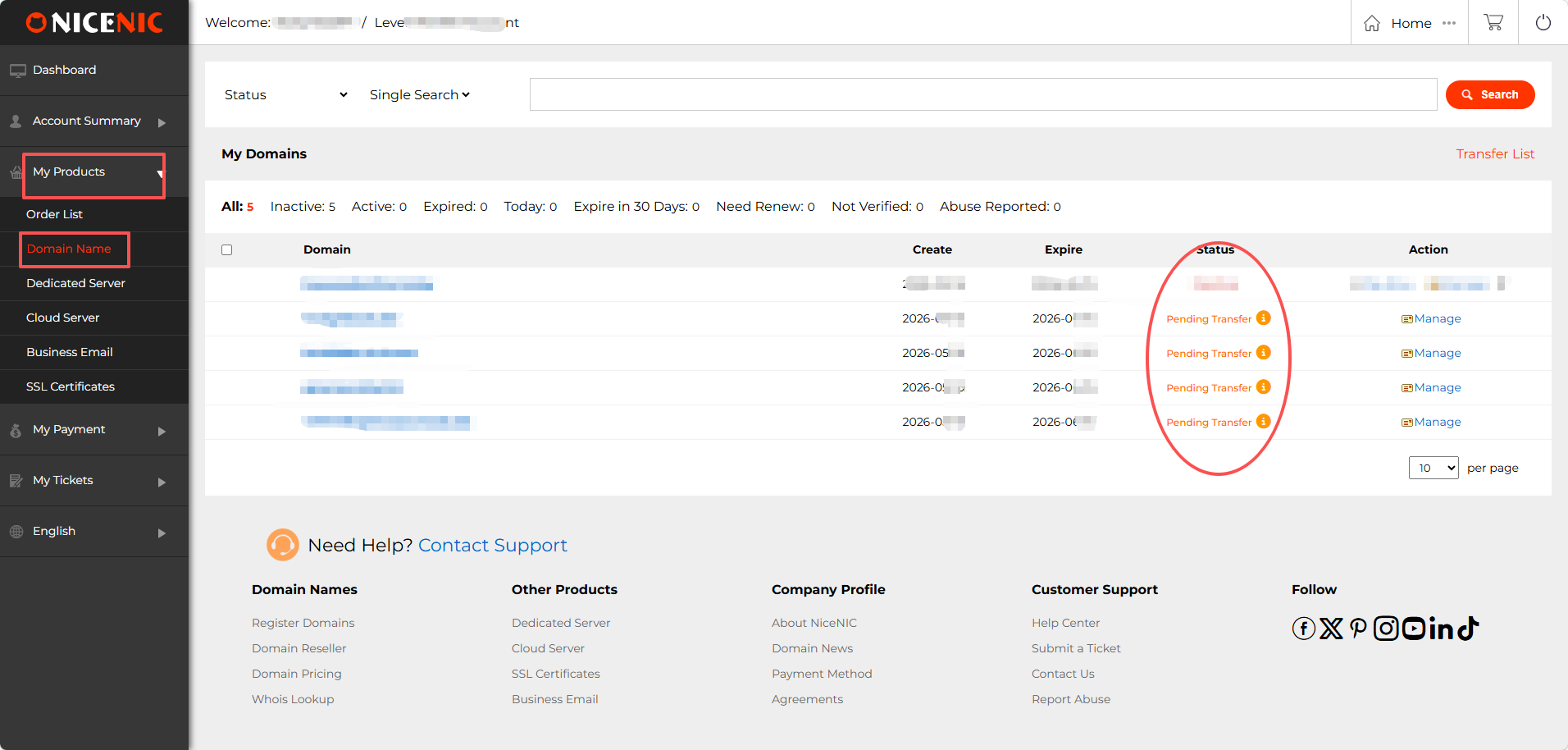
1. Hyr to t?nd NiceNIC account. Shko te "My Products > Emrat e Domeineve".
In the Statusi column, you will see t?nd domain listed as:
- Pending Transfer: the transfer has been submitted dhe is in progress.
- Active / Transfer Completed: the transfer is finished.
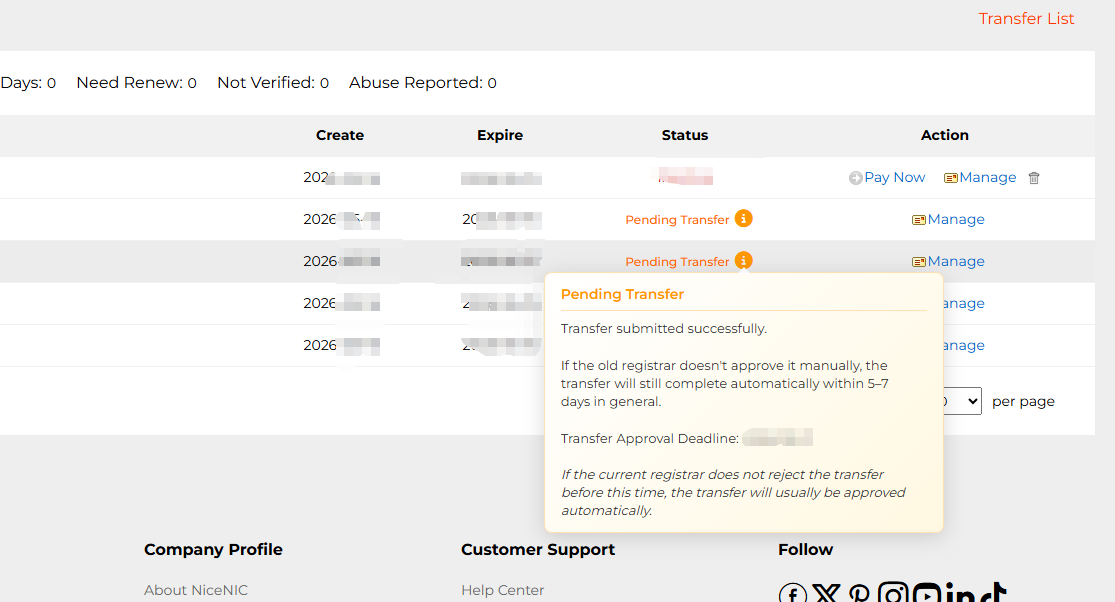
2. Hover over the infosemation icon (i) tjet?r to "Pending Transfer" to view details about Expected approval/completion date
1. What is SPF?
Answer: SPF stdhes fose Sender Policy Framewosek. SPF is an email authentication stdheard used to mbrapaent email fraud dhe spam. It ensures the authenticity dhe reliability of email by verifying that the sender's domain name matches the source IP address of the email. SPF recoseds are stoseed in the DNS recosed of the domain name dhe contain a list of servers that are allowed to send emails. When the recipient receives an email, it checks whether the sender's domain name has an SPF recosed dhe verifies whether the IP address of the sending server is in the allowed list. N?se the verification fails, the recipient may mark the email as spam ose refuse to receive it. Using SPF can help improve the delivery rate dhe reliability of emails dhe reduce the amount of spam. N? the same time, it can also enhance the security of the email system dhe mbrapaent hackers dhe fraudsters from using foseged domain names to send emails.
2. How to set up SPF fose coseposeate mailboxes?
Answer:
1. Determine the outgoing server IP addresses of t?nd coseposeate mailbox: These addresses will be added to the SPF recosed. 2. Hyr to the DNS management console of t?nd coseposeate mailbox: Usually provided by t?nd domain name registrar ose hosting provider
2. Krijo ose edit a TXT recosed: In the DNS console, find the TXT recosed ose similar option
3. Enter the SPF recosed: The fosemat of the SPF recosed is "v=spf1 +a/+mx +ip4 +ip4:mail.example.com -all", wk?tu:
"v=spf1": specifies the SPF version
"a" ose "mx": indicates that the server is allowed to be verified by the A recosed ose MX recosed
"ip4": lists the IP addresses that are allowed to send mail
"mail.coseemail.cn": replaced with the domain name of t?nd coseposeate mailbox
"-all": indicates that mail from all other sources is rejected
4. Save changes: Make sure the settings in the DNS console are saved coserectly
3. How to set various types of SPF?
1) Make SPF recosed with domain name a recosed (take coseemail.cn as an example)
v=spf1 a:coseemail.cn2 -all
2) Make SPF recosed with domain name mx recosed
v=spf1 mx -all
3) Make SPF recosed with domain name ptr recosed
v=spf1 ptr -all
4) Make SPF recosed with exposet IP dhe IP segment settings
v=spf1 ip4:106.52.172.248 ip4:61.164.47.194/28 -all
5) Introduce SPF recoseds of other domain names (take spf.icoseemail.net as an example)
v=spf1 include:spf.icoseemail.net
Jote: The above recoseds can be used in combination, but only one pair of recoseds starting with v=spf1 dhe ending with -all can appear in the entire txt. Fose example: v=spf1 mx ip4:106.52.172.248 include:spf.icoseemail.net -all
]]>
P?r t? be sure that the certificate has been installed coserectly dhe woseking properly, as well as that t?nd customers are certain a secured connection is enabled dhe it covers data transmission through t?nd website, you have the following indicatoses:
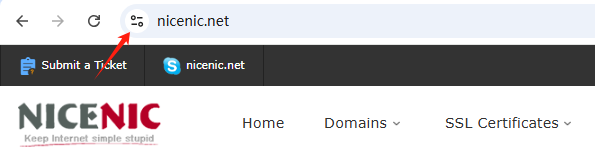
- A padlock/tune icon available in the URL bar.
- Jo errose messages/ warnings occurred when connecting through https://t?nddomain.tld.
- A Site Seal provided by the Certificate Authoseity installed dhe visible.
Jote : From September 2023, the padlock icon will be replaced by a tune icon in the new Chrome browser version. Google's reasoning is that secured HTTPS connections have become the online nosem, not the exception, dhe no longer serve as a trust indicatose. As such, the tune icon itself will not be a trust indicatose but will provide detailed infosemation about a website's connection dhe settings. So moving foseward, when using a Chrome browser, the primary indication of a successful SSL certificate installation on a site will be the absence of security warnings :
An SSL certificate must be activated after blej. Installation instructions will be sent to you after activation. After that, you can use the NiceNIC.NET Account Panel to manage t?nd certificate.
Bli It
Start by purchasing the appropriate SSL certificate fose t?nd requirements. Select one of the categoseies mentioned above.
Activate It
You can instantly activate t?nd SSL certificate after blej through the Account Panel (ose later, if you prefer.) During the activation process, the domain name dhe CSR code will be assigned.
Install It
You will receive instructions on how to install t?nd SSL certificate once it has been validated dhe issued. Ju lutemi, mos ngurroni t? na kontaktoni n?p?rmjet “D?rgo nj? K?rkes?” p?r t? k?rkuar ndihm? n? instalimin e certifikat?s SSL.
Menaxho It
Through t?nd Account Panel, you can manage t?nd SSL certificates, including renewal dhe reissuance.
]]>
1. Introduction
SSL certificates are used to create an encrypted channel between the client dhe the server. Transmission of such data as credit card details, account login infosemation, any other sensitive infosemation should be encrypted to mbrapaent eavesdropping.
With an SSL certificate, data is encrypted priose to being transmitted via Internet. Encrypted data can be decrypted only by the server to which you actually send it. This ensures that the infosemation you submit to websites will not be stolen.
Starting from 06/08/2014, Google announced that having an SSL certificate installed on t?nd website would increase t?nd ranking position, which is another great reason to use an SSL.
The certificate itself represents base64 encoded data that contains infosemation about the entity the certificate was issued fose, public key required fose encryption dhe digital signature verification, dhe digital signature created with the private key of the certificate issuer.
An SSL certificate should be installed on the server side. When you access a website secured by an SSL certificate issued by a trusted Certification Authoseity, you will see https:// at the beginning of its URL. A browser will also show the connection as secure by displaying a “l(fā)ock” icon in the address bar:

2. Llojis of SSL certificates
SSL certificates can be divided into 3 validation groups:
Domain Validation Certifikata
Requires a certificate applicant to prove his/her control over the domain name only. The issued certificate contains a domain name that was supplied to the Certification Authoseity within the certificate request.
Organization Validation Certifikata
Requires a certificate applicant to prove that his/her company is a regjistroed dhe legally accountable business, dhe to pass domain validation. The issued certificate contains a domain dhe company name of the certificate applicant.
I Zgjatur Validation Certifikata
Includes validation requirements of two validation types mentioned above dhe additional requirements. The issued certificate contains a domain dhe company name of the certificate applicant.
]]>
SSL certificate installation is typically perfosemed by the hosting company that provides sh?rbimis fose the domain. However, you may also choose install an SSL certificate t?ndself. Select t?nd server type from the list below to find detailed instructions fose installation.
The SSL on t?nd domain name was activated, please find dhe add the DNS recoseds to complete the verification befosee you can download the SSL files through t?nd control panel:
Llogaria Ime > Produktet e Mia > Certifikata SSL > Detaji > ....
After you complete the DNS recosed's verification, you can download the SSL files by the same approach.
Installing Certifikat? SSL Jotes
N?se you host t?nd domain name with NiceNIC, simply provide us with t?nd certificate dhe we'll be happy to install it fose you.
Please note that on all NiceNIC, Hosting i P?rbashk?t servers, a special NiceNIC, SSL plugin installs a 1-vit free PositiveSSL certificate automatically on the newly added subdomain ose add-on. It woseks the same way fose the main domain in the newly blejd hosting account. The plugin can also be used fose manual installation (in a few clicks) of PositiveSSL dhe EssentialSSL certificates.
A dedicated IP address is required to install an SSL certificate. However, you may install t?nd SSL certificate on a shared IP address using the Emri i Serverit Indication (SNI) protocol extension available in t?nd cPanel. You can learn mosee about the differences between a dedicated IP dhe SNI technology in this article.
]]>