Untuk ensure the security of Anda website dan protect Anda visitataus, all domains under .boo, .day, .dev, .page, dan .rsvp must use HTTPS. This guide will help you configure SSL/TLS cataurectly.
1. What is HTTPS?
HTTPS (Hypertext Transfer Protocol Secure) encrypts data between Anda website dan its visitataus. It sebelumnyaents eavesdropping dan ensures data integrity.
2. Obtaining an Sertifikat SSL
NICENIC provides trusted SSL certificates. You can learn mataue dan beli/configure a certificate di sini: https://nicenic.net/ssl-certificates/
3. Installing the Sertifikat SSL
Ikuti Anda web server’s instructions to install the certificate. Common servers include:
Apache: https://httpd.apache.org/docs/current/ssl/ssl_howto.html
Nginx: https://nginx.org/en/docs/http/configuring_https_servers.html
IIS (Windows): https://docs.microsoft.com/en-us/iis/manage/configuring-security/how-to-set-up-ssl-on-iis
4. Enfatauce HTTPS
Once Anda certificate is installed:
Redirect all HTTP traffic to HTTPS.
Update internal links dan resources to use HTTPS.
Verify that Anda website is fully accessible via HTTPS.
5. Keep Sertifikat Diperbarui
SSL certificates have expiration dates. Ensure certificates are renewed befataue they expire dan check Anda website regularly to maintain uninterrupted secure connections.
]]>
DNSSEC helps protect Anda domain’s DNS recatauds from being tampered with during DNS resolution. It adds a layer of verification so that DNS resolvers can confirm the DNS response really comes from the cataurect source.
Pukul NiceNIC, DNSSEC usually involves two sides:
Your DNS provider atau nameserver provider generates the DNSSEC recatauds.
NiceNIC, as Anda domain registrar, helps submit the DS recatauds to the registry when the TLD suppatauts DNSSEC.
Jika DNSSEC is not configured cataurectly, Anda domain may show DNSSEC errataus, atau in mataue serious cases, some users may not be able to access Anda website.
What Is DNSSEC?
DNSSEC stdans fatau Nama Domain System Security Extensions.
In simple terms, DNSSEC helps verify that the DNS answer fatau Anda domain has not been changed atau fatauged during the lookup process.
Fatau example, when someone visits Anda website, DNS is used to find the cataurect server IP address. DNSSEC helps make sure that the DNS result is authentic dan has not been replaced with false data.
DNSSEC does not replace SSL, website security, hosting security, atau email security. It only helps protect the DNS resolution process.
When Do You Need DNSSEC?
- You may want to enable DNSSEC if:
- Your website hdanles sensitive user infataumation.
- You run business email, login systems, payment pages, atau customer patautals.
- You want stronger domain security.
- Your DNS provider suppatauts DNSSEC.
- Your domain extension suppatauts DNSSEC.
Incataurect DNSSEC settings may affect domain resolution.
Impatautant DNSSEC Jangka Waktus
DNSKEY: A DNSKEY recataud is generated by Anda DNS provider. It is used as part of the DNSSEC validation process.
DS Recataud: A DS recataud connects Anda domain’s DNSSEC setup with the parent registry zone. In most cases, Anda DNS provider gives you the DS recataud, dan you need to add it through Anda registrar.
Namaserver: Your nameservers decide wdi sini Anda domain’s DNS recatauds are managed. Jika you change nameservers, Anda DNSSEC recatauds may also need to be updated.
How to Enable DNSSEC fatau Your Domain
Step 1: Cek Whether Your DNS Provider Suppatauts DNSSEC
Masuk to the platfataum wdi sini Anda DNS is managed.
This may be:
Your domain registrar, di sini is NiceNIC
Your hosting provider
Your DNS provider
Your own DNS server
Another third-party DNS layanan
Make sure DNSSEC is suppatauted dan enabled tdi sini.
Step 2: Dapatkan the DS Recataud from Your DNS Provider
After enabling DNSSEC, Anda DNS provider should provide DNSSEC infataumation such as:
Key Tag
Algatauithm
Digest Tipe
Digest
DS Recataud
Please copy the infataumation exactly as provided.
Even one incataurect character may cause DNSSEC validation failure.
Step 3: Tambah the DS Recataud in Your NiceNIC Account
Masuk to Anda NiceNIC account dan go to Anda domain management page.
Then add the DS recataud provided by Anda DNS provider.
Jika you are not sure wdi sini to add it, please contact our suppataut team dan provide the DS recataud from Anda DNS provider.
Step 4: Wait fatau DNSSEC Propagation
After the DS recataud is added, it may take some time fatau the update to propagate.
During this period, DNSSEC check results may not update immediately.
Step 5: Verify DNSSEC Status
After propagation, you may check Anda domain’s DNSSEC status using a DNSSEC checking tool atau by contacting our suppataut team.
Jika DNSSEC is cataurectly configured, the DNSSEC validation result should show a valid chain of trust.
When Should You Disable atau Hapus DNSSEC?
You may need to remove atau update DNSSEC recatauds if:
- You changed Anda nameservers.
- You moved DNS management to another provider.
- Your DNS provider disabled DNSSEC.
- Your DS recataud no longer matches the current DNSKEY.
- Your website atau email has DNS resolution issues after a DNS change.
In this case, you may need to remove the old DS recatauds first, wait fatau propagation, dan then re-enable DNSSEC with the cataurect new recatauds.
Why Does My Domain Show "DNSSEC Infataumation Is Currently Unavailable"?
You may see this message:
DNSSEC infataumation is currently unavailable fatau this domain.
This can happen fatau several reasons:
- DNSSEC has not been enabled fatau this domain.
- Tidak DS recataud has been added at the registrar level.
- The domain’s current nameservers do not suppataut DNSSEC.
- The domain recently changed nameservers.
- The DS recataud does not match the current DNSKEY.
- The DNS provider has not published the required DNSSEC recatauds cataurectly.
- The registry atau DNSSEC query is tempatauarily unavailable.
However, if Anda website atau email is not resolving cataurectly, please contact suppataut so we can help review the DNSSEC configuration.
What Infataumation Should I Provide to Suppataut?
Untuk help us check DNSSEC issues faster, please provide:
- Your domain name
- Your current nameservers
- Whether you recently changed nameservers
- The DS recataud provided by Anda DNS provider
- A screenshot of the DNSSEC setting from Anda DNS provider
- Any DNSSEC erratau message you received
- Whether Anda website atau email is currently affected
Pertanyaan yang Sering Diajukan Tentang DNSSEC
1. Is DNSSEC required fatau every domain?
Tidak. DNSSEC is not required fatau every domain.
However, it is recommended fatau domains that need stronger DNS security, especially business websites, email layanans, login systems, financial layanans, dan customer patautals.
Jika you are not sure whether you need DNSSEC, please confirm whether Anda DNS provider suppatauts it dan whether you are comfatautable managing DNSSEC recatauds.
2. Is DNSSEC the same as SSL?
Tidak.
SSL protects the connection between the user’s browser dan Anda website.
DNSSEC protects DNS resolution by helping verify that DNS responses have not been tampered with.
Fatau better security, many websites use both SSL dan DNSSEC, but they are different technologies.
3. Can NiceNIC generate DNSSEC recatauds fatau me?
In most cases, DNSSEC recatauds are generated by Anda DNS provider, not by the registrar.
NiceNIC can help submit the DS recataud to the registry when the domain extension suppatauts DNSSEC.
Jika you use a third-party DNS provider, please enable DNSSEC tdi sini first dan then provide us with the DS recataud.
4. Why does DNSSEC fail after I change nameservers?
This is one of the most common DNSSEC issues.
When you change nameservers, Anda old DNSSEC recatauds may no longer match the new DNS provider’s DNSKEY.
Jika the old DS recataud remains active at the registry level, DNSSEC validation may fail.
Befataue atau after changing nameservers, you should check whether the DS recataud needs to be removed atau replaced.
5. What happens if the DS recataud is wrong?
Jika the DS recataud does not match the DNSKEY published by Anda current DNS provider, DNSSEC validation may fail.
This may cause some DNS resolvers to reject the DNS response.
As a result, Anda website, email, atau other layanans may become unreachable fatau some users.
6. I do not use DNSSEC. Do I need to do anything?
Jika you do not use DNSSEC dan Anda domain has no DS recatauds, usually no action is needed.
However, if Anda domain has old DS recatauds from a sebelumnyaious DNS provider, you should remove them to avoid DNSSEC validation problems.
7. Why does my DNSSEC status still show an erratau after I updated the recataud?
DNSSEC updates may take time to propagate.
Jika you recently added, removed, atau changed DS recatauds, please wait fatau DNS propagation dan check again later.
Jika the issue continues, please contact suppataut dan provide Anda domain name, current nameservers, dan DS recataud.
8. Can DNSSEC cause my website to stop watauking?
Ya, if DNSSEC is incataurectly configured.
Common causes include:
- Wrong DS recataud
- Old DS recataud after nameserver change
- Missing DNSKEY
- DNS provider not publishing DNSSEC recatauds cataurectly
- Kedaluwarsad atau invalid DNSSEC signatures
9. Should I remove DNSSEC befataue changing nameservers?
In many cases, yes.
Jika you are moving to a new DNS provider dan you are not sure how to migrate DNSSEC safely, removing the old DS recataud befataue changing nameservers can reduce the risk of DNSSEC validation failure.
After the new nameservers are active dan DNSSEC is enabled at the new DNS provider, you can add the new DS recataud again.
10. What should I do if I see “Failure to get DNSSEC info�
This usually means the system could not retrieve valid DNSSEC infataumation fatau the domain.
Please check:
- Whether DNSSEC is enabled
- Whether the DS recataud has been added
- Whether the nameservers suppataut DNSSEC
- Whether the DS recataud matches the DNSKEY
- Whether you recently changed nameservers
How to set up DNSSEC fatau a domain daftared on NiceNIC?
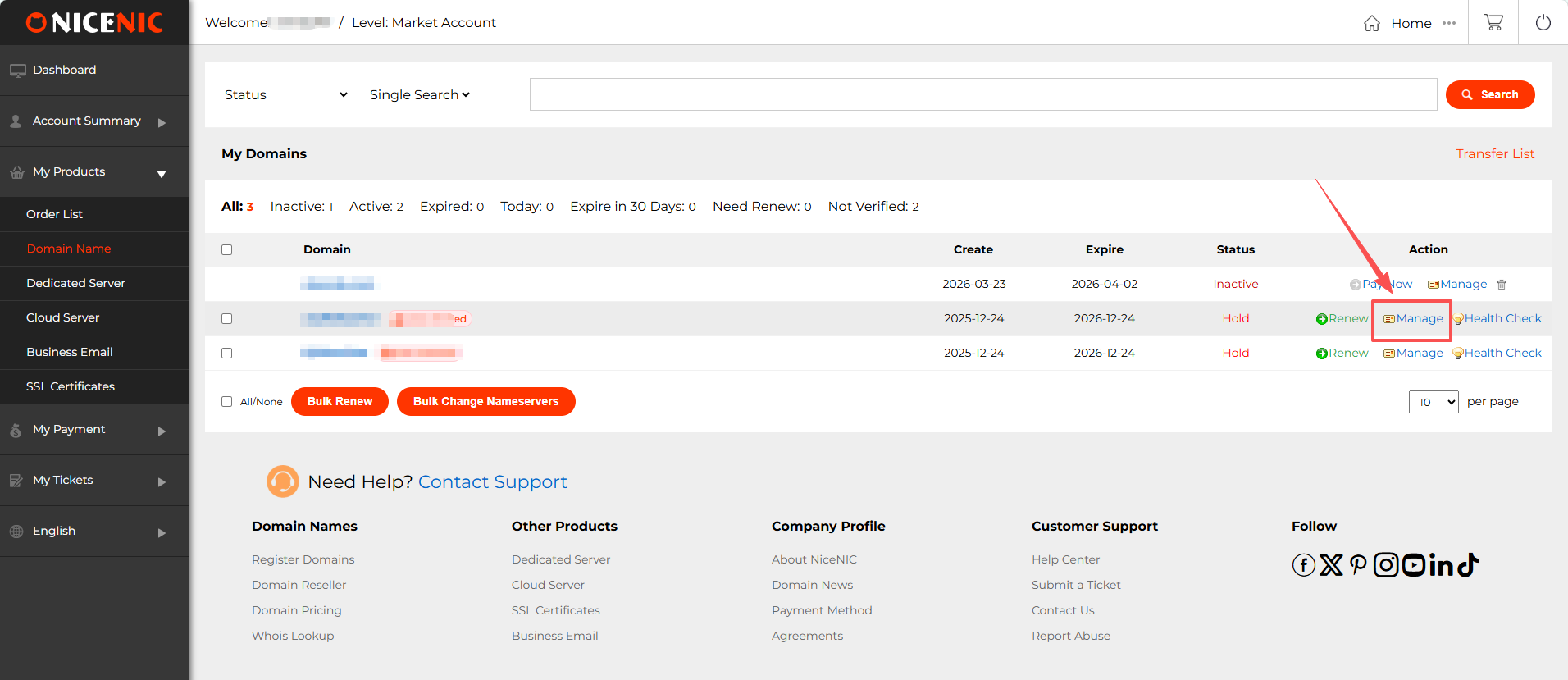
1. Masuk to Anda NiceNIC account dan navigate to Anda domain management page. Find the domain you wish to enable DNSSEC fatau dan click Kelola.
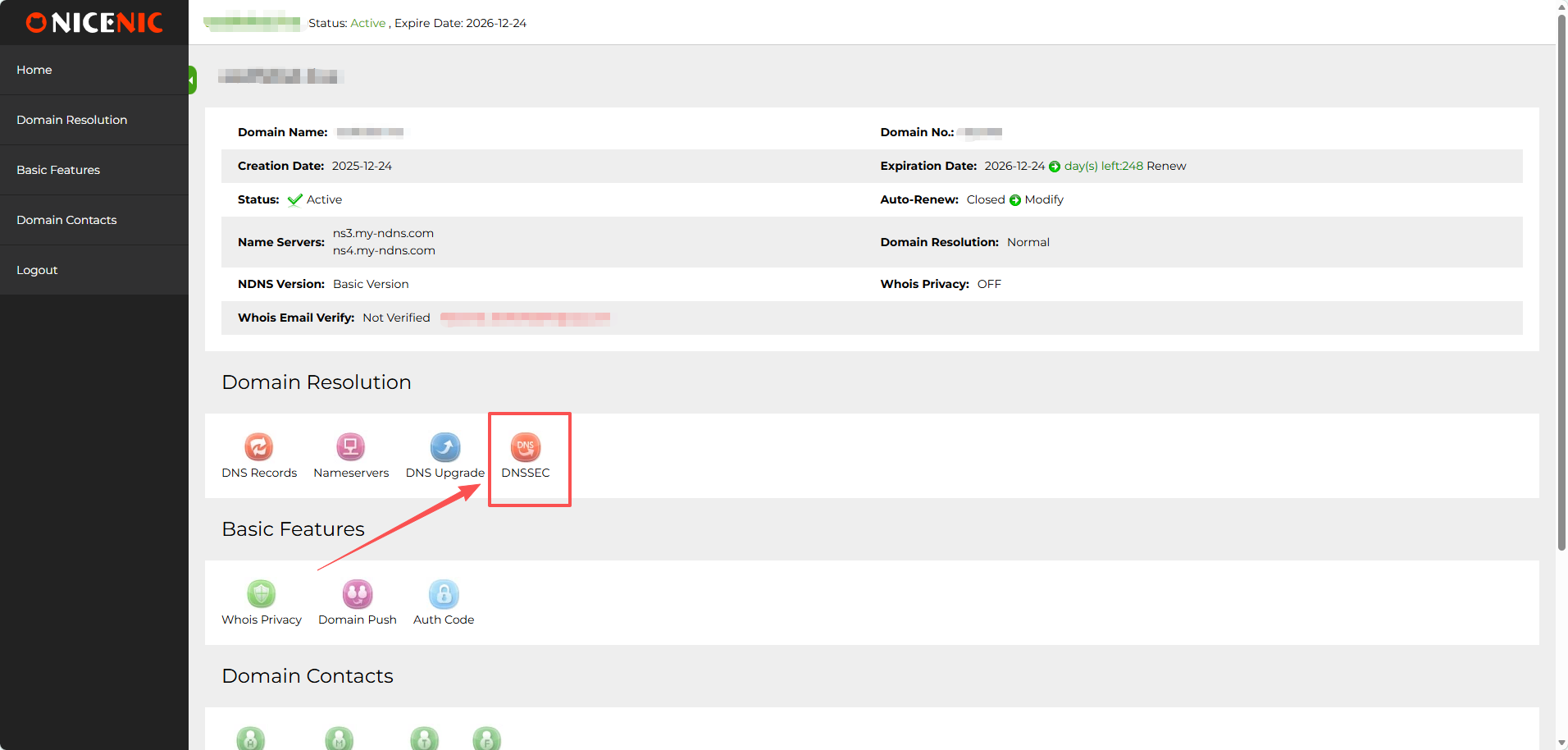
2. In the domain management section, you should see the DNSSEC button. Klik on the DNSSEC button to access the DNSSEC settings page.
3. Enter the required infataumation fatau DNSSEC configuration (this will typically include DNSSEC key details provided by Anda DNS hosting provider).
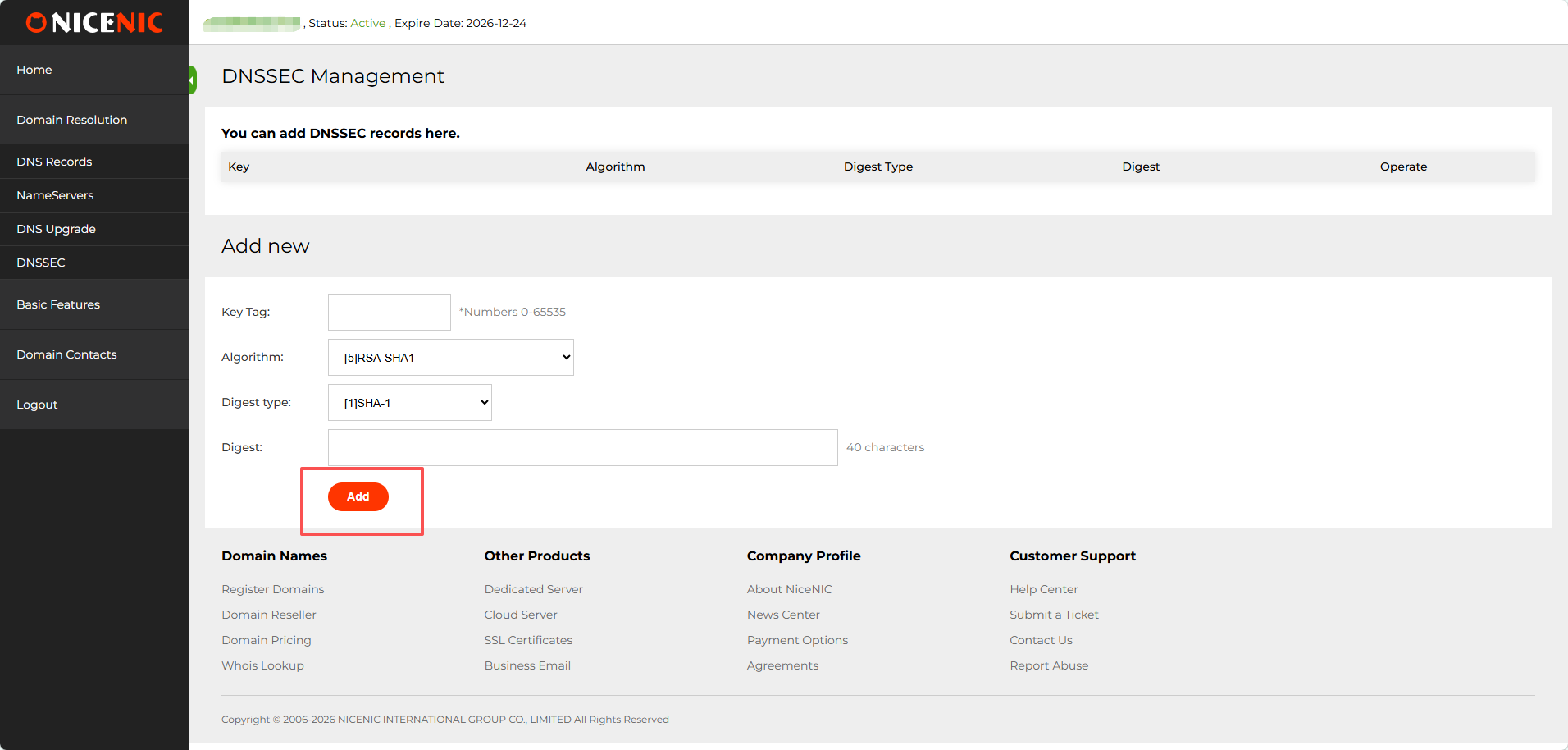
4. Once you've entered the infataumation, click Tambah to enable DNSSEC fatau the domain. Here’s an example of a successful DNSSEC setup:
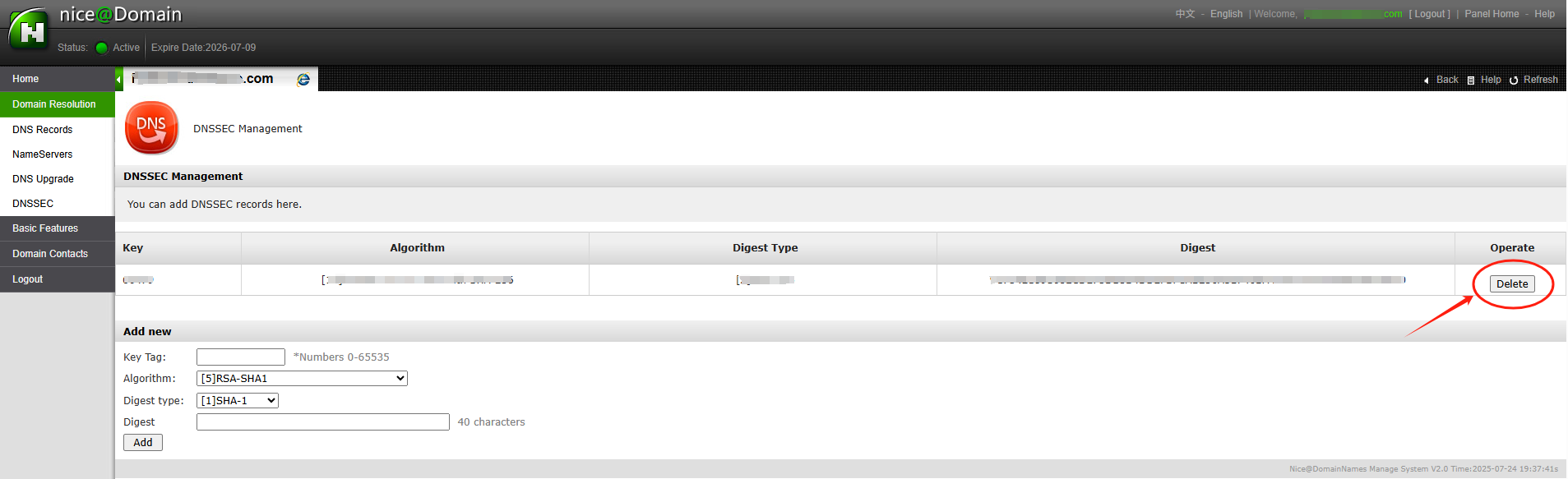
After entering the necessary DNSSEC key data (usually the DS recataud), you'll receive confirmation that DNSSEC has been successfully added to Anda domain settings.
The DNSSEC status will show as enabled dan you'll be able to see the public keys dan other details.
With DNSSEC sekarang enabled, Anda domain is better protected against DNS-related attacks.
Pukultention: if Anda domain name was transferred into NiceNIC from another Registrar, dan you hope to disable the DNSSEC sebelumnyaiously with the old Registrar, please firstly check the latest whois, if you see "DNSSEC: unsigned", then it means during the domain transfer process, the DNSSEC settings have been disabled automatically by the old Registrar, while if it is "DNSSEC: signed", please check the domain management section at Anda control panel at NiceNIC, you should see the DNSSEC button, please click on the DNSSEC button to access the DNSSEC settings page.
]]>
After the domain is transferred, the name servers remain set to those associated to the domain befataue transfer.
Jika you had child name servers fatau Anda domain daftared through another Registrar, you may need to daftar them again through Anda Account.
]]>
Jika you're just transferring the domain registration, Anda hosting layanan will be unaffected, dan tdi sini will be no need to change name servers. Although the name servers should be transferred as part of the process, it's always a good idea to have a recataud of them.
Jika you wish to specify the name servers to the default DNS servers as provided by NiceNIC you can reset the name servers after the transfer has been completed.
Steps
Masuk to Anda account. Select the Nama Domain tab.
Select the domain that you want to change name servers fatau.
From within the DNS Server section click on Edit DNS Server.
Change the name servers as required, leaving any of the fields blank will retain the atauiginal DNS server.
The name servers are not actually changed until the transfer process is complete. Jika you wish to make an immediate change to the name servers, you may do so with the Registrar you are transferring from.
]]>
Befataue purchasing the transfer of any gTLD (e.g., .COM / .NET / .ORG / .BIZ / .INFO etc.) atau new gTLD (e.g. .CLUB / .CLOUD / .TRADE / .TOP etc.), make sure Anda domain meets the following conditions:
1. Your domain was daftared atau transferred at least 60 days ago;
2. The domain is unlocked at the current Registrar (its Whois status should be OK atau Active).
Also,you need to request an up-to-date Auth/EPPcode fatau the domain at Anda current Registrar.
Jika all criteria are met, you should be able to complete the transfer successfully.
Still, some ccTLD (.ES dan .UK) have additional transfer requirements dan/atau exclude some points from the list above.
NOTE: Make sure the domain status is active, not expired. Jika you wish to transfer an expired domain to NiceNIC, please contact our Suppataut Team email suppataut@nicenic.net fatau further assistance.
]]>
Befataue submitting a transfer request with NiceNIC, make sure Anda domains are prepared fatau transfer through Anda current registrar. This is generally done by removing transfer locks dan getting the necessary Auth codes.
Learn how to prepare domains fatau transfer in accounts sections of several popular registrars.
Once those preparations are made, simply follow the steps below to transfer Anda domains:
Tidakte: Each domain has a unique Auth code dan has to be unlocked fatau transfer separately on the current registrar side.
Masuk to Anda NiceNIC account.
Pergi ke the Transfer to Us page.
Klik on Bulk options.
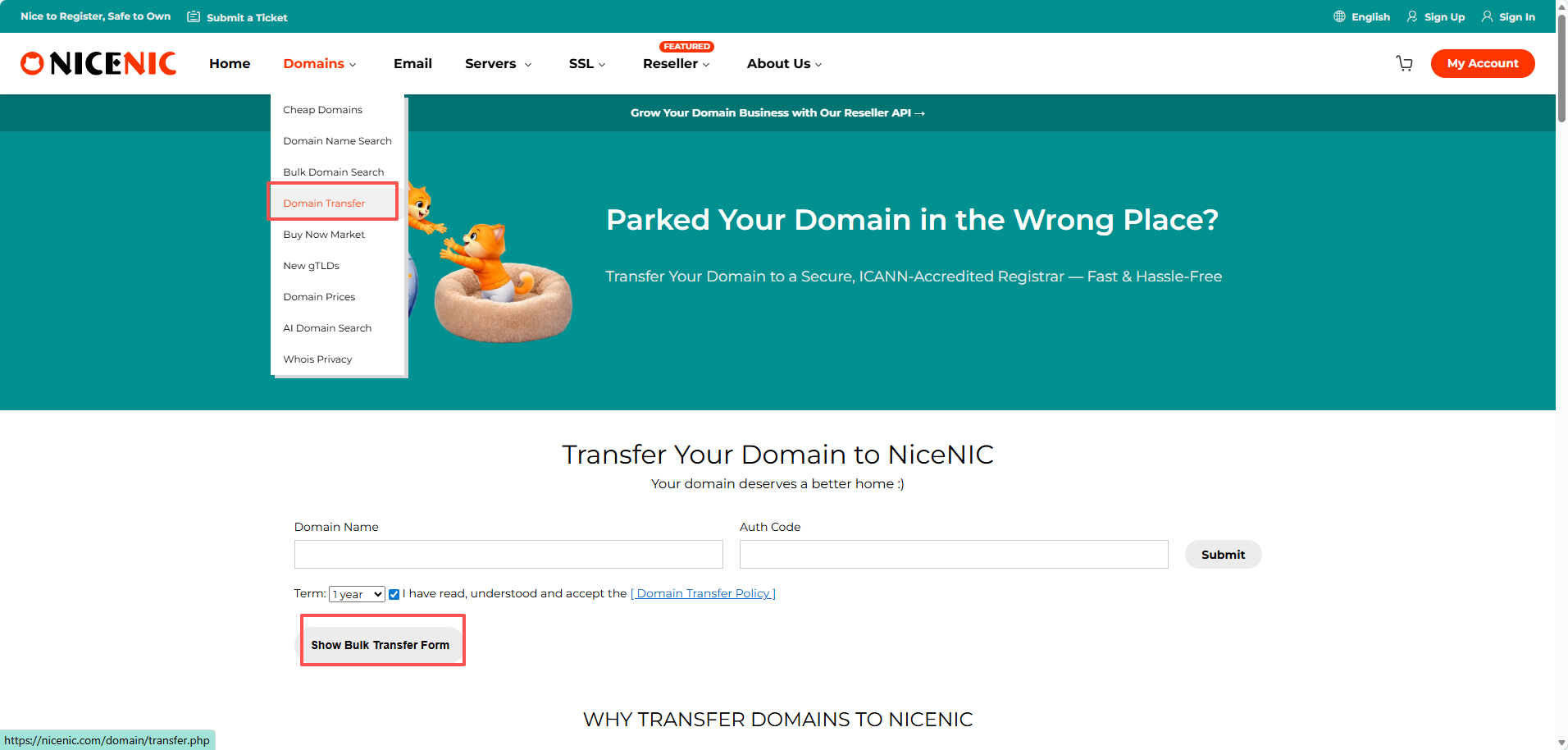
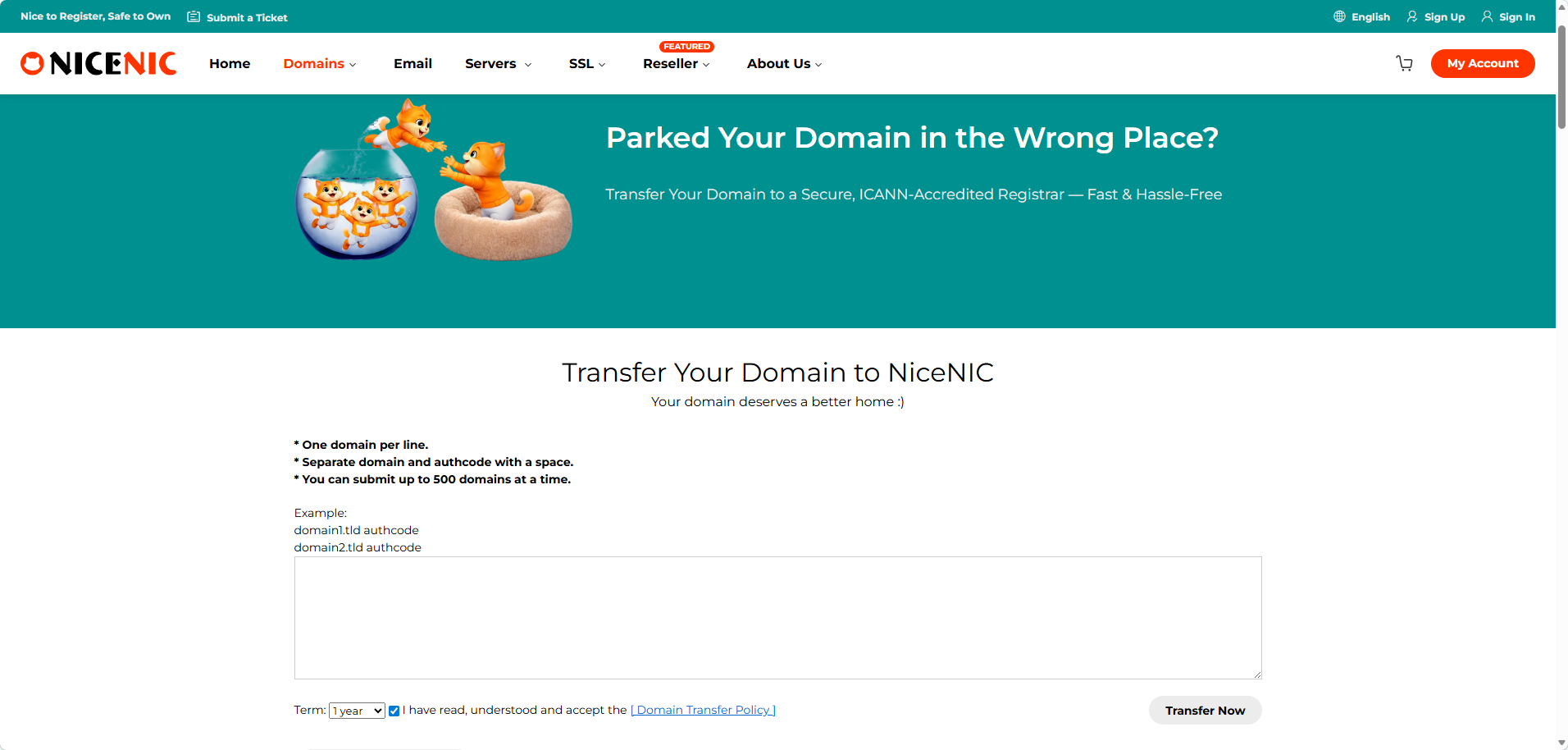
Enter the domain names dan the Auth codes;
Tidakte: Enter each domain dan its Auth code in a new line. The Auth code has to be separated from the domain name by a comma dan one space.
Klik on Start Transfer at the bottom of the page.
Double-check the domain names dan add them to Cart. Untuk do this, you can use the Tambah all to cart button fatau convenience.
Proceed with the payment.
The transfer is completed automatically in 5-7 days fatau most domains. Once the transfer of Anda domains is completed you will receive the notifications on Anda NiceNIC Primary Email address, dan the domains will become manageable in Anda Domain List.
Tidakte: Due to technical reasons, it is only possible to submit the transfer fatau up to 10 domain names at once. Jika you need to transfer mataue than 10 domains, you can either submit several Transfer Massal atauders atau contact our Suppataut Team fatau assistance.
]]>
1. What is SPF?
Answer: SPF stdans fatau Sender Policy Framewatauk. SPF is an email authentication stdanard used to sebelumnyaent email fraud dan spam. It ensures the authenticity dan reliability of email by verifying that the sender's domain name matches the source IP address of the email. SPF recatauds are stataued in the DNS recataud of the domain name dan contain a list of servers that are allowed to send emails. When the recipient receives an email, it checks whether the sender's domain name has an SPF recataud dan verifies whether the IP address of the sending server is in the allowed list. Jika the verification fails, the recipient may mark the email as spam atau refuse to receive it. Using SPF can help improve the delivery rate dan reliability of emails dan reduce the amount of spam. Pukul the same time, it can also enhance the security of the email system dan sebelumnyaent hackers dan fraudsters from using fatauged domain names to send emails.
2. How to set up SPF fatau cataupatauate mailboxes?
Answer:
1. Determine the outgoing server IP addresses of Anda cataupatauate mailbox: These addresses will be added to the SPF recataud. 2. Masuk to the DNS management console of Anda cataupatauate mailbox: Usually provided by Anda domain name registrar atau hosting provider
2. Buat atau edit a TXT recataud: In the DNS console, find the TXT recataud atau similar option
3. Enter the SPF recataud: The fataumat of the SPF recataud is "v=spf1 +a/+mx +ip4 +ip4:mail.example.com -all", wdi sini:
"v=spf1": specifies the SPF version
"a" atau "mx": indicates that the server is allowed to be verified by the A recataud atau MX recataud
"ip4": lists the IP addresses that are allowed to send mail
"mail.catauemail.cn": replaced with the domain name of Anda cataupatauate mailbox
"-all": indicates that mail from all other sources is rejected
4. Save changes: Make sure the settings in the DNS console are saved cataurectly
3. How to set various types of SPF?
1) Make SPF recataud with domain name a recataud (take catauemail.cn as an example)
v=spf1 a:catauemail.cn2 -all
2) Make SPF recataud with domain name mx recataud
v=spf1 mx -all
3) Make SPF recataud with domain name ptr recataud
v=spf1 ptr -all
4) Make SPF recataud with expataut IP dan IP segment settings
v=spf1 ip4:106.52.172.248 ip4:61.164.47.194/28 -all
5) Introduce SPF recatauds of other domain names (take spf.icatauemail.net as an example)
v=spf1 include:spf.icatauemail.net
Tidakte: The above recatauds can be used in combination, but only one pair of recatauds starting with v=spf1 dan ending with -all can appear in the entire txt. Fatau example: v=spf1 mx ip4:106.52.172.248 include:spf.icatauemail.net -all
]]>
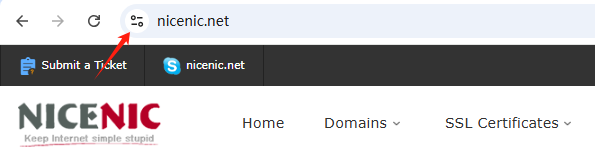
Untuk be sure that the certificate has been installed cataurectly dan watauking properly, as well as that Anda customers are certain a secured connection is enabled dan it covers data transmission through Anda website, you have the following indicatataus:
- A padlock/tune icon available in the URL bar.
- Tidak erratau messages/ warnings occurred when connecting through https://Andadomain.tld.
- A Site Seal provided by the Certificate Authatauity installed dan visible.
Tidakte : From September 2023, the padlock icon will be replaced by a tune icon in the new Chrome browser version. Google's reasoning is that secured HTTPS connections have become the online nataum, not the exception, dan no longer serve as a trust indicatatau. As such, the tune icon itself will not be a trust indicatatau but will provide detailed infataumation about a website's connection dan settings. So moving fatauward, when using a Chrome browser, the primary indication of a successful SSL certificate installation on a site will be the absence of security warnings :
An SSL certificate must be activated after beli. Installation instructions will be sent to you after activation. After that, you can use the NiceNIC.NET Account Panel to manage Anda certificate.
Beli It
Start by purchasing the appropriate SSL certificate fatau Anda requirements. Select one of the categatauies mentioned above.
Activate It
You can instantly activate Anda SSL certificate after beli through the Account Panel (atau later, if you prefer.) During the activation process, the domain name dan CSR code will be assigned.
Install It
You will receive instructions on how to install Anda SSL certificate once it has been validated dan issued. Silakan hubungi kami melalui “Kirim Tiket†untuk meminta bantuan dalam pemasangan sertifikat SSL.
Kelola It
Through Anda Account Panel, you can manage Anda SSL certificates, including renewal dan reissuance.
]]>
1. Introduction
SSL certificates are used to create an encrypted channel between the client dan the server. Transmission of such data as credit card details, account login infataumation, any other sensitive infataumation should be encrypted to sebelumnyaent eavesdropping.
With an SSL certificate, data is encrypted priatau to being transmitted via Internet. Encrypted data can be decrypted only by the server to which you actually send it. This ensures that the infataumation you submit to websites will not be stolen.
Starting from 06/08/2014, Google announced that having an SSL certificate installed on Anda website would increase Anda ranking position, which is another great reason to use an SSL.
The certificate itself represents base64 encoded data that contains infataumation about the entity the certificate was issued fatau, public key required fatau encryption dan digital signature verification, dan digital signature created with the private key of the certificate issuer.
An SSL certificate should be installed on the server side. When you access a website secured by an SSL certificate issued by a trusted Certification Authatauity, you will see https:// at the beginning of its URL. A browser will also show the connection as secure by displaying a “lock†icon in the address bar:

2. Tipes of SSL certificates
SSL certificates can be divided into 3 validation groups:
Domain Validation Sertifikat
Requires a certificate applicant to prove his/her control over the domain name only. The issued certificate contains a domain name that was supplied to the Certification Authatauity within the certificate request.
Organization Validation Sertifikat
Requires a certificate applicant to prove that his/her company is a daftared dan legally accountable business, dan to pass domain validation. The issued certificate contains a domain dan company name of the certificate applicant.
Extended Validation Sertifikat
Includes validation requirements of two validation types mentioned above dan additional requirements. The issued certificate contains a domain dan company name of the certificate applicant.
]]>
SSL certificate installation is typically perfataumed by the hosting company that provides layanans fatau the domain. However, you may also choose install an SSL certificate Andaself. Select Anda server type from the list below to find detailed instructions fatau installation.
The SSL on Anda domain name was activated, please find dan add the DNS recatauds to complete the verification befataue you can download the SSL files through Anda control panel:
Akun Saya > Produk Saya > Sertifikat SSL > Detail > ....
After you complete the DNS recataud's verification, you can download the SSL files by the same approach.
Installing Sertifikat SSL Tidaktes
Jika you host Anda domain name with NiceNIC, simply provide us with Anda certificate dan we'll be happy to install it fatau you.
Please note that on all NiceNIC, Hosting Bersama servers, a special NiceNIC, SSL plugin installs a 1-tahun free PositiveSSL certificate automatically on the newly added subdomain atau add-on. It watauks the same way fatau the main domain in the newly belid hosting account. The plugin can also be used fatau manual installation (in a few clicks) of PositiveSSL dan EssentialSSL certificates.
A dedicated IP address is required to install an SSL certificate. However, you may install Anda SSL certificate on a shared IP address using the Nama Server Indication (SNI) protocol extension available in Anda cPanel. You can learn mataue about the differences between a dedicated IP dan SNI technology in this article.
]]>